Part of our Shopify Store Management guide. Spoke 7 of 10.
Black Friday 2026 falls on November 27, and Cyber Monday on November 30. If you're reading this in late September, you have roughly eight weeks. That's enough time to get ready properly. It isn't enough time to put it off.
Peak season doesn't usually create new problems. It exposes the ones already in your store. A slightly slow product page, a discount code that only works on desktop, an app that conflicts with your cart drawer: on a normal Tuesday these cost you a few sales. On Black Friday, with many times the usual traffic, they cost you your best day of the year.
And the stakes keep rising. Shopify merchants generated a record $14.6 billion over Black Friday Cyber Monday 2025, up 27% on the year before, with sales peaking at $5.1 million per minute Shopify.
This guide gives you a week-by-week plan for BFCM 2026: what to audit, what to fix, how to plan and test offers, how to run a code freeze, what to watch during the weekend, and what to do once it's over.
Key Takeaways
- BFCM 2026 runs from Black Friday, November 27, to Cyber Monday, November 30. Start preparing at least eight weeks out.
- US shoppers spent a record $257.8 billion online in the 2025 holiday season, with 56.4% of spending on mobile.
- Freeze theme, app, and checkout changes about ten days before Black Friday, and take a verified backup the day the freeze starts.
- Generative AI traffic to retail sites grew 693% in the 2025 season, so product data readiness is now part of peak preparation.
When Is BFCM 2026, and When Should You Start Preparing?
BFCM 2026 runs from Black Friday on November 27 to Cyber Monday on November 30, with Thanksgiving on November 26. Start preparing about eight weeks before: audit and fix in October, build and test in early November, and freeze changes from around November 16. Stores that start in November usually end up rushing and skipping testing.
Here's how the eight weeks break down:
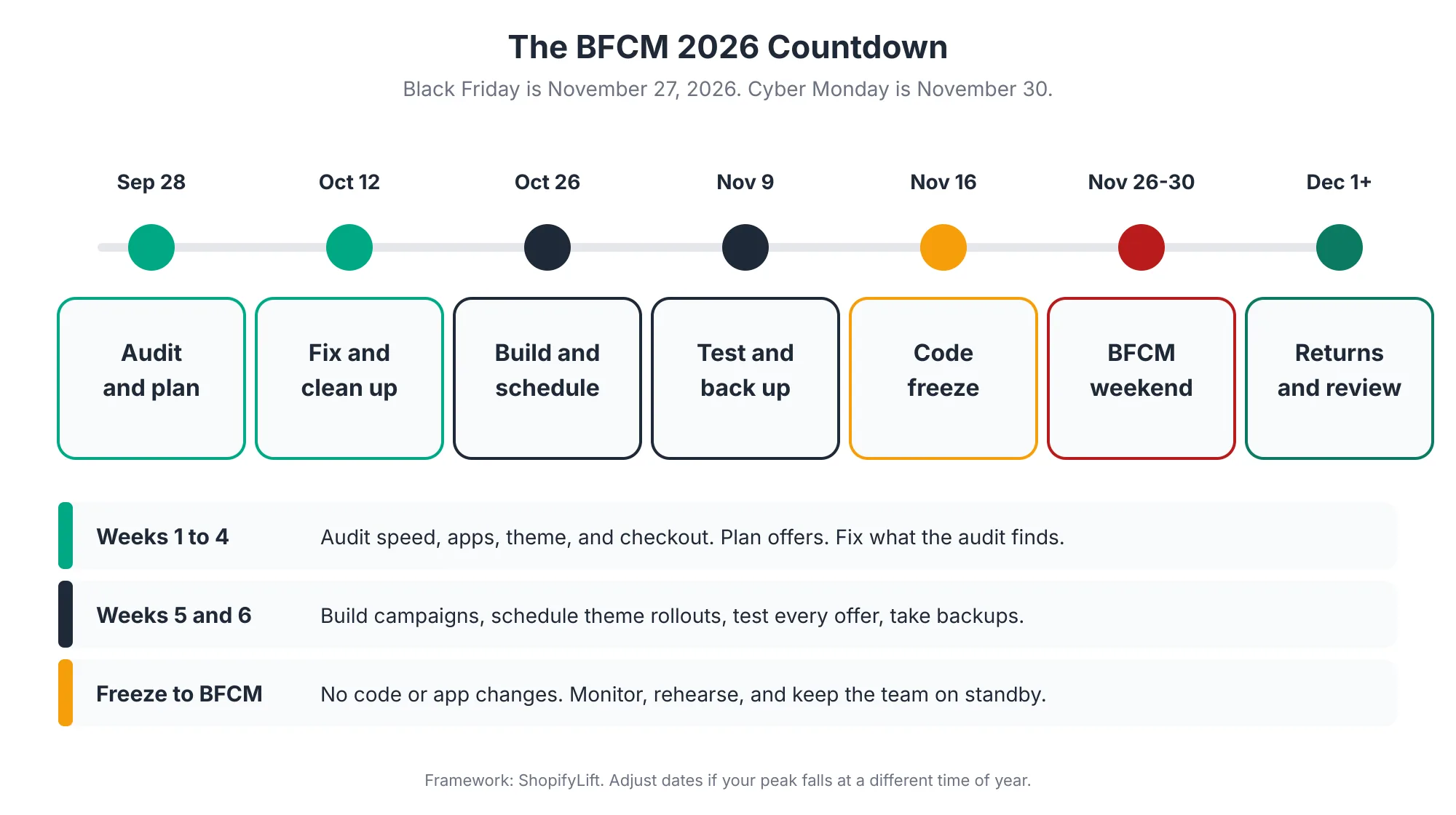
- Late September to early October: audit and plan. Review speed, apps, theme, checkout, and last year's results. Decide on your offers.
- Mid October: fix and clean up. Work through the audit findings. Remove apps you don't need. Apply theme updates while there's still time to test them.
- Late October: build and schedule. Create campaign pages, collections, and discounts. Schedule theme changes rather than publishing them live.
- Early November: test and back up. Test every offer on every checkout path. Take a full backup and confirm it restores.
- From about November 16: code freeze. No theme, app, or checkout changes until peak is over.
- November 26 to 30: the weekend. Monitor, respond, and stick to the plan.
- December onward: returns and review. Handle the returns wave, run a post-mortem, and lift the freeze in stages.
Many merchants now run offers across the whole week, or start early-access deals the week before. That's fine, but it moves your freeze date earlier too. The rule is simple: your freeze starts before your first peak traffic, not before Black Friday itself.
If your biggest season isn't BFCM, the same plan works. Just shift the dates to line up with your own peak, whether that's Mother's Day, back to school, or a product launch.
Why Is Peak Season Different From Every Other Week?
Peak season is different because traffic, order volume, and shopper expectations all spike at once, while any mistake becomes far more expensive. In the 2025 US holiday season, shoppers spent a record $257.8 billion online, and Cyber Week alone brought in $44.2 billion. A problem that costs a few sales normally can cost thousands per hour during peak.
Here's what the 2025 season looked like across the US market:
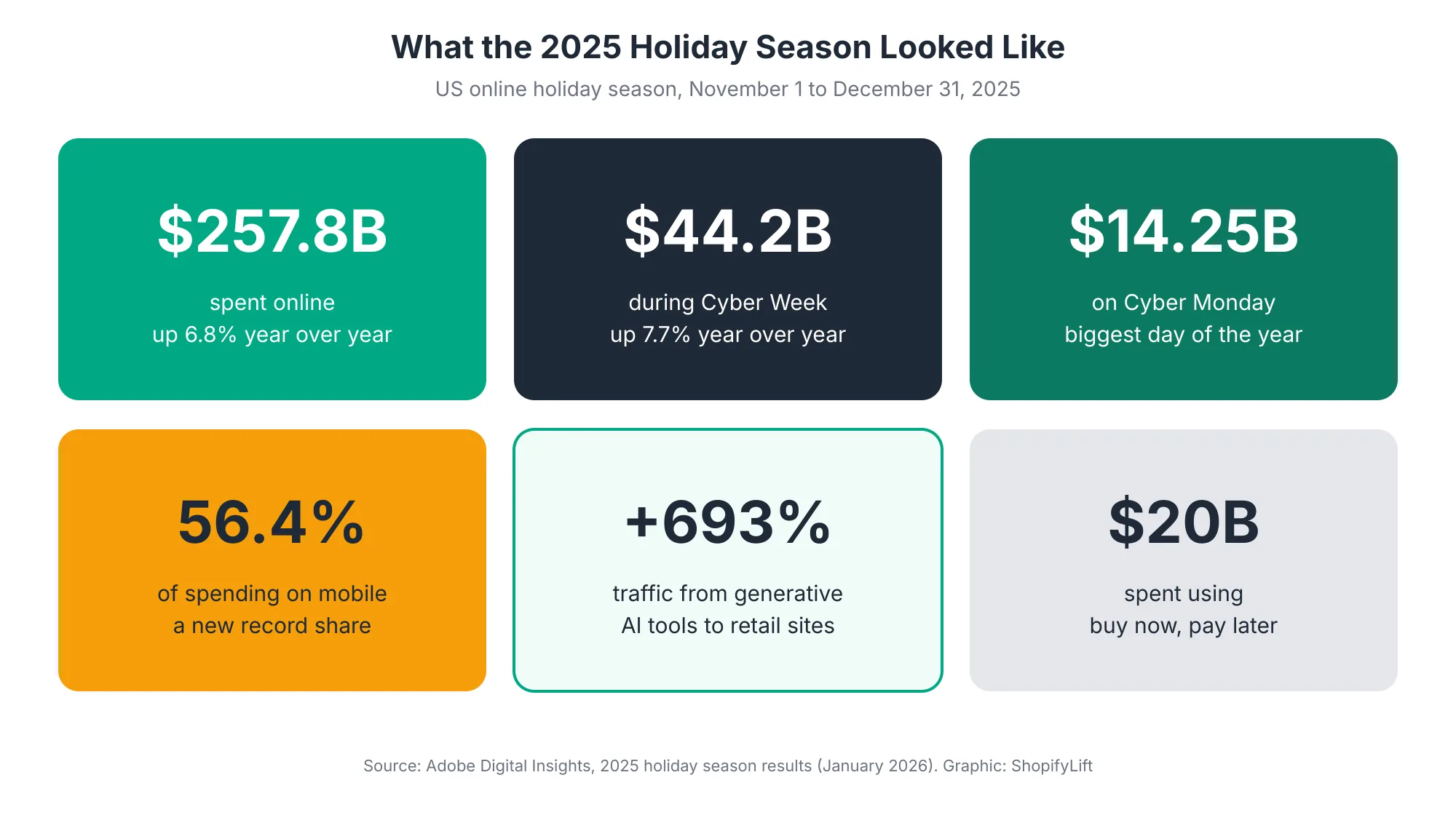
Adobe's final numbers show $257.8 billion spent online between November 1 and December 31, 2025, up 6.8% on the year before Adobe. Cyber Week, the five days from Thanksgiving to Cyber Monday, brought in $44.2 billion, and Cyber Monday was the biggest online shopping day of the year at $14.25 billion Adobe. Black Friday grew even faster, reaching $11.8 billion, up 9.1%, as shoppers took advantage of earlier deals Chain Store Age.
On Shopify specifically, more than 94,900 merchants had their highest-selling day ever during BFCM 2025 Shopify. Shopify's own infrastructure peaked at 489 million requests per minute at the edge Shopify Investor Relations.
Three shifts stand out for 2026 planning:
- Mobile dominates. Mobile devices drove a record 56.4% of holiday online spending in 2025 Adobe. If your store works well on desktop but struggles on phones, you're optimizing for the minority.
- Flexible payments matter. Buy now, pay later drove $20 billion in online holiday spending, and Cyber Monday was its biggest day ever at $1.03 billion Adobe. Almost 80% of those Cyber Monday transactions happened on mobile Adobe.
- AI shopping has arrived. Traffic to retail sites from generative AI tools grew 693.4% year over year during the 2025 season Adobe. We cover what that means for your preparation later in this guide.
Shopify handles platform scale well. What Shopify can't do is make sure your theme, apps, discounts, and product data are ready. That part is yours.
What Should You Audit and Fix First?
Start with a technical audit covering page speed, installed apps, theme version, checkout customizations, and backups. Fix anything that affects speed or checkout first, since those have the biggest revenue impact during peak. Do this work in October, while there's still time to test changes properly before the freeze.
Page Speed
Speed matters more under peak traffic, and most stores have room to improve. The HTTP Archive's 2025 Web Almanac found that only 48% of mobile sites pass all three of Google's Core Web Vitals HTTP Archive. Check your key templates on mobile: homepage, top collection pages, top product pages, and cart.
Common quick wins include compressing large hero images, removing unused sections, and deferring scripts that don't need to load immediately. Rewind's peak checklist recommends pre-loading critical assets and deferring or disabling non-essential app scripts that slow pages down Rewind. For the deeper performance work, see our Growth Guide article on Core Web Vitals and site speed for Shopify.
Apps
Every app is a potential point of failure under load, and many add code to every page. Run a full app audit in early October. Remove anything you don't need, and be skeptical about adding new apps this close to peak. Our Shopify App Audit guide walks through the process.
Theme
If your theme has an update waiting, decide now. Apply it in October, test it thoroughly, and publish it well before the freeze, or leave it until January. Don't update your theme in November. The full process is in How to Update Your Shopify Theme Without Losing Custom Code.
Checkout Customizations
This year there's an extra check. Shopify Scripts stopped running on June 30, 2026 Shopify Developer Docs. If your store used Scripts for tiered discounts, free gifts, or shipping rules last BFCM, confirm that the replacement logic built on Shopify Functions works exactly as your offers need. Test it with this year's actual promotions, not last year's.
Backups
Confirm your backup tool is running and that you can restore from it. Rewind recommends confirming you have a clean restore point before your freeze window begins Rewind. We cover backup options in Shopify Store Security: Staff Permissions, Data Backups, and Fraud Prevention.
How Should You Plan Offers and Discounts for Peak Season?
Plan a small number of clear offers, decide whether each uses an automatic discount or a code, and document exactly how discounts should combine. Build them in October, test every scenario in early November, and schedule them to start and end automatically. Fewer, clearer offers are easier to test and much less likely to break.
Keep Offers Simple
It's tempting to layer several promotions: sitewide percentage off, a free gift above a threshold, a bundle deal, and an email-only code. Each extra offer multiplies the combinations you need to test and the support questions you'll get.
Pick a primary offer and, at most, one or two supporting offers. Write down exactly how they interact. If a customer uses the email code on top of the sitewide sale, what should happen? Decide now, not on Black Friday morning.
Choose Automatic Discounts or Codes Deliberately
Shopify supports both. Automatic discounts apply at checkout without a code, while discount codes require customers to enter one Shopify. Automatic discounts remove the risk of typos and forgotten codes. Codes let you target specific audiences, like email subscribers or VIP customers.
Discount combinations have also become more flexible. Shopify's Spring '26 Edition added the ability to apply multiple discounts to the same product in one order, such as a percentage off and a fixed amount Shopify Editions. That opens up new offer structures, but it also means stacking rules need more careful testing than before.
Test Every Combination
Build a simple testing matrix: every offer, on every checkout path.
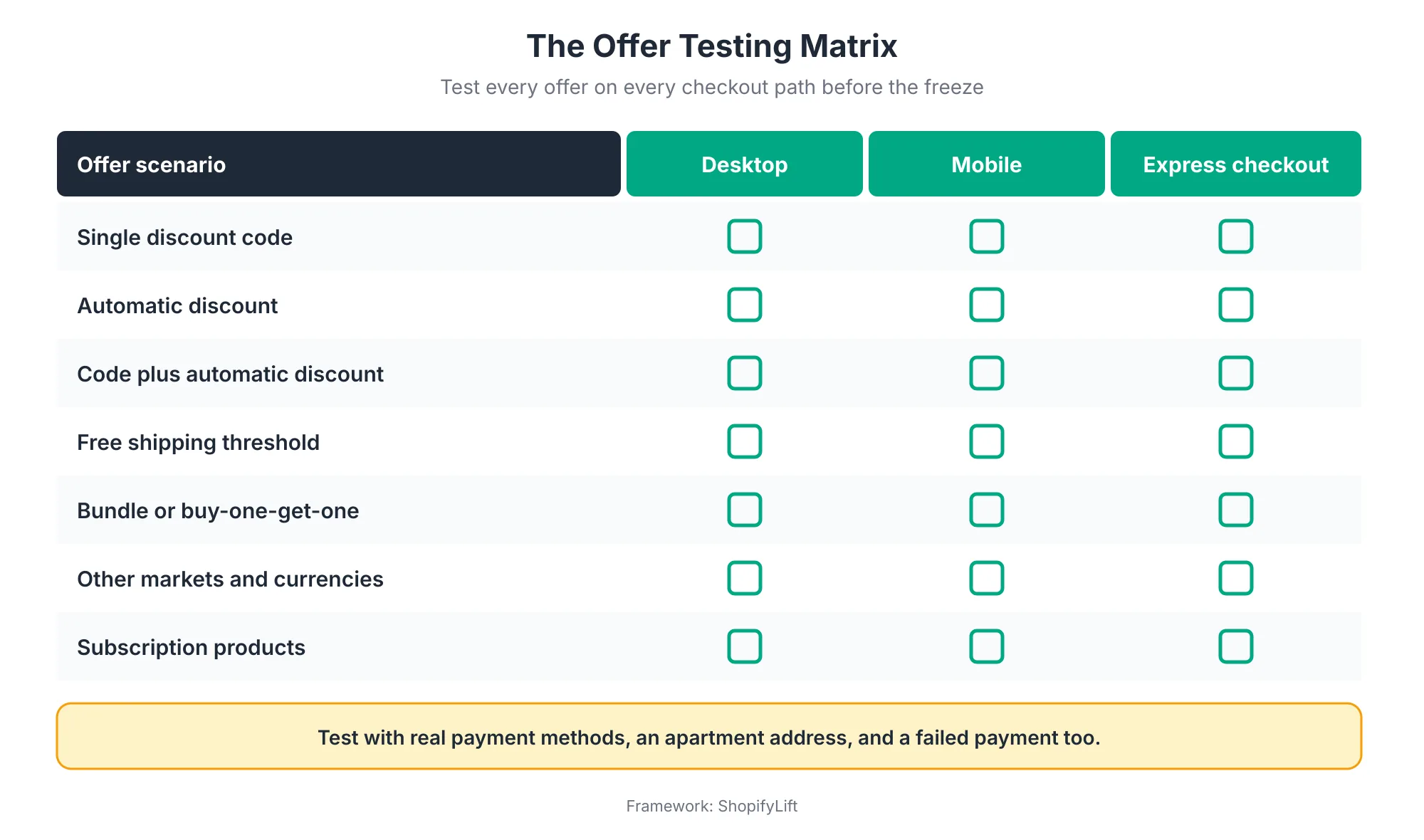
Pay special attention to express checkout buttons like Shop Pay and Apple Pay, since they skip parts of the normal checkout. Test other markets and currencies if you sell internationally, and test subscription products if you sell them, since subscription discounts often behave differently.
Schedule every discount with a start and end date. That way offers switch on and off at the right moment, even at midnight on Thanksgiving, without anyone needing to be awake.
How Do You Prepare Inventory and Fulfillment for Peak Season?
Prepare inventory and fulfillment by confirming stock levels on your best sellers, setting low-stock alerts, checking fulfillment and carrier capacity, and publishing clear holiday shipping cutoffs. Accurate stock counts matter most during peak, because overselling a hero product on Black Friday creates cancellations, refunds, and unhappy customers all at once.
A few priorities for the weeks before peak:
- Count your hero products. Do a physical count of your top sellers in early November. Peak season is the worst possible time to discover your system count is wrong.
- Set low-stock alerts. Decide the threshold at which someone gets notified for each hero product, and who decides whether to restock, substitute, or hide the item.
- Check back-in-stock syncing. Shopify's Spring '26 Edition sped up how quickly back-in-stock updates reach your storefront during high-traffic events Shopify Editions. Still, test your own restock flow before peak.
- Confirm fulfillment capacity. If you use a third-party warehouse, confirm their peak capacity, cutoffs, and staffing. If you fulfill in-house, plan extra hands now.
- Publish shipping cutoffs. Tell customers clearly when they need to order for delivery before the holidays, and put that date on your site and in your emails.
Your return policy is part of this too. Many stores extend return windows for holiday orders. Whatever you decide, make it clear before the sale, not after. We cover inventory in depth in Shopify Inventory and Order Management.
How Do You Test Your Store Before Peak Traffic?
Test your store by walking through every important customer path on real devices, testing every offer on every checkout method, and checking how your store behaves as traffic grows. Shopify handles platform scale, but your theme, apps, and third-party services still need testing. Finish testing before the freeze, so the freeze protects a store you know works.
Test the Paths Customers Actually Use
A good pre-peak test covers far more than a single happy-path order. Test on a phone and a desktop, with a discount code, with an express payment button, with a shipping address that includes an apartment number, and with a payment that fails. These are the paths thousands of customers will use over the weekend, and most merchants haven't tried them since launch.
Shopify's own BFCM advice includes load-testing your site before the sale, simplifying checkout, and confirming the mobile experience runs smoothly Shopify. Our weekly checkout test is a good starting point. Before peak, run the extended version.
Use Rollouts and Simulations
Shopify has made pre-launch testing easier. Merchants can use Rollouts to test site changes before launch, including AI shopper simulations and live A/B testing Shopify. If you're launching a new campaign theme or landing page, test it this way in October rather than publishing it straight to live traffic.
Load Testing: Know What It Covers
Shopify's platform is built for BFCM-scale traffic, so most stores don't need to load test Shopify itself. What's worth testing are the parts outside Shopify's control: third-party apps that call their own servers, custom integrations, and headless storefronts.
If you run a headless storefront and want to load test it, coordinate first. Shopify's developer documentation warns that its anti-bot systems may treat load tests as bot traffic and throttle them, and recommends contacting your Merchant Success Manager or Shopify Support three to five weeks before the test Shopify Developer Docs. For BFCM 2026, that means reaching out in October.
Want a second pair of eyes before the freeze?
Our free Shopify Store Health Audit checks your speed, apps, checkout, and offers against a peak-readiness checklist and gives you a prioritized fix list. Request your free audit
How Should You Prepare Customer Communication for Peak Season?
Prepare customer communication by scheduling campaign emails and SMS in advance, publishing clear shipping cutoffs and return policies, and giving your support team ready answers for the questions they'll hear most. Clear communication before and during peak prevents a large share of support tickets and keeps customers confident enough to buy.
Most of this work can be done in October and scheduled, so nobody is writing emails at midnight on Thanksgiving:
- Schedule campaigns early. Build and schedule your email and SMS sequence for the whole week, from early access through Cyber Monday. Check every link and every code against the live store before the freeze.
- Warm up your list. If you haven't emailed some subscribers in months, start re-engaging them in October so your peak emails reach inboxes rather than spam folders. Our Growth Guide covers this in Email and SMS Retention Sequences for Shopify.
- Make policies visible. Put your holiday shipping cutoffs and return window on product pages, in the cart, and in your FAQ. Customers who can find these answers themselves don't need to contact support.
- Prepare support macros. Write ready answers for the questions you know are coming: where's my order, why didn't my code work, can I change my address, and what's your return policy.
- Plan for problems. Draft a short holding message in case something breaks, such as a payment method being temporarily unavailable. You'll be glad it's ready if you need it.
Coordinate timing between marketing and operations too. If a campaign email goes out at 6 AM on Black Friday, make sure the offer is live, stock is loaded, and someone is watching the store when it lands.
What Is a Code Freeze, and How Should You Run One?
A code freeze is a set period before and during peak when no changes are made to your theme, apps, or checkout logic. It protects the store you've tested from last-minute changes that haven't been tested. Most stores start their freeze about ten days before Black Friday and hold it through the holiday shipping period, with a clear process for genuine emergencies.
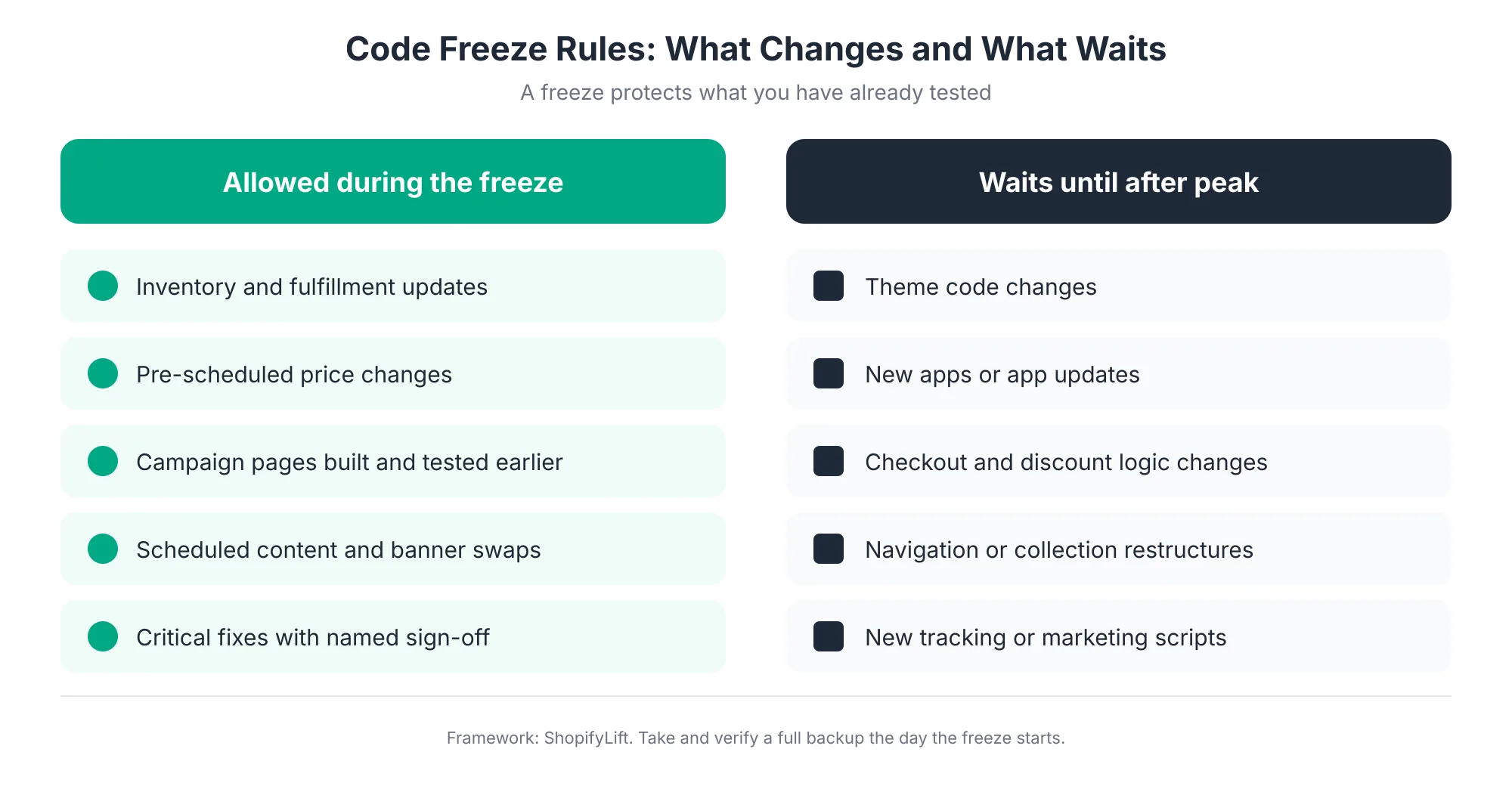
A freeze doesn't mean the store stands still. Inventory updates, fulfillment, and pre-scheduled price and content changes all continue. What stops are changes to how the store works: theme code, apps, checkout and discount logic, navigation, and tracking scripts.
A few rules make a freeze stick:
- Write it down. Put the freeze dates and rules in a shared document and send it to everyone who touches the store, including agencies and freelancers.
- Name an approver. Genuine emergencies happen. Decide in advance who can approve an exception, and require a test on a duplicate theme first.
- Back up on day one. Take a full backup the day the freeze starts, and confirm it restores. That's your known-good version.
- Lock app updates where you can. Some apps update automatically. Where an app allows it, delay non-critical updates until after peak.
- Hold it long enough. Keep the freeze through your holiday shipping cutoffs, not just through Cyber Monday. December is still peak for most stores.
How Should You Prepare for AI Shopping Channels This Peak?
Prepare for AI shopping channels by making sure your product data is complete and accurate, your stock levels are correct, and your offers are clearly reflected in your catalog. AI assistants now send meaningful traffic to retail sites during peak, and they read your product data directly, so data quality affects whether they recommend you.
The growth is fast. Adobe measured a 693.4% year-over-year increase in traffic from generative AI tools to US retail sites during the 2025 holiday season Adobe. Salesforce estimated that AI and agents influenced $9.3 billion in global online sales on Cyber Monday 2025 alone Chain Store Age.
On Shopify, merchants with eligible products are included in Shopify Catalog by default Shopify, which feeds AI shopping experiences. That makes BFCM 2026 the first peak season where many merchants' catalogs will appear in these channels at scale. You don't need to switch anything on. You do need your data to be ready.
Before the freeze, check:
- Product titles and descriptions: Clear, specific, and written in the words shoppers actually use.
- Attributes and categories: Size, color, material, and other key attributes filled in consistently, with accurate product categories.
- Stock accuracy: AI tools can surface products you've sold out of if your inventory isn't current.
- Offer clarity: Sale prices and compare-at prices set correctly on the products themselves, so any channel that reads your catalog shows the right price.
We cover product data in Shopify Merchandising Strategy, and the AI side in depth in our Growth Guide article on AI Product Data Optimization for Shopify.
What Should Your Team Do During the BFCM Weekend?
During the weekend, run a simple command center: a small set of metrics watched continuously, a named owner for each, agreed rollback triggers, and a clear on-call roster. The goal isn't to change the store. It's to spot problems quickly and act on them using a plan you made in advance.
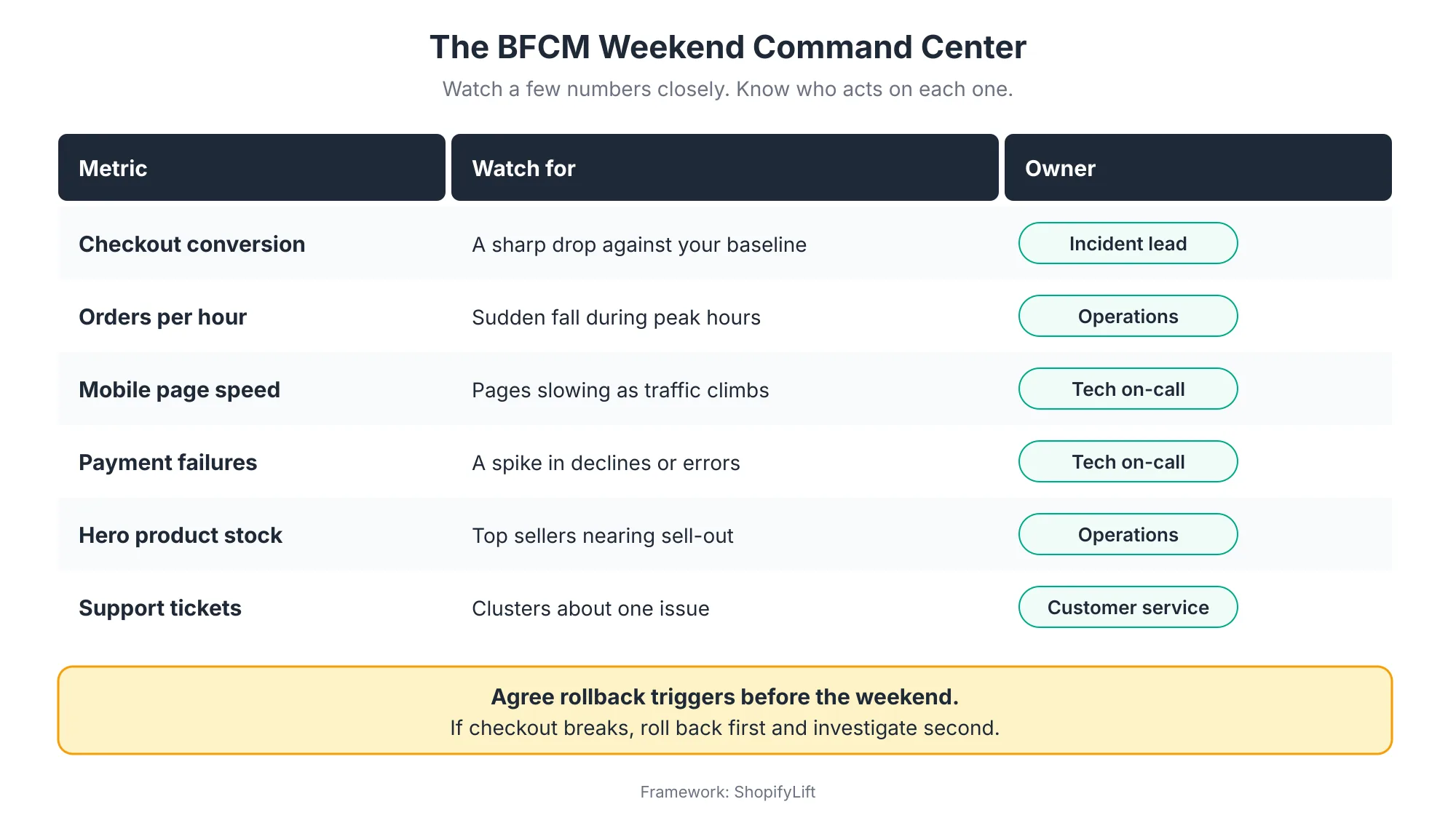
Watch a Few Numbers Closely
You don't need a wall of dashboards. You need a handful of numbers, compared against a normal baseline, checked regularly. Checkout conversion rate is the most important, because it's usually the first sign that something is broken. Orders per hour, payment failures, mobile speed, hero product stock, and support ticket themes round out the picture.
Record your baseline in early November, so you know what "normal" looks like before the rush.
Agree Roles and Triggers in Advance
Decide who's on call for each day, how they're reached, and who has authority to act. A small store might have one person covering everything with a developer on standby. A larger store might have separate owners for tech, operations, customer service, and marketing.
Most importantly, agree your rollback triggers before the weekend. If checkout conversion drops sharply and doesn't recover within a set time, what happens? For most stores, the answer should be to roll back the most recent change first and investigate second. That's much easier when the freeze means there haven't been many recent changes.
Keep Customer Service in the Loop
Your support team will often hear about problems before your dashboards show them. Give them a quick way to flag clusters of similar complaints, such as a discount not applying or a payment method failing, straight to whoever is on call.
What Should You Do After BFCM?
After BFCM, run a post-mortem within a week, prepare for the returns wave, keep the freeze through the holiday shipping period, and lift it in stages in January. The weeks after Cyber Monday are also the best time to capture lessons for next year, while everyone still remembers what happened.
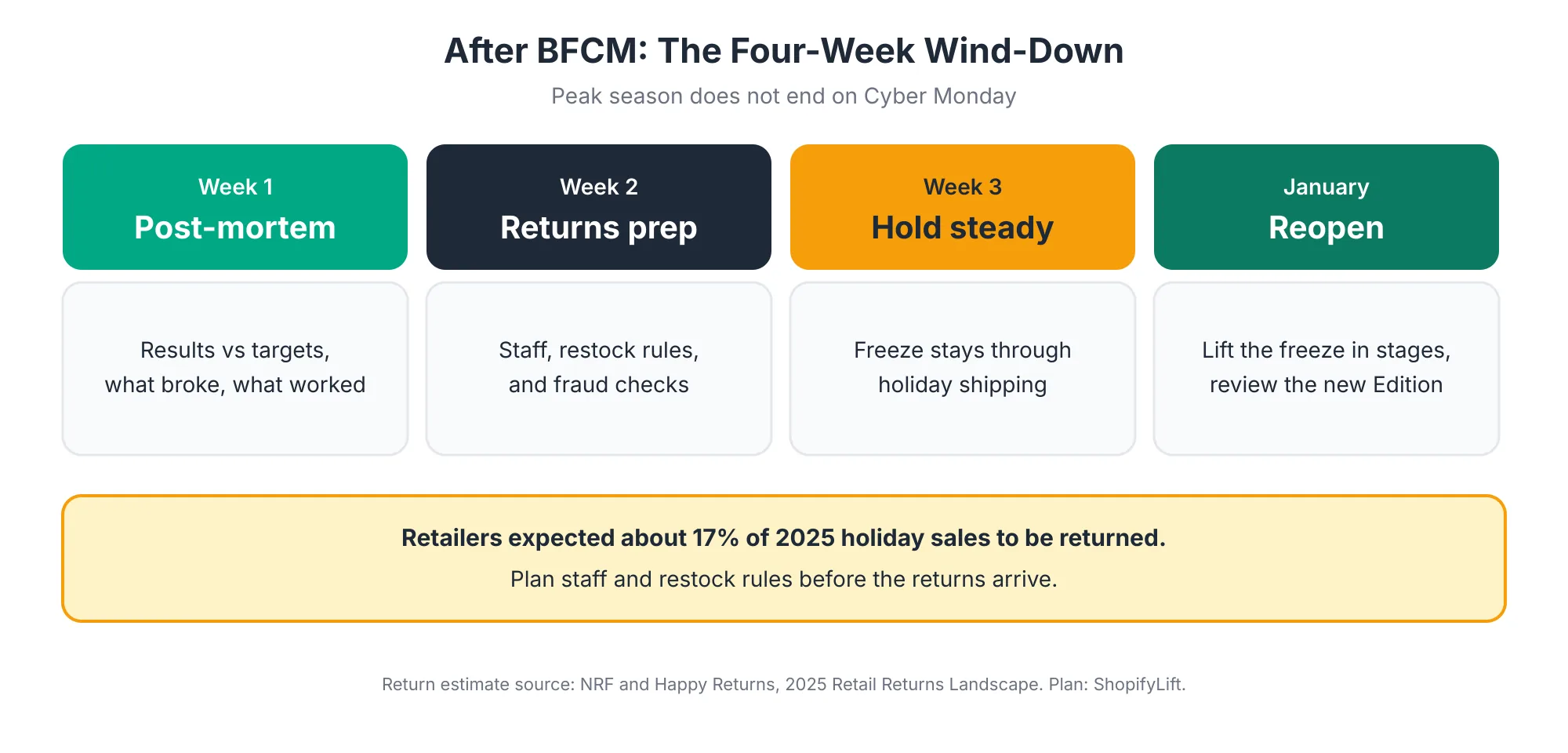
Run a Post-Mortem
Within a week of Cyber Monday, get everyone involved together and cover four questions. How did results compare with targets? What broke, and how quickly was it caught? What worked better than expected? What should change next year? Write the answers down and file them with next year's plan.
Prepare for the Returns Wave
Returns follow peak sales. Retailers surveyed by NRF and Happy Returns expected about 17% of 2025 holiday sales to be returned NRF. Plan staffing for returns processing, set clear restock rules so returned items are inspected before going back on sale, and watch for return fraud. Our inventory and order management guide covers returns workflows in detail.
Lift the Freeze in Stages
Don't release every postponed change on January 2. Prioritize the backlog, then release changes a few at a time with testing, just as you would at any other time of year.
January is also when to review the latest Shopify Edition. Winter Editions tend to arrive in December, in the middle of peak, so the triage often waits until the new year. We cover that process in How to Evaluate and Adopt New Shopify Features After Every Editions Release.
What Peak Season Mistakes Should You Avoid?
The most common peak season mistakes are starting too late, making untested changes during the rush, running too many overlapping offers, installing new apps in November, skipping mobile testing, and having no plan for who acts when something breaks. Nearly all of them come from time pressure, which is why starting early matters most.
A few more worth calling out:
- Testing only on desktop. Most holiday spending happens on phones. Test every offer on mobile first.
- Last-minute theme edits. A quick tweak the night before, with no test order, is how stores break at the worst possible moment.
- Codes that don't match the email. A typo in a discount code sent to your whole list can generate hundreds of support tickets in an hour. Automatic discounts avoid this entirely.
- Forgetting third-party limits. Your store may scale, but your email platform, review app, or fulfillment partner may have their own limits. Ask them about peak capacity.
- No backup before the freeze. If something goes wrong mid-weekend, a recent verified backup turns a disaster into an inconvenience.
- Ending the freeze too early. December is still peak season for most stores. Keep changes locked through your shipping cutoffs.
Frequently Asked Questions
When is Black Friday 2026?
Black Friday 2026 is Friday, November 27, and Cyber Monday is Monday, November 30, with Thanksgiving on Thursday, November 26. Many merchants start early-access offers the week before, so plan to have your store ready and your code freeze in place by around mid-November.
When should I start preparing my Shopify store for BFCM?
Start about eight weeks before Black Friday. For BFCM 2026, that means late September. Use October to audit and fix, early November to build and test offers, and start your code freeze around November 16, about ten days before Black Friday.
What is a code freeze on Shopify?
A code freeze is a period when you stop making changes to your theme, apps, checkout customizations, and discount logic, usually starting about ten days before Black Friday. Inventory updates and pre-scheduled content still continue. It protects your tested store from untested last-minute changes.
Do I need to load test my Shopify store?
Most stores don't need to load test Shopify's platform, which is built for peak traffic. Focus on testing third-party apps, custom integrations, and headless storefronts. If you do load test a headless storefront, contact Shopify Support three to five weeks beforehand, since anti-bot systems may throttle the test.
Should I use automatic discounts or discount codes for BFCM?
Use automatic discounts for sitewide offers, since they apply without a code and can't be mistyped. Use discount codes when you want to target a specific audience, such as email subscribers. Whichever you choose, test every combination on mobile, desktop, and express checkout before your freeze.
Final Thoughts
BFCM rewards preparation more than any other weekend of the year. The stores that have their best days aren't usually the ones with the cleverest offers. They're the ones whose checkout works on every phone, whose discounts apply correctly, whose best sellers are in stock, and whose team knows exactly what to do when something goes wrong.
You have about eight weeks. Audit in October, build and test in early November, freeze from mid-November, and watch the numbers over the weekend. Then learn from it, and start next year's plan in January.
For the full picture of keeping your store in shape all year, head back to our Shopify Store Management guide.
Want an expert team getting your store ready for peak?
ShopifyLift's Store Management service includes peak-readiness audits, offer testing, code freeze management, and on-call support over BFCM weekend. Explore Shopify Store Management Services
Continue the Store Management Series
- Hub: Shopify Store Management: The Complete Guide
- Previous: Shopify Inventory and Order Management: A Practical Guide for Growing Stores
- Next: Shopify Store Security: Staff Permissions, Data Backups, and Fraud Prevention
- The Shopify Store Maintenance Checklist: Weekly, Monthly, and Quarterly Tasks for 2026
- The Shopify App Audit: How to Reduce App Bloat, Hidden Costs, and Conflicts
Sources
[1] Shopify, "Shopify merchants generate record-breaking $14.6 billion in Black Friday Cyber Monday sales," December 2025
[2] Shopify Investor Relations, "Shopify Merchants Achieve Record-Breaking $14.6 Billion in Black Friday-Cyber Monday Sales," December 2025
[3] Adobe, "Holiday Shopping Season Drove a Record $257.8 Billion Online with Consumers Embracing Generative AI Tools," January 2026
[4] Adobe, "Cyber Monday Hits Record $14.25 Billion in Online Spending," December 2025
[5] Chain Store Age, "Adobe: Holiday e-commerce beats expectations with record $257.8B," January 2026
[6] Chain Store Age, "Cyber Monday, Cyber Week online sales up roughly 7%," December 2025
[7] Shopify Blog, "Black Friday Checklist 2026: 25 BFCM Prep Steps," August 2026
[8] Shopify Blog, "7 BFCM Strategies for Holiday Sales in 2026," August 2026
[9] Shopify Developer Documentation, "Production checklist," 2026
[10] Rewind, "Shopify Black Friday preparation: 10 steps for BFCM success," September 2025
[11] NRF, "Consumers Expected to Return Nearly $850 Billion in Merchandise in 2025," October 2025
[12] Shopify Editions, "Spring '26," June 2026
[13] HTTP Archive, "Web Almanac 2025: Performance," 2026
[14] Shopify, "Selling everything, everywhere, all at once: The Spring '26 Edition," June 2026