Part of our Shopify Store Management guide. Spoke 6 of 10.
When a store is small, inventory management is simple. You know what's on the shelf. You pack orders yourself. If something runs out, you notice.
Growth changes that. A second warehouse. A retail location. A third-party fulfillment partner. Pre-orders, bundles, wholesale customers, and a peak season where orders arrive faster than anyone can check stock by hand. Suddenly the number in Shopify and the number on the shelf don't always agree, and every mismatch turns into an oversell, a cancellation, or cash tied up in stock that isn't moving.
2026 has also been a big year for Shopify inventory. Stocky, Shopify's long-standing inventory app, shut down on August 31, 2026 Ordoro. At the same time, Shopify's Spring '26 Edition added major native inventory features, including purchase orders that create transfers and the ability to stock the same variant across multiple locations Shopify Editions.
This guide explains how Shopify's inventory and order system actually works, what changed this year, and how to keep stock accurate, orders flowing, and returns under control as you grow.
Key Takeaways
- Out-of-stocks and overstocks cost retailers an estimated $1.7 trillion a year, equal to 6.2% of global retail sales, according to IHL Group's 2026 study.
- Stocky shut down on August 31, 2026. Shopify's native tools now cover purchase orders, transfers, barcode receiving, and multi-location stock.
- "Available" and "On hand" are different numbers. Understanding Shopify's inventory states explains most "wrong count" problems.
- Returns are an inventory issue too. An estimated 19.3% of US online sales were returned in 2025.
What Does Inventory and Order Management Cover on Shopify?
Inventory and order management on Shopify covers everything from buying stock to getting it back after a return. That includes purchase orders and receiving, stock levels by location, transfers between locations, how orders are routed and fulfilled, and how returns are inspected and restocked. It's the operational backbone that keeps what you sell in line with what you actually have.
It's useful to separate the two halves:
- Inventory management: What you have, where it is, and what's coming. Purchase orders, receiving, transfers, counts, and adjustments.
- Order management: What happens after someone buys. Routing the order to a location, picking and packing, shipping, and handling returns.
Shopify brings these together more than it used to. In Shopify's own description, inventory now works as one connected flow, from ordering stock from a supplier to receiving it, selling it, and handling returns Shopify Blog.
This guide focuses on day-to-day management. If your catalog also needs better organization for shoppers, see Shopify Merchandising Strategy. If you're preparing for a traffic spike, see Seasonal Store Readiness.
Why Does Inventory Accuracy Matter So Much?
Inventory accuracy matters because every error costs money in one of two directions. Too little stock means lost sales and oversells. Too much means cash tied up and eventual markdowns. IHL Group's 2026 study puts the global cost of this "inventory distortion" at $1.7 trillion a year, equal to 6.2% of global retail sales.
That figure comes from IHL Group, which has tracked inventory distortion for nearly 20 years IHL Group. It covers large retailers, but the pattern is the same for a growing Shopify store: lost sales from empty shelves on one side, and capital stuck in slow stock on the other.
For online stores, inaccurate inventory shows up in a few specific ways:
- Oversells: Shopify says an item is available, a customer buys it, and there's nothing to ship. You cancel, refund, and apologize.
- Hidden stock: Inventory exists but isn't recorded as available at the right location, so it never sells.
- Wrong reorder decisions: Bad counts lead to ordering too much of one product and too little of another.
- Merchandising problems: Sold-out products stay at the top of collection pages while available stock sits unseen.
Returns make accuracy harder. IHL Group reports that 70% of retailers struggle with inventory accuracy as a direct result of their own return processes, because returned items get miscounted, mis-shelved, or lost IHL Group. We'll cover returns in detail later in this guide.
How Do Shopify's Inventory States Work?
Shopify tracks inventory in states at each location. "Available" is what can be sold now. "Committed" is tied to placed orders that haven't shipped. "Unavailable" is stock you're holding back, such as damaged or quality-control items. "On hand" is the physical total of all three. "Incoming" is stock on its way that can't be sold until it's received.
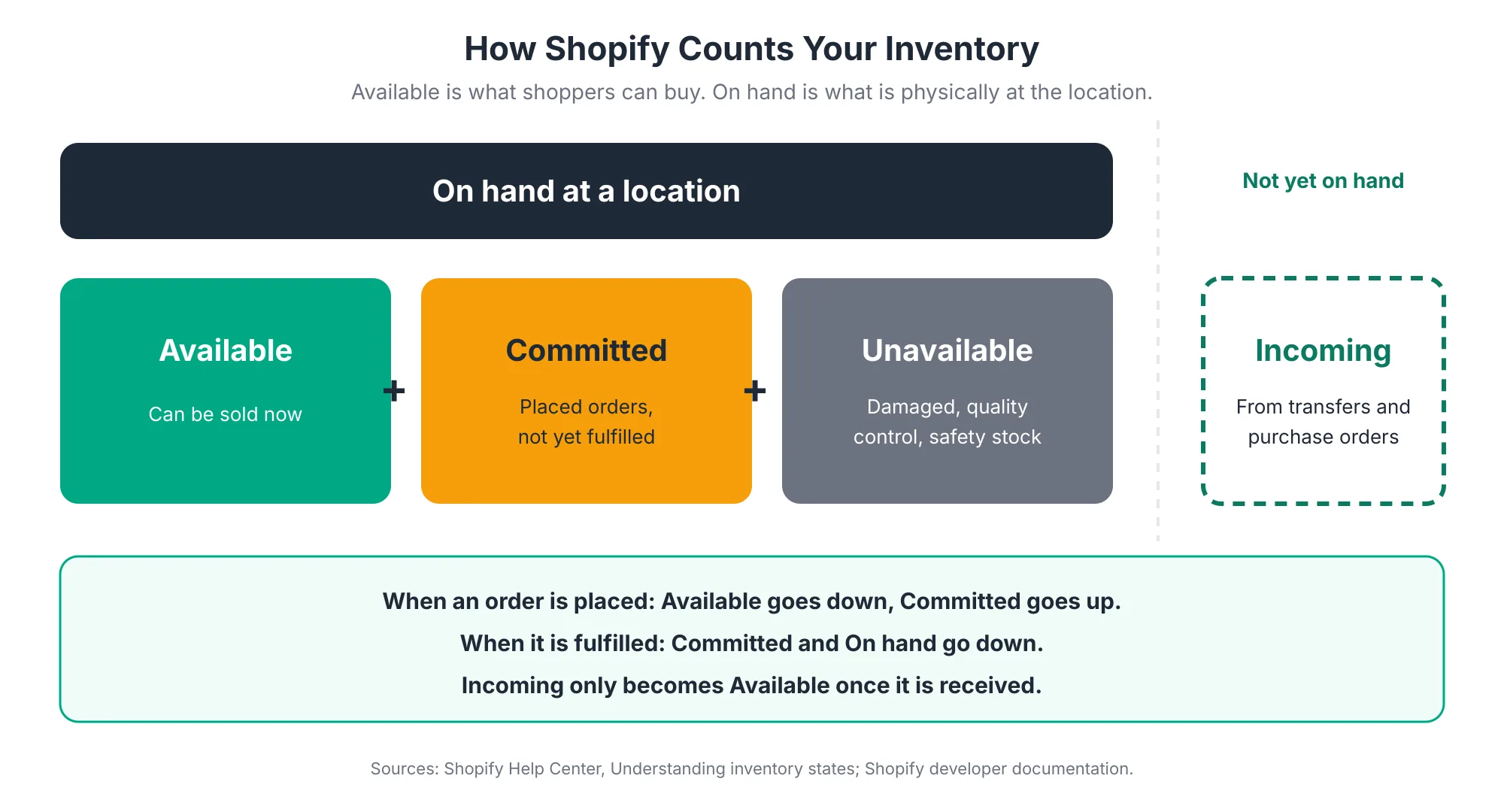
Understanding these states explains most of the "why doesn't this number match?" questions merchants ask. Here's what each one means in practice:
- Available: Stock that isn't committed or set aside as unavailable, and that doesn't include incoming stock Shopify Help Center. This is the number that decides whether shoppers can buy.
- Committed: Units on placed orders that haven't been fulfilled yet. When an order is placed, Shopify lowers Available and raises Committed. When it's fulfilled, Committed goes back down Shopify Developer Docs.
- Unavailable: Stock that's physically at your location but not for sale, such as damaged items or units pulled for quality control Shopify Help Center.
- Incoming: Stock on its way from transfers or purchase orders. It isn't available to sell until it's received Shopify Developer Docs.
- On hand: The physical total at a location, made up of Committed, Unavailable, and Available units Shopify Help Center.
A common example: your warehouse shows 50 units on hand, but 45 are committed to unshipped orders. Only 5 are available. From the shopper's point of view, you're nearly sold out, even though the shelf looks full.
When counts look wrong, check Committed and Unavailable first. Unfulfilled orders, items waiting in quality control, and stock reserved for draft orders all reduce Available without changing On hand.
How Do Orders Move Through Shopify?
Every Shopify order moves through the same stages: placed, routed to a location, picked and packed, shipped, delivered, and sometimes returned. Each stage changes your inventory numbers. Most order problems come from three places: routing to the wrong location, slow sync between a sale and an inventory update, and returns that sit uninspected.
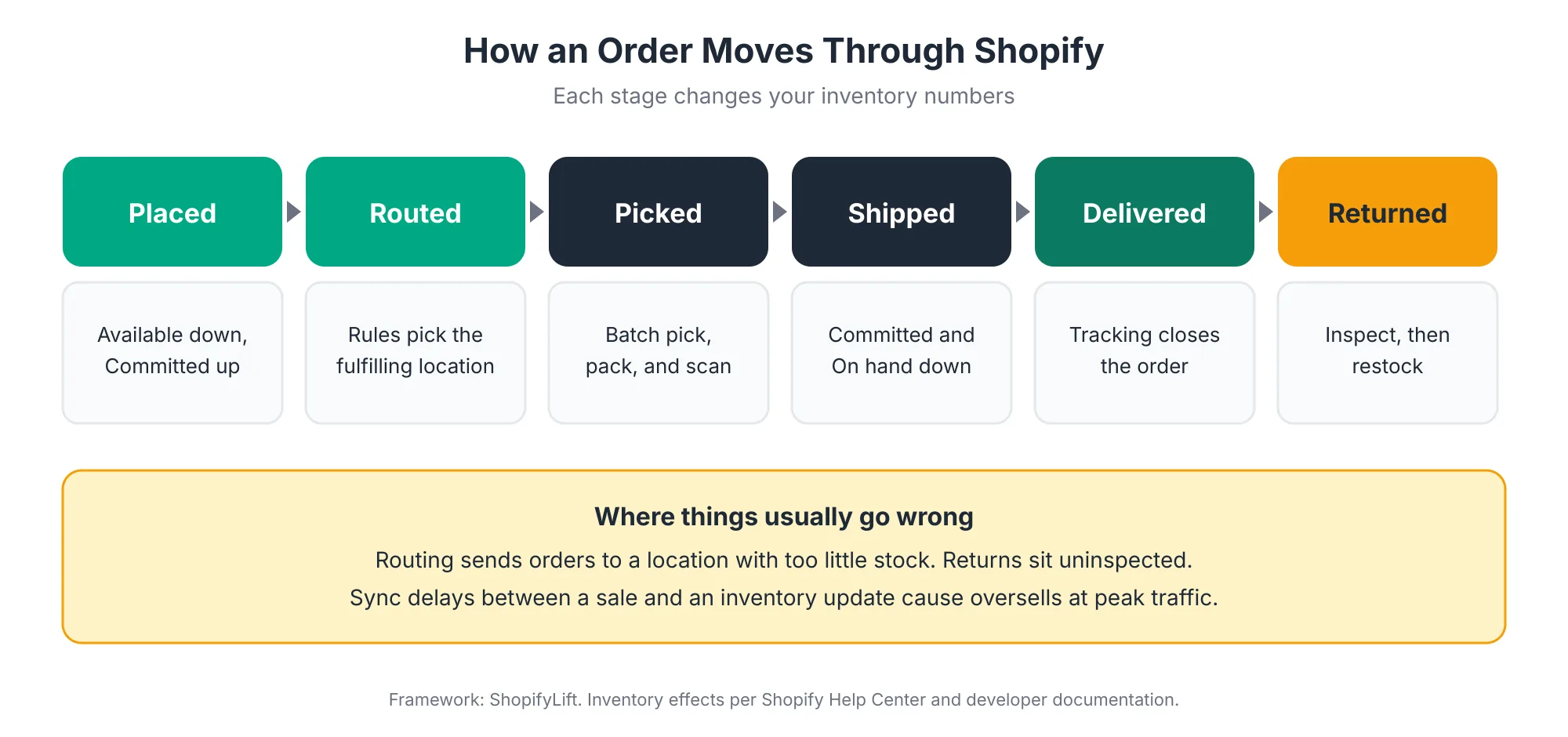
Routing: Which Location Fulfills the Order?
If you have more than one location, Shopify uses order routing rules to decide which location fulfills each order. The rules you set, such as preferring the closest location or minimizing split shipments, determine where stock is committed.
This matters more than it seems. If routing prefers a location that's running low, orders can be delayed or split even when another location has plenty. Review your routing rules whenever you add a location or change how stock is distributed.
Fulfillment: Picking, Packing, and Shipping
For stores that ship their own orders, Spring '26 added a native batch fulfillment workflow. You can group orders into batches and fulfill them through a customizable pick, pack, scan, and ship process Shopify Editions. For higher-volume stores, batching saves real time over processing orders one by one.
Shipping labels can be automated too. Spring '26 added automatic label purchasing through Shopify Flow rules Squashed Pixel. That's useful for predictable orders, though it's worth reviewing the rules before a busy period so exceptions don't slip through.
Inventory Policies: Deny or Continue Selling
Each variant has an inventory policy that decides what happens when Available reaches zero. For ordinary stocked products, stopping sales at zero is the safe default. Allowing sales past zero makes sense only when you genuinely have incoming stock, sell made-to-order products, or run pre-orders. Review these settings regularly, since a single variant set to keep selling can create a run of oversells during a promotion.
What Changed in Shopify Inventory Management in 2026?
Two things changed in 2026. Stocky, Shopify's inventory app, was removed from the App Store in February and shut down on August 31, 2026. Meanwhile, the Spring '26 Edition expanded native inventory tools, connecting purchase orders to transfers, allowing the same variant to be stocked across locations, and adding barcode receiving and batch fulfillment.
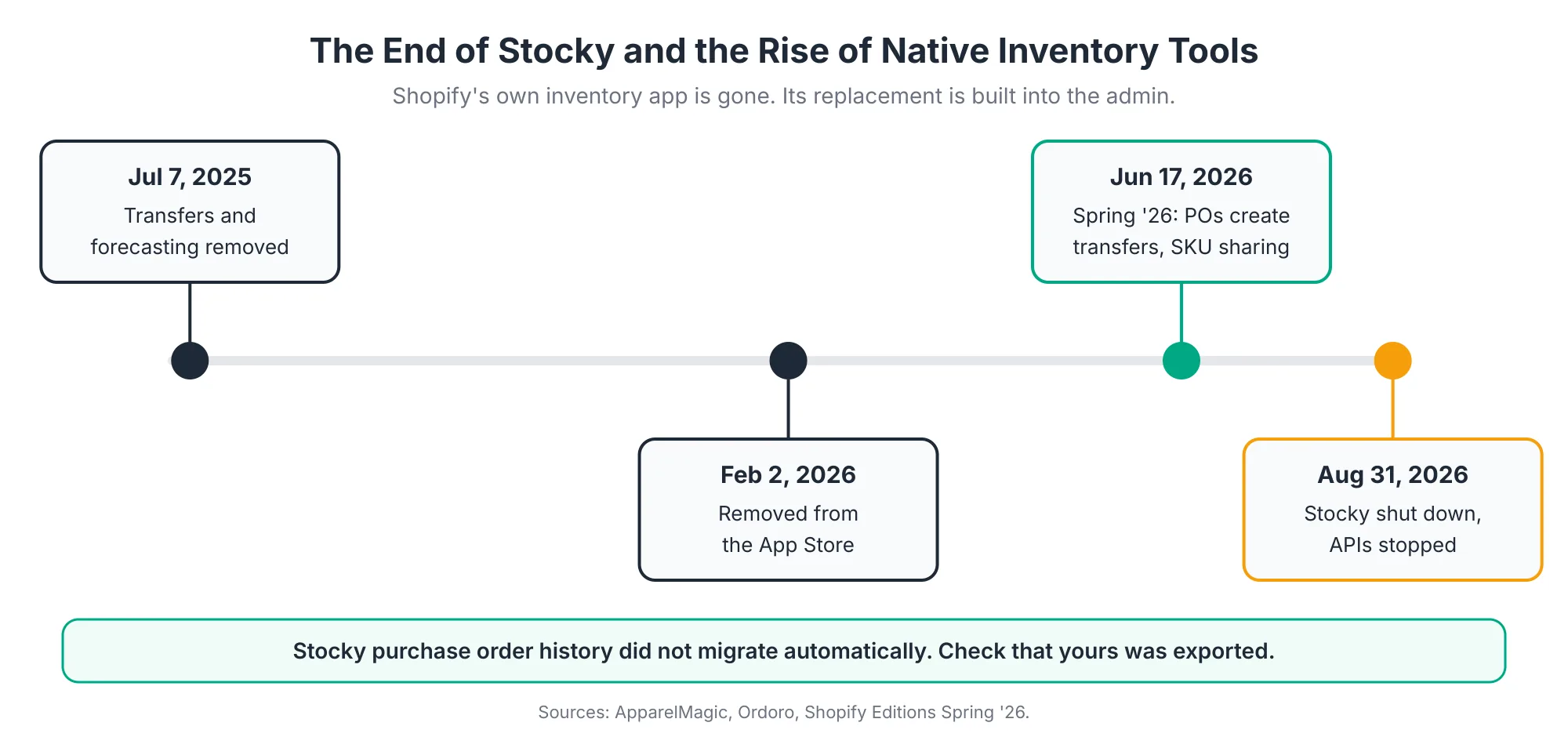
The Stocky Shutdown
Stocky wound down in stages. Inventory transfers and min/max forecasting were removed on July 7, 2025. The app was pulled from the Shopify App Store on February 2, 2026. It shut down completely on August 31, 2026, when its APIs also stopped working ApparelMagic.
One detail catches many merchants out: historical Stocky data, including purchase orders and stocktakes, did not migrate to Shopify automatically ApparelMagic. If your store used Stocky, confirm that past purchase order history was exported and stored somewhere you can still reach. Supplier costs and past order quantities are valuable for future buying decisions.
Shopify's New Native Inventory Tools
Shopify's Spring '26 inventory features are widely seen as its answer to Stocky's retirement Simple Bundles. The main additions are:
- SKU sharing across locations: Stock the same variant at multiple locations without duplicating inventory items Shopify Editions.
- Purchase orders that create transfers: A purchase order records the business agreement, and transfers handle the physical receiving. You can create multiple transfers per purchase order and route incoming stock to the location that needs it Shopify Blog.
- Barcode receiving: Scan shipment barcodes such as GS1-128 to receive transfers faster in the admin Shopify Editions.
- Stock at non-selling locations: Manage or move stock at locations independently of where products are actively for sale Shopify Editions.
- Faster back-in-stock updates: Performance improvements help restocked inventory reach your online store faster during high-traffic events Shopify Editions.
- Sidekick purchase orders: Sidekick can now generate purchase orders, which automatically create transfers Shopify Editions.
Some features have extra requirements. Certain in-person pickup and transfer receiving features require Shopify POS Pro, for example Shop Circle. Check the requirements for each feature before planning around it.
What Native Shopify Still Does Not Cover
Native tools now cover far more than they used to, but not everything.
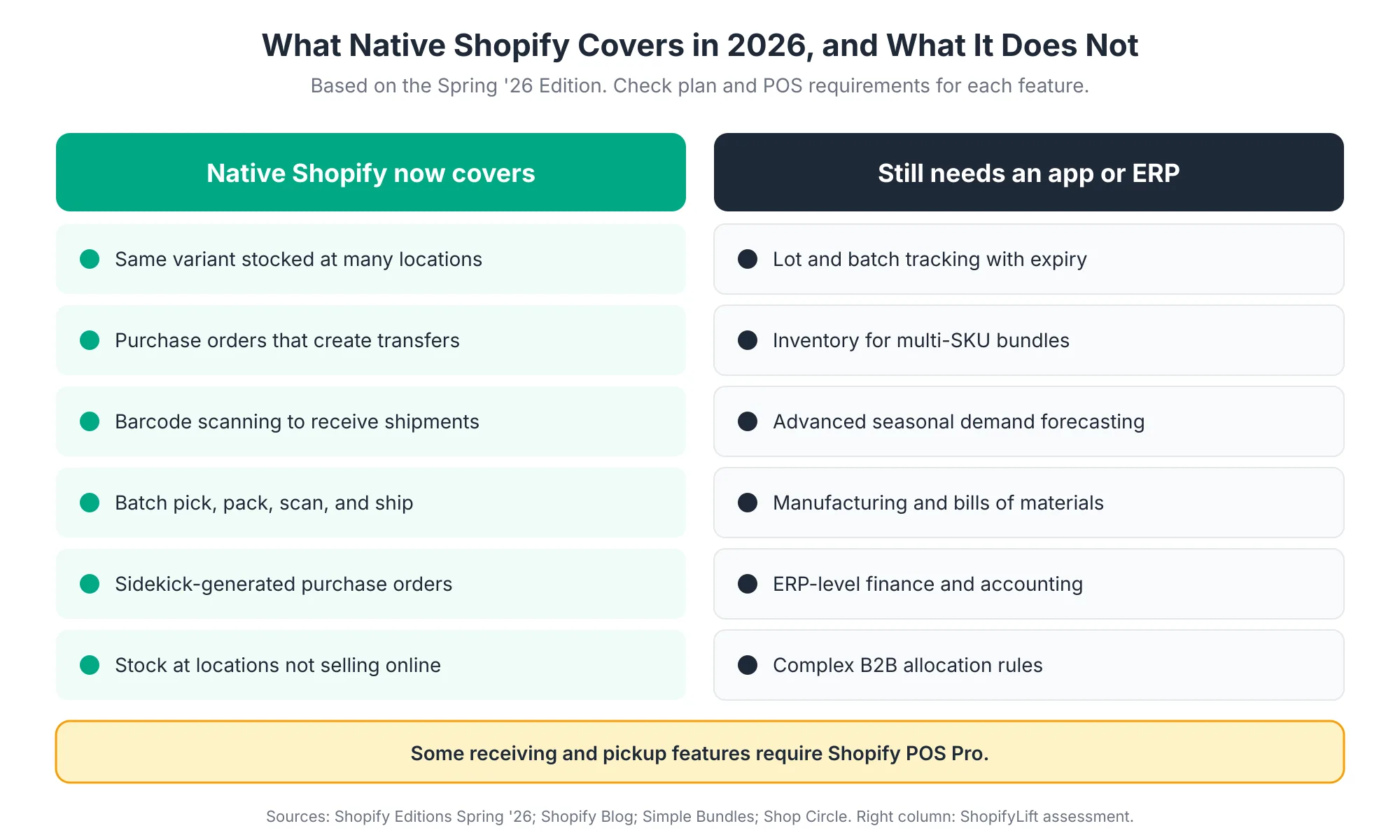
If you sell perishable goods, track batches or lots, manage expiry dates, or sell multi-SKU bundles, there are still real gaps to plan around Simple Bundles. Advanced demand forecasting, manufacturing, and complex financial workflows usually need a specialist app or an ERP too.
How Do Purchase Orders and Receiving Work in Shopify Now?
In Shopify's current workflow, a purchase order records what you ordered from a supplier and what it cost, and transfers handle the physical movement of that stock into your locations. You can split one purchase order into several transfers, send each shipment to the location that needs it, and receive stock by scanning barcodes instead of counting line by line.
This is the part of Shopify inventory that changed most in 2026, so it's worth walking through step by step:
- Create the purchase order: Record the supplier, products, quantities, and costs. Sidekick can now draft purchase orders for you Shopify Editions, which is useful for routine reorders, though someone should still review quantities before sending.
- Split shipments into transfers: If the supplier ships in several deliveries, create a transfer for each one so every shipment is tracked separately Shopify Blog.
- Route stock to the right place: Send incoming stock from a single purchase order straight to whichever location needs it, rather than receiving everything at one site and moving it later Shopify Blog.
- Receive with barcodes: When the delivery arrives, scan shipment barcodes to receive it faster in the admin Shopify Editions.
- Check discrepancies: Compare what arrived with what was ordered. Short or damaged deliveries should be recorded at receiving, not discovered weeks later.
Why does this matter beyond convenience? Because the moment stock is received, it moves from Incoming to Available and can be sold. Every day a delivery sits unreceived is a day of potential sales lost, especially for products that were already running low.
How Should You Manage Inventory Across Multiple Locations?
Manage multiple locations by deciding which locations fulfill online orders, setting routing rules that match how stock is distributed, and using transfers to rebalance stock before it runs out. With SKU sharing now available, stock each variant wherever it's actually held, and receive every transfer promptly so incoming stock becomes available as soon as possible.
A few practices make multi-location inventory much easier:
- Decide each location's role: Which locations ship online orders? Which are retail only? Which are storage? Set fulfillment settings to match.
- Match routing to reality: Routing rules should reflect where stock actually is, not where it used to be.
- Rebalance with transfers: Move stock before a location runs dry, not after orders start splitting or failing.
- Receive promptly: Incoming stock can't be sold until it's received. A delivery sitting unscanned at the dock is lost sales.
- Keep third-party logistics in sync: If you use a fulfillment partner, check that stock levels sync reliably, especially before peak periods.
- Count regularly: Cycle counts, where you count a slice of your catalog each week, catch errors early without shutting down for a full stocktake.
If you sell internationally, location strategy also affects delivery times and costs for each market. Our Growth Guide covers international selling in Shopify Markets Pro: International Expansion.
How Do You Prevent Overselling on Shopify?
Prevent overselling by stopping sales at zero for ordinary stock, keeping a small safety buffer on fast-selling products, syncing inventory quickly across every channel and location, and managing bundles carefully. Oversells usually happen in the gap between a sale and an inventory update, so the higher your traffic, the more that gap matters.
The key insight is timing. Oversells during a product drop or a BFCM surge happen in the gap between a sale and an inventory update Simple Bundles. When sales are slow, a small delay rarely matters. At peak, when Shopify merchants collectively sold $5.1 million per minute during BFCM 2025 Shopify, a few seconds of delay can mean several extra orders for the last unit.
Practical steps:
- Default to deny: Stop selling at zero for regular stocked items, and allow overselling only for genuine pre-orders or made-to-order products.
- Use a safety buffer: For fast movers, move a few units to Unavailable as safety stock. Shopify will stop selling before the true last unit goes.
- Watch multi-channel sync: If you sell on marketplaces, social channels, or in person, make sure every channel draws from the same inventory and syncs quickly.
- Handle bundles carefully: A bundle sells several products at once. If bundle stock isn't tied to each component's stock, you can sell bundles you can't build. This is one area where a dedicated app is often still needed.
- Load test before peak: Before big launches, review sync settings and apps that touch inventory. We cover peak preparation in Seasonal Store Readiness.
Worried about oversells or inventory drift?
Our free Shopify Store Health Audit reviews your inventory settings, routing rules, and inventory-related apps, and flags the risks before your next busy period. Request your free audit
How Should You Handle Returns in Your Inventory Process?
Treat returns as part of inventory management, not just customer service. Inspect returned items quickly, restock sellable items to Available and anything questionable to Unavailable, and track return reasons by product. With nearly one in five online purchases returned in 2025, slow or careless returns handling quietly distorts inventory accuracy.
The scale is significant. The NRF and Happy Returns estimated that 15.8% of US retail sales would be returned in 2025, totaling $849.9 billion, and that 19.3% of online sales would come back NRF.
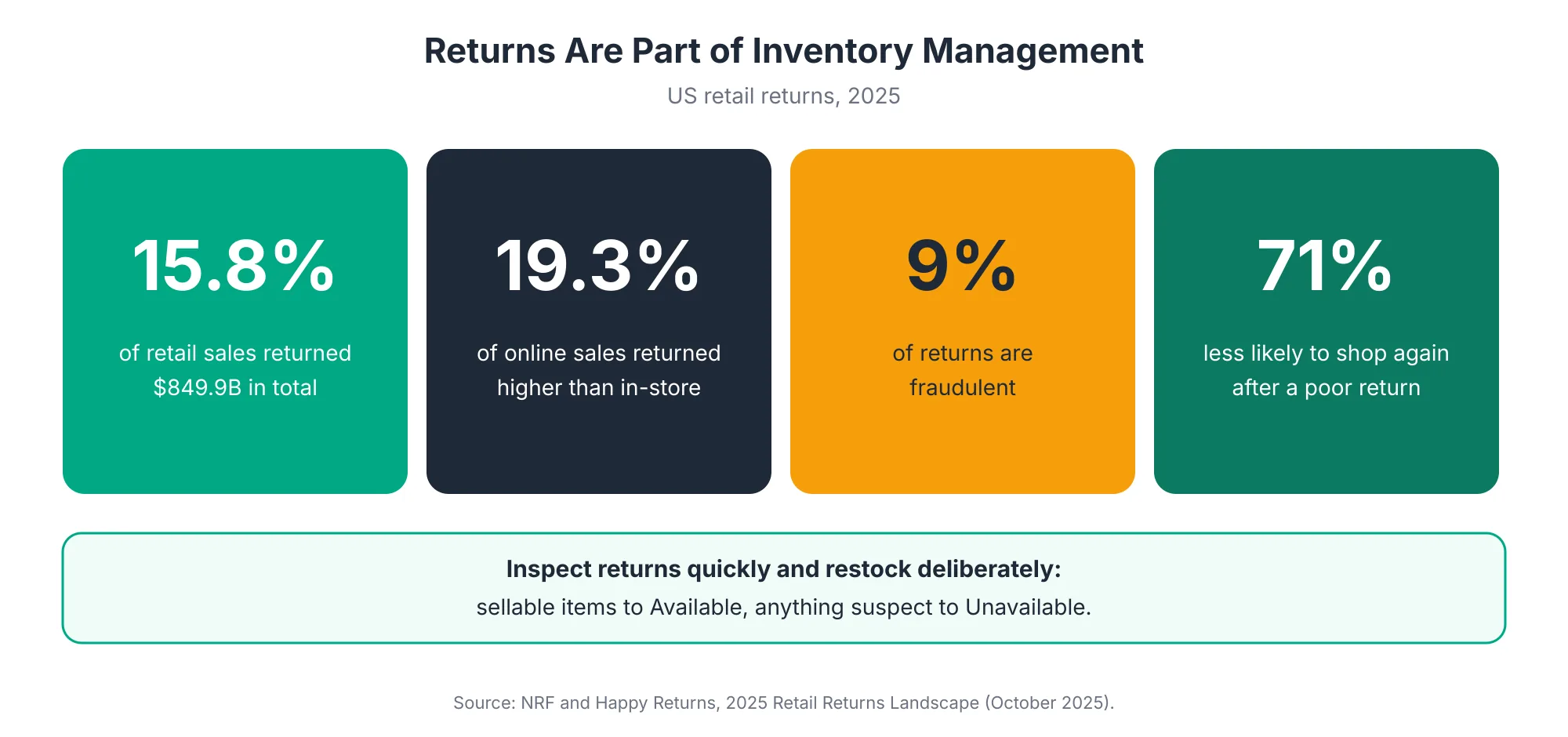
Returns affect your store in three ways:
- Inventory accuracy: Until a return is inspected and restocked, it's neither available to sell nor clearly written off. Items that sit in a returns bin for weeks distort your counts.
- Fraud risk: The same report found that 9% of all returns are fraudulent NRF. Inspecting items before restocking protects both your inventory and your margin.
- Customer loyalty: 71% of consumers say they're less likely to shop with a retailer again after a poor returns experience NRF.
A clean returns process has four steps:
- Receive and log: Record the return as soon as it arrives, not when someone gets around to it.
- Inspect: Check condition, completeness, and authenticity.
- Restock deliberately: Sellable items go back to Available. Damaged or suspect items go to Unavailable until they're resolved.
- Track reasons: Record why each item came back. Patterns by product, size, or description point to fixes that reduce future returns.
Return reasons are especially useful. If one product keeps coming back as "smaller than expected," the fix may be a better size guide or clearer product photos, not a returns policy change. Our Growth Guide covers product page improvements in Shopify Product Page Optimization.
When Should You Add an Inventory App or ERP?
Add an inventory app or ERP when native Shopify no longer fits how your business operates. Common triggers include lot or expiry tracking, multi-SKU bundles, manufacturing, advanced demand forecasting, complex wholesale allocation, or finance teams that need inventory tied directly to accounting. Many growing stores can now stay native for longer than they could a few years ago.
Signs you've outgrown native tools:
- You need lot, batch, or expiry tracking for regulated or perishable products.
- You sell bundles or kits and need component-level stock control.
- You manufacture products and need bills of materials.
- You need seasonal demand forecasting across hundreds or thousands of SKUs.
- Your finance team needs inventory valuation and costing inside an accounting or ERP system.
It also helps to be realistic about larger businesses. One Shopify agency notes that merchants already running an ERP typically aren't abandoning it for Shopify's native order management, even though native features keep improving what.digital. For those businesses, the job is making Shopify and the ERP work well together.
Before adding any inventory app, weigh the cost, the storefront and admin impact, and the risk of apps writing to your inventory data. Our Shopify App Audit guide covers how to evaluate apps, and our Shopify development services can help with custom ERP integrations.
Which Inventory and Order Metrics Should You Track?
Track six metrics: stockout rate, oversell count, and order-to-ship time weekly, plus inventory count variance, sell-through rate, and return rate monthly. Together they show whether customers can buy what they want, whether orders ship on time, whether your records match reality, and whether stock is moving at a healthy pace.
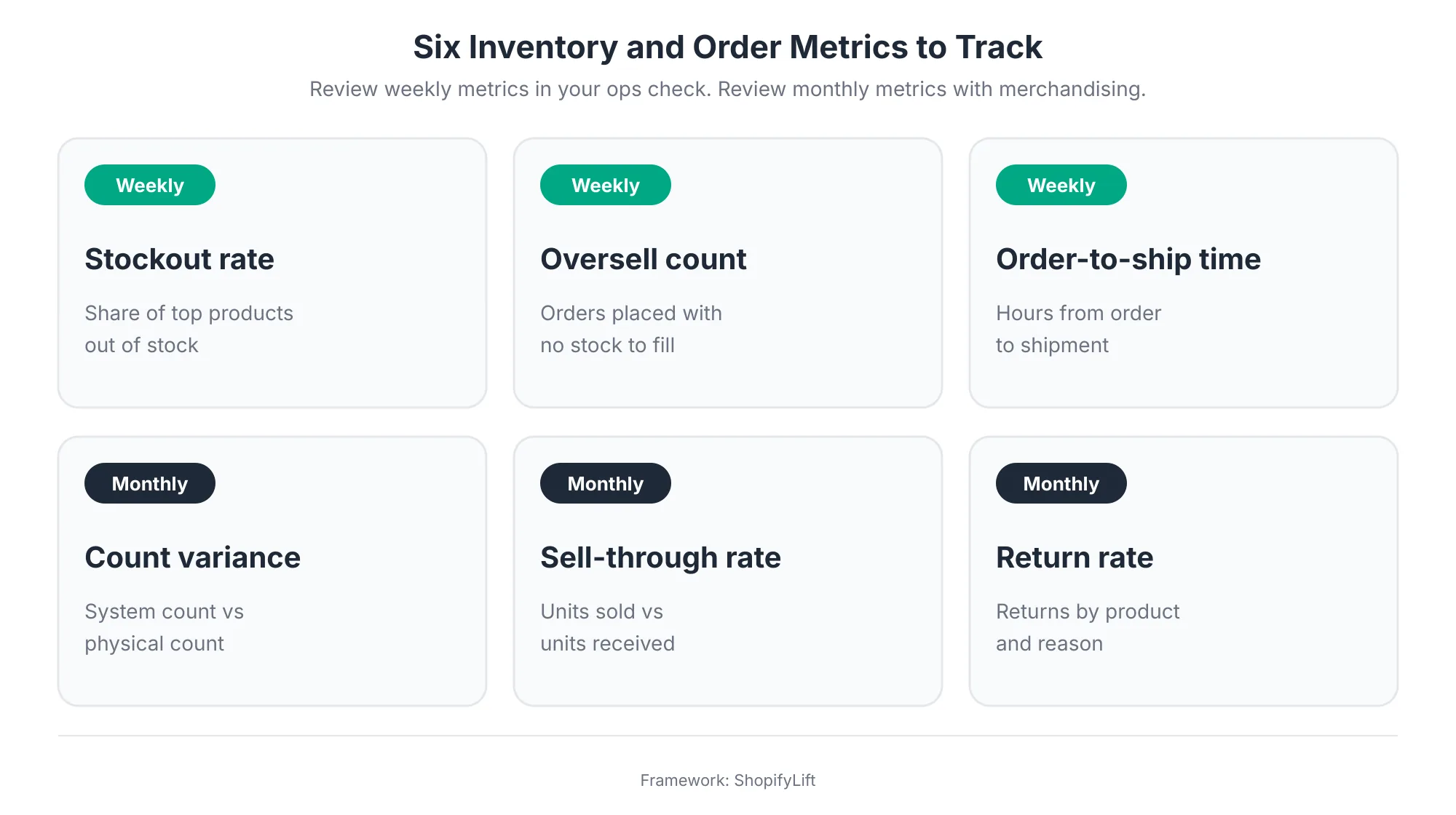
What each one tells you:
- Stockout rate: The share of your top products that are out of stock. High rates mean lost sales and wasted marketing.
- Oversell count: Orders placed without stock to fill them. Ideally zero. Any oversell is worth investigating.
- Order-to-ship time: How long orders wait before shipping. Rising times usually signal a staffing, stock, or routing problem.
- Count variance: The difference between Shopify's count and a physical count. Large variances point to receiving, returns, or shrinkage issues.
- Sell-through rate: How much of the stock you received actually sold over a period. Low sell-through ties up cash.
- Return rate: Returns by product and reason. Useful for spotting product, sizing, or description problems.
Shopify's analytics can cover many of these, and Sidekick can help surface trends. We cover using Sidekick for operational work in Using Shopify Sidekick to Automate Daily Store Operations.
What Does a Good Inventory and Order Routine Look Like?
A good routine runs weekly, monthly, and quarterly. Weekly, review failed orders, fulfillment exceptions, oversells, and low stock. Monthly, run cycle counts, review sell-through and returns, and check routing rules. Quarterly, review inventory policies, locations, suppliers, and whether your tools still fit how you operate.
Weekly:
- Review unfulfilled, delayed, and failed orders.
- Check for oversells and find the cause of each one.
- Review low-stock alerts for your top products and plan reorders.
- Receive any outstanding transfers and purchase orders.
Monthly:
- Cycle count a portion of your catalog and investigate variances.
- Review sell-through and flag slow-moving stock for promotion or markdown.
- Review returns by product and reason.
- Check that routing rules still match stock distribution.
Quarterly:
- Review inventory policies, especially any variants allowed to oversell.
- Review locations and their fulfillment settings.
- Review supplier lead times and reorder points.
- Assess whether native tools, apps, or an ERP still fit your operation.
These tasks slot into the wider store routine in The Shopify Store Maintenance Checklist. It's also worth making sure inventory-related data, including supplier records and purchase order history, is covered by your backup process. See Shopify Store Security: Staff Permissions, Data Backups, and Fraud Prevention.
What Inventory and Order Mistakes Should You Avoid?
The most common mistakes are treating On hand as sellable stock, letting deliveries sit unreceived, allowing variants to oversell by accident, leaving returns uninspected, ignoring routing rules after adding a location, and relying on an inventory tool without a backup of its data. Each one quietly erodes accuracy until it causes a visible problem.
A few more worth watching for:
- Manual adjustments without notes: Every adjustment should have a reason. Unexplained changes make count variances impossible to trace.
- Inventory apps writing over each other: Two apps both updating stock levels can create conflicts that look like random errors.
- Skipping counts before peak: Going into a busy season with unverified counts almost guarantees oversells or hidden stock.
- No owner for returns: When returns belong to everyone, they belong to no one, and the returns pile grows.
- Forgetting historical data: Supplier costs and purchase history inform future buying. Losing them when changing tools, as some Stocky users discovered, makes planning harder.
Frequently Asked Questions
What is the difference between available and on hand in Shopify?
On hand is the physical total at a location. Available is what shoppers can actually buy. The difference is committed stock, tied to unfulfilled orders, and unavailable stock, such as damaged or quality-control items. If you have 50 on hand and 45 committed, only 5 are available.
What replaced Stocky in Shopify?
Stocky shut down on August 31, 2026. Shopify's native tools now handle purchase orders, which create transfers, along with barcode receiving, SKU sharing across locations, and Sidekick-generated purchase orders. Stores needing lot tracking, bundles, or advanced forecasting usually add a specialist app.
How do I stop overselling on Shopify?
Stop selling at zero for regular stock, keep a small safety buffer on fast sellers by moving a few units to Unavailable, and make sure every sales channel syncs from the same inventory. Oversells usually happen in the gap between a sale and an inventory update, so they spike during high-traffic events.
Can Shopify manage inventory across multiple locations?
Yes. Shopify tracks inventory by location, uses routing rules to choose which location fulfills each order, and supports transfers between locations. Since Spring '26, you can also stock the same variant at multiple locations without duplicating inventory items.
How should I handle returned items in Shopify inventory?
Log returns as soon as they arrive, inspect them, then restock sellable items to Available and damaged or suspect items to Unavailable. Track return reasons by product. With 19.3% of US online sales returned in 2025, slow returns handling can noticeably distort inventory accuracy.
Final Thoughts
Inventory and order management doesn't get much attention until something goes wrong: a flurry of oversells, a warehouse count that doesn't match, or a returns pile nobody has processed. By then, the fix is harder and more expensive.
The good news for 2026 is that Shopify's native tools are stronger than they've ever been. Purchase orders, transfers, multi-location stock, barcode receiving, and batch fulfillment now cover what many growing stores need. What makes the difference is using them consistently, understanding what the numbers mean, and reviewing them on a regular rhythm.
For the full picture of keeping your store in shape, head back to our Shopify Store Management guide.
Want help getting your inventory and orders under control?
ShopifyLift's Store Management service includes inventory setup, routing reviews, oversell prevention, returns workflows, and post-Stocky migration support. Explore Shopify Store Management Services
Continue the Store Management Series
- Hub: Shopify Store Management: The Complete Guide
- Previous: Shopify Merchandising Strategy: Collections, Search, and Filters That Drive Sales
- Next: Seasonal Store Readiness: How to Prepare Your Shopify Store for BFCM and Peak Sales
- The Shopify Store Maintenance Checklist: Weekly, Monthly, and Quarterly Tasks for 2026
- Using Shopify Sidekick to Automate Daily Store Operations
Sources
[1] Shopify Blog, "Managing inventory in Shopify just got easier (2026)," June 2026
[2] Shopify Editions, "Spring '26," June 2026
[3] Shopify Help Center, "Understanding inventory states," 2026
[4] Shopify Developer Documentation, "Apps in inventory management," 2026
[5] Ordoro, "Shopify Sunsets Stocky in 2026: Alternatives and Next Steps," 2026
[6] ApparelMagic, "Stocky Is Shutting Down: What Retailers Need to Know," May 2026
[7] Simple Bundles, "Shopify's Spring 2026 inventory overhaul," July 2026
[8] IHL Group, "The 2026 Inventory Distortion Study," July 2026
[9] IHL Group, "Fixing Inventory Distortion," 2025 edition, published 2026
[10] NRF and Happy Returns, "2025 Retail Returns Landscape," October 2025
[11] NRF, "Consumers Expected to Return Nearly $850 Billion in Merchandise in 2025," October 2025
[12] Squashed Pixel, "Shopify Spring '26 Editions: What Actually Matters for Your Brand," June 2026
[13] Shop Circle, "Shopify Spring Edition 2026: 5 Major Updates Explained," 2026
[14] what.digital, "Shopify Summer 2026 Edition: What Really Matters," August 2026
[15] Shopify, "Shopify merchants generate record-breaking $14.6 billion in Black Friday Cyber Monday sales," December 2025