Part of the ShopifyLift Series
Start here: The Shopify Growth Guide 2026: Key Strategies and Trends Every Merchant Should Know
Related deep dives:
Shopify Markets Pro: The Complete Guide to Multi-Currency, Multi-Language, Multi-Region Expansion
Right now, 30% of your store traffic comes from outside your primary market, and you're probably converting almost none of it.
The reason isn't hard to understand. International selling feels insurmountable: currency confusion, tax nightmares, compliance liability, shipping delays, payment method incompatibility, localization complexity. Most merchants see the effort required and stop before they start. Others try to build fragile custom solutions that collapse under compliance pressure.
Shopify Markets Pro exists to fix this. For less than the cost of a part-time developer, it transfers merchant-of-record liability to Global-e, automates tax and duty collection, negotiates international shipping rates, and handles fraud detection across 150+ markets. More importantly: it's designed so merchants can launch new international markets in weeks instead of months.
Here's what changed in October 2025: pricing fell dramatically. New merchants now pay 3.5% per transaction plus 1.5% currency conversion, down from 6.5% + 2.5%. That's a 46% cost reduction on day one. For most mid-market stores, this pencils out to break even within 4-6 months on the first international market.
This guide walks through how to evaluate whether Markets Pro fits your business, which markets to prioritize, how to structure pricing and localization, how to implement tax and duty automation, and how to measure ROI by geography. We'll also cover the 12-month roadmap for going from research to full-scale operations across multiple regions.
What Is Shopify Markets vs. Shopify Markets Pro?
Before diving into Markets Pro, it's worth understanding the baseline: Shopify Markets (included free).
Shopify Markets is a localization layer. It lets you:
- Add multiple currencies (130+ supported)
- Translate store copy (auto-translate or manual)
- Set region-specific pricing
- Add local payment methods
- Create international domains or subdirectories
- Manage inventory visibility by market
You're still liable for tax registration, duty collection, fraud prevention, and compliance. You're managing these yourself or contracting lawyers and tax specialists in each country.
Shopify Markets Pro is the end-to-end solution. It layers merchant-of-record (MoR) liability management, automated tax/duty collection, fraud screening, international shipping negotiation, and chargeback protection on top of Markets. Your business sells to Global-e; Global-e resells to international customers and handles all compliance obligations, tax registration, and liability transfer.
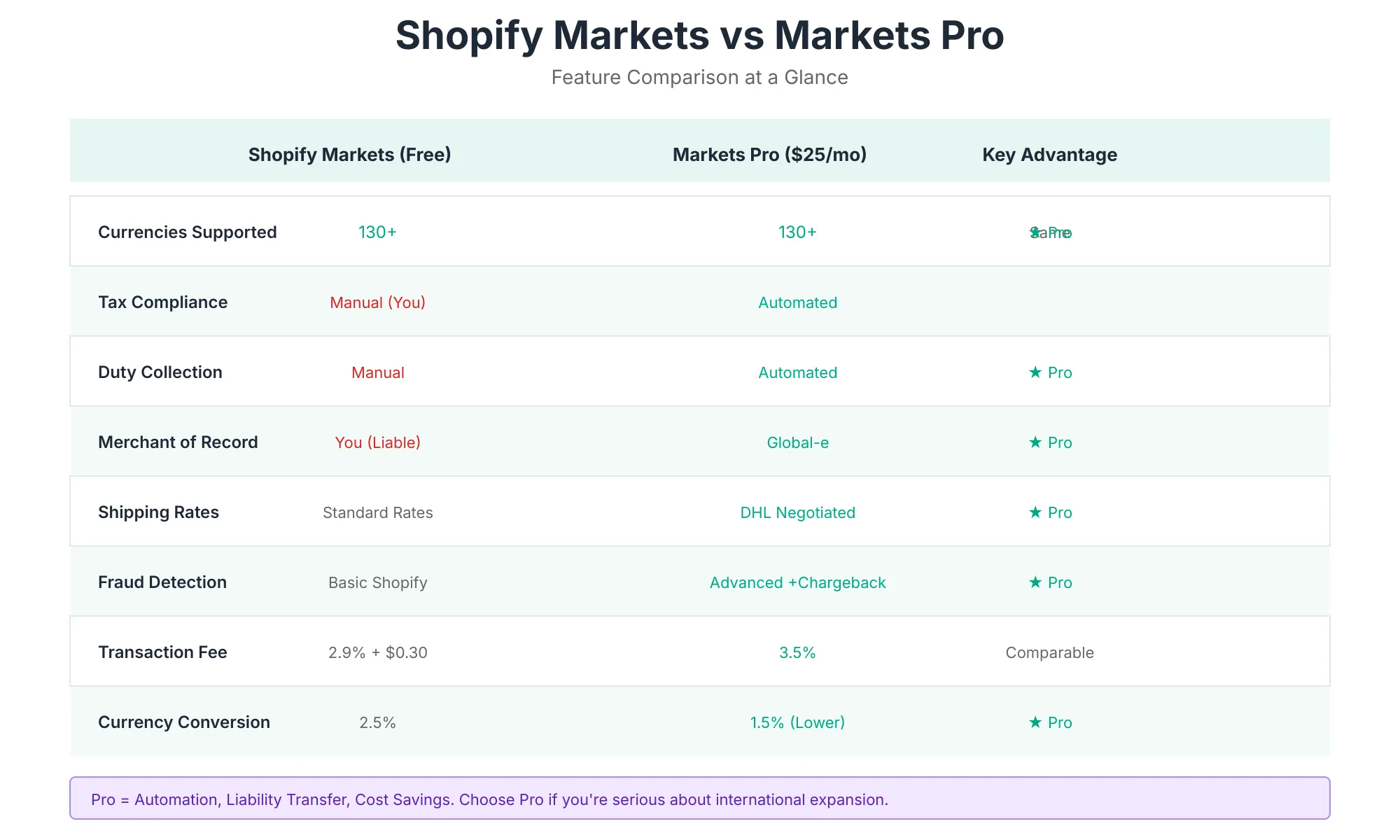
Markets Pro Feature Breakdown
| Feature | Markets (Free) | Markets Pro |
|---|---|---|
| Currencies | 130+ | 130+ |
| Languages | Unlimited (auto + manual) | Unlimited (auto + manual) |
| Tax Compliance | Manual (you register + file) | Automated (Global-e handles) |
| Duty Collection | Manual calculation | Automated at checkout |
| Merchant-of-Record | You | Global-e (liability transferred) |
| Shipping Negotiation | Standard rates | DHL Express discounted rates (1-5 day delivery to 150+ markets) |
| Fraud Detection | Standard Shopify tools | International fraud screening + chargeback protection |
| Currency Conversion | 2.5% (free plan) | 1.5% (Pro) |
| Transaction Fee | 2.9% + $0.30 | 3.5% (Pro tier) |
| Domains | Unlimited | Unlimited |
| Price Limit | Free plan: 3 markets max | Plus plan: unlimited markets |
The Business Case: Why International Expansion Now
Here's the market reality in 2026:
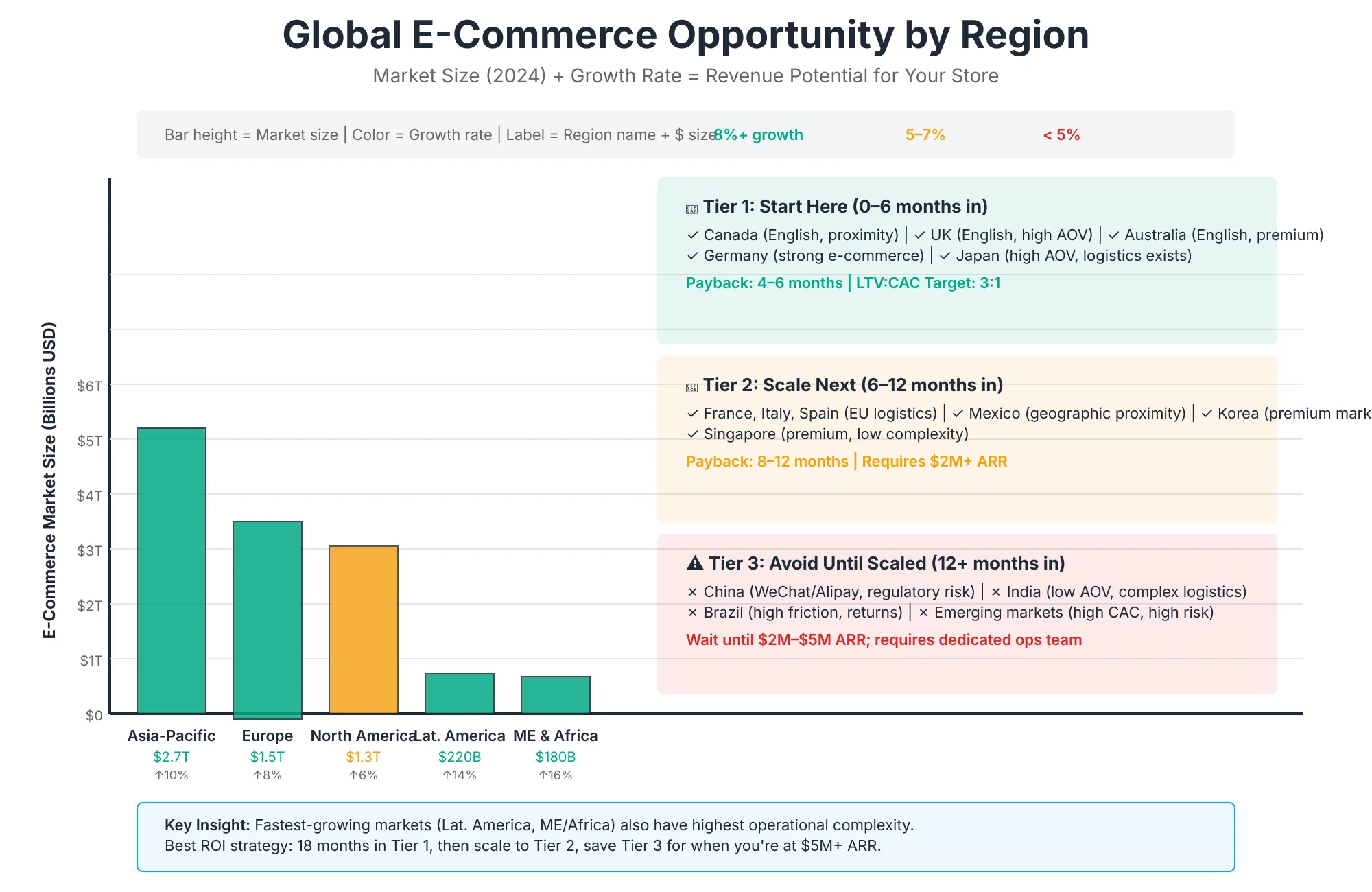
Demand is exploding. 98% of merchants expect international order volume growth this year, with 52% forecasting 1-10% growth and 40% predicting 11-25% year-over-year increases. 22% of global e-commerce transactions are now cross-border. That's $1.21 trillion in annual cross-border consumer spend and cross-border is growing 26.4% annually (219% faster than domestic e-commerce).
Your traffic is already international. 30% of store visitors come from outside your primary market, yet most merchants convert less than 3% of that international traffic. Why? Friction at checkout (currency confusion, unexpected duties, unfamiliar payment methods), missing localization (language, cultural messaging), and friction in fulfillment (slow shipping, high costs).
Regional growth varies by vertical, but upside is universal. Footwear brands (e.g., Crocs) derive 49% of revenue internationally; athletic apparel sits 25-30% (Lululemon); even home goods at 12% (Wayfair) are ahead of most Shopify merchants. Your vertical sets the ceiling but most merchants are not hitting even 50% of that ceiling.
Merchant sentiment is clear: When asked about top international priorities for 2026, 50% cited improving delivery speed/reliability, 41% cited expanding into new markets, 40% cited reducing shipping costs. Merchants want to scale internationally; they lack the tooling and compliance infrastructure.
Revenue concentration risk. If 90% of revenue comes from one market, you're exposed to policy changes, economic downturns, tariff escalation, or competitive saturation in that single region. International diversification is no longer optional for sustainable growth it's a risk management necessity.
Markets Pro vs. Manual International Expansion: The Hidden Costs
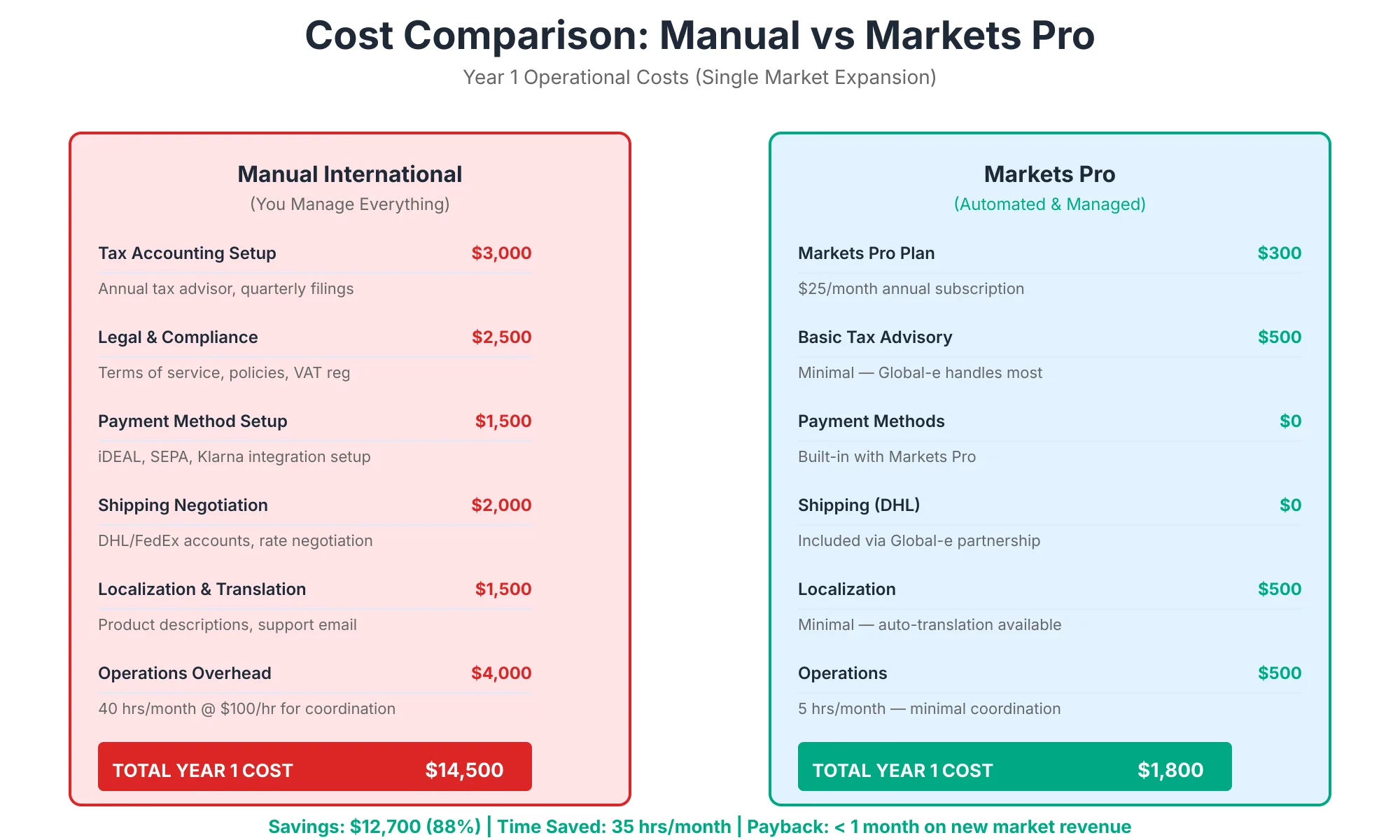
Let's quantify what "doing it yourself" actually costs.
Cost & Complexity Comparison
Manual Approach (DIY)
- Tax registration: Hire local accountant/law firm in each country (€2,000–€5,000 per country; 4-8 weeks)
- Compliance monitoring: Ongoing monitoring for VAT threshold changes, duty rule updates, etc. ($500–$1,500/month)
- Duty/tax collection: Manual calculation per order or third-party app ($300–$800/month)
- Fraud prevention: Standard Shopify tools only (no international fraud screening)
- Shipping: Negotiate rates yourself or use standard carrier pricing (5-15 day delivery to most regions)
- Chargeback management: Internal management (5-8% chargeback rate on international orders)
- Timeline to launch: 12–20 weeks (legal setup, tax registration, fulfillment partnership)
- Ongoing operational overhead: 8–12 hours/week (compliance updates, chargeback disputes, fulfillment coordination)
- Total Year 1 cost: $15,000–$35,000 + internal labor
- Total Year 2+ cost: $8,000–$15,000/year + internal labor
Markets Pro Approach
- Setup & configuration: Shopify team support + Markets Pro admin (2–3 weeks)
- Tax registration: Global-e handles (zero merchant overhead)
- Compliance monitoring: Global-e maintains (zero merchant oversight)
- Duty/tax collection: Automated (included)
- Fraud prevention: International fraud screening + chargeback protection (included)
- Shipping: DHL Express negotiated rates, 1-5 day delivery (included)
- Chargeback management: Global-e coverage (included)
- Timeline to launch: 3–5 weeks (localization + testing)
- Ongoing operational overhead: 2–3 hours/week (reporting, regional performance optimization for CDN and latency)
- Transaction cost: 3.5% + 1.5% currency conversion = 5% all-in
- Total Year 1 cost: $2,000–$5,000 (Markets Pro setup) + transaction fees (5% of revenue)
- Total Year 2+ cost: Transaction fees only (5% of revenue)
The math on a $500K/year international revenue stream:
- Manual approach Year 1: $15K–$35K fixed + $25K internal labor = $40K–$60K
- Markets Pro Year 1: $2.5K setup + $25K transaction fees (5% of $500K) = $27.5K
- Markets Pro breaks even in month 2 and saves $12.5K–$32.5K in Year 1
For a $1M/year international revenue stream, Markets Pro saves $25K–$65K annually compared to manual management.
Market Selection: Where to Start
Not all markets are created equal. The goal is to pick high-probability markets where customer demand, shipping economics, and localization complexity align with your store's strengths.
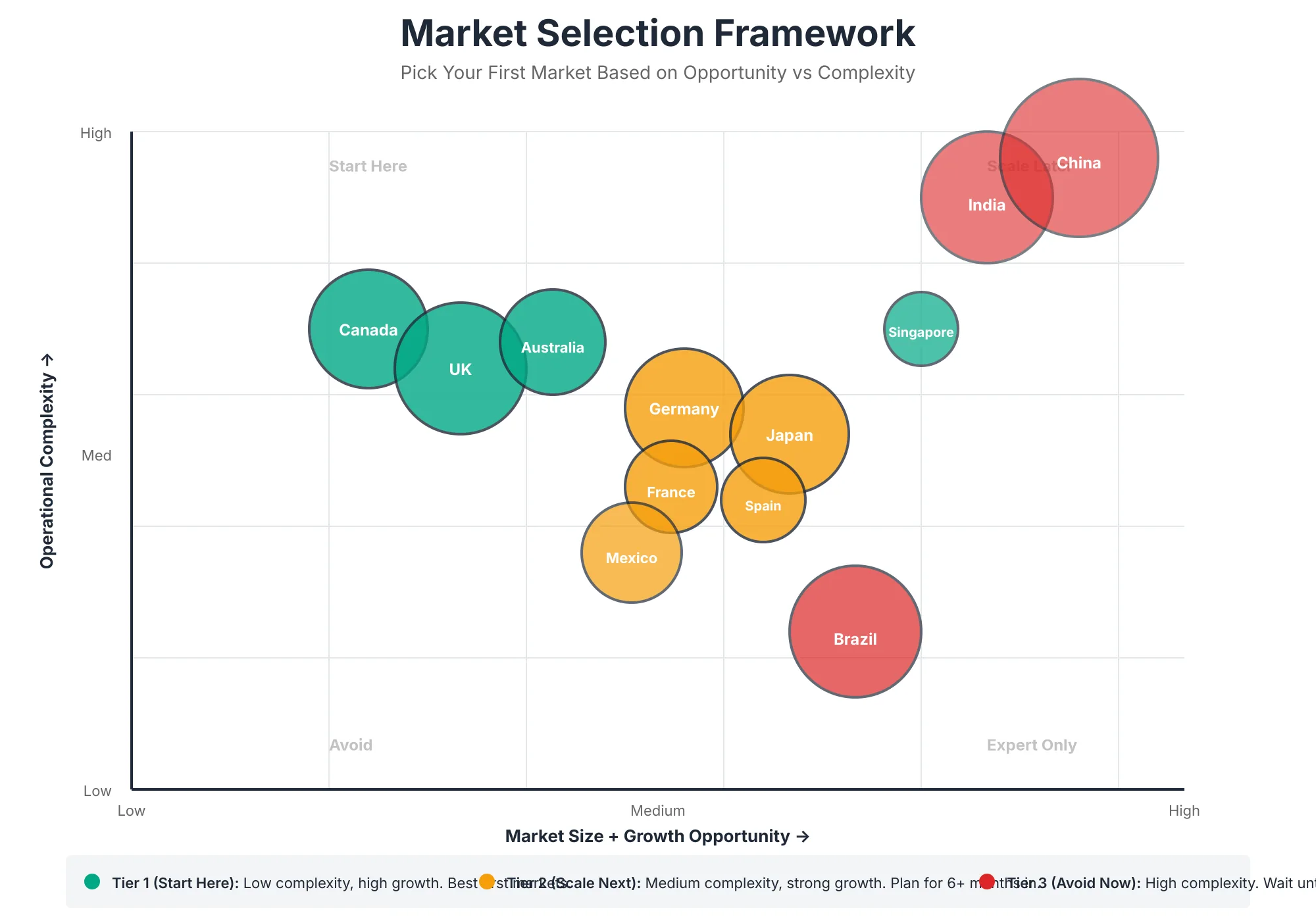
Market Selection Framework
Step 1: Analyze Your Current Traffic
Pull your Google Analytics international traffic breakdown. Where is your highest-volume, highest-conversion traffic coming from?
- Tier 1 (highest priority): Countries with 5%+ of traffic and 1%+ conversion rate
- Tier 2 (test markets): Countries with 3-5% traffic but lower conversion (localization opportunity)
- Tier 3 (upside potential): Countries with low current traffic but high market size (India, Brazil, Vietnam)
Step 2: Evaluate Shipping Economics
International margin is destroyed by shipping costs. Before launching a market, confirm unit economics pencil out.
With DHL Express via Markets Pro, rates are negotiated globally. Rough estimates:
- EU (from US/Canada): $8–$15 per unit, 4–7 days
- UK/Ireland: $8–$12, 2–4 days
- APAC (Australia, Japan): $15–$25, 5–7 days
- LATAM (Brazil, Mexico): $10–$18, 5–10 days
- Middle East (UAE, Saudi): $12–$20, 5–8 days
If your product is <1kg and margins are >50%, most markets work. If margins are <30%, focus on higher-density regions (EU, UK, Canada).
Step 3: Localization Complexity Scoring
Some markets are easy; others require significant work. Score each candidate on:
- Language barrier: English-speaking countries (0 points), major languages (1 point), niche languages (2 points)
- Payment method density: Credit card dominant (0), multiple methods available (1), limited methods (2)
- Currency volatility: Stable major currency (0), moderate volatility (1), high volatility (2)
- Customs/compliance difficulty: Low (EU, Canada, UK = 0), medium (most APAC = 1), high (Brazil, Mexico = 2)
Total score:
- 0-2: Launch immediately (e.g., UK, Canada, Australia)
- 3-4: Launch after Tier 1 success (e.g., Germany, France, Japan)
- 5-6: Third wave or higher-margin products only (e.g., Brazil, South Korea)
Step 4: Revenue Projection by Vertical
Different product categories have wildly different international revenue potential:
- Apparel & Fashion: 25–50% international (high demand, low shipping weight, cultural cachet)
- Footwear: 40–50% international (global brands, niche sizing, premium positioning)
- Beauty & Cosmetics: 30–45% international (high margins absorb shipping, growth in APAC)
- Electronics & Hobby: 20–35% international (category saturation, heavy shipping costs)
- Home Goods: 10–20% international (high shipping cost, category-specific demand)
- Jewelry & Accessories: 35–50% international (low weight, high margin, luxury appeal)
Benchmark your category revenue mix against public companies (e.g., Crocs = 49%, Lululemon = 25-30%) to set realistic targets.
Pricing & Currency Strategy
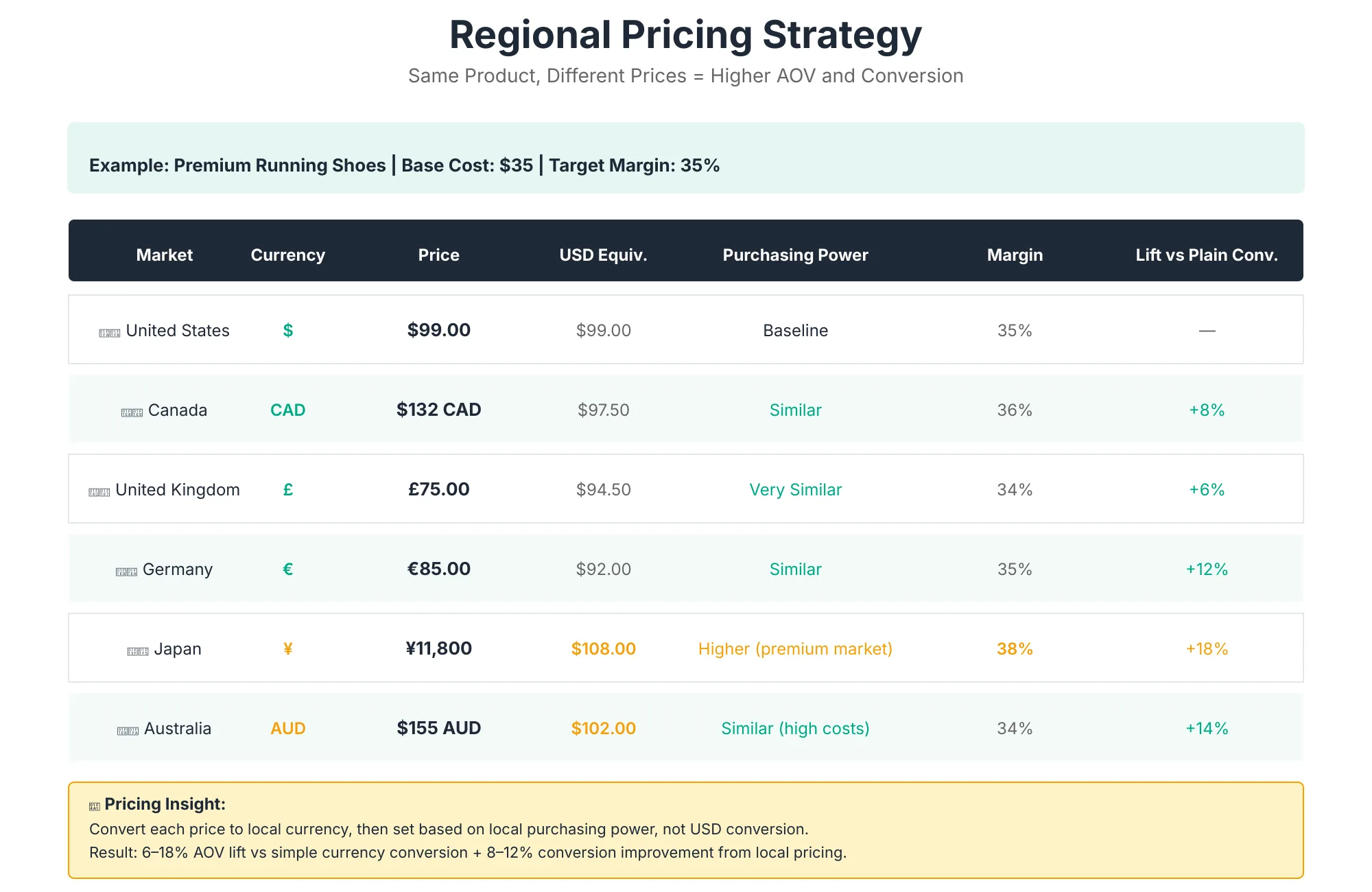
Pricing internationally isn't as simple as converting USD to EUR. Customer psychology, local wage levels, competitive positioning, and currency volatility all play roles.
Dynamic vs. Fixed Pricing
Fixed pricing (most common with Markets Pro):
- Set price in local currency for each market
- Example: $100 USD = €92 EUR = £85 GBP (manual conversion)
- Simplicity, predictability, no currency risk exposure
Dynamic pricing (risk for merchants):
- Price adjusts based on real-time currency rates
- Increases conversion complexity, margin risk
Recommendation: Use fixed pricing. Calculate local prices at launch, then review quarterly. Currency volatility is Global-e's risk with Markets Pro, not yours.
Regional Price Elasticity
Willingness-to-pay varies dramatically by region. Don't charge the same USD price converted to local currency it destroys conversion in lower-wage markets.
General framework (indexed to US pricing at 100):
- UK/Canada/Australia: 95–105 (similar wage levels)
- Western Europe (DE, FR, NL): 90–105 (slightly lower)
- Eastern Europe (PL, CZ, HU): 60–80 (lower wages, price-sensitive)
- LATAM (BR, MX, AR): 50–75 (significant price sensitivity)
- APAC (JP, SG, HK): 90–120 (premium positioning possible)
- India, Southeast Asia: 40–60 (extremely price-sensitive)
If your margin can't support regional pricing, focus on high-income regions (UK, Canada, Western Europe, APAC) where you can maintain USD-equivalent pricing.
Currency Conversion Messaging
Show local currency, but display conversion rates clearly to reduce checkout abandonment.
Good checkout flow:
- Product price in local currency (€92)
- Cart shows subtotal + duties/taxes + shipping in local currency
- Final charge shows conversion rate: "Charged in EUR (~$100 USD at today's rate)"
Avoid:
- Hiding conversion rates (increases distrust)
- Showing multiple conversion scenarios (causes decision paralysis)
- Displaying USD alongside local currency (creates confusion)
Localization: Beyond Translation
Translation is the easy part. Localization adapting your entire experience to local culture, payment methods, and expectations is where conversion happens.
Language
Markets Pro supports auto-translation, but auto-translation alone converts at 30-40% below manual translation. Budget for human review of critical pages:
- Must manually translate: Homepage copy, localized product descriptions for top 20 SKUs, checkout, FAQ, support pages
- Can auto-translate with review: Blog content, email sequences, secondary navigation
- Safe to auto-translate: Detailed product specs, bulk metadata
Payment Methods by Region
The #1 checkout abandonment driver for international orders is payment method mismatch. Offer local payment methods.
Tier 1 Markets (add immediately):
- UK: Apple Pay, Google Pay, PayPal, Klarna
- EU: SEPA Direct Debit, Klarna, Apple Pay, local cards
- Australia: PayPal, Apple Pay, Google Pay
- Canada: Same as US (Apple Pay, Google Pay, PayPal)
Tier 2 (add after initial launch):
- Germany/France: iDEAL (NL), Giropay, Bancontact (BE)
- Spain/Italy: IDEAL, Bancontact, regional bank transfers
- Brazil: Pix (instant payment), Boleto
- Mexico: OXXO Pay (cash payment at retail locations)
- Japan: Convenience store payment (FamilyMart, 7-Eleven)
- Middle East: Mada (Saudi debit cards), local transfers
Markets Pro integrates with Shopify Payments (which supports 70+ local payment methods). No additional configuration required just enable for each market.
Cultural Adaptation
Translation + payment methods alone aren't enough. Adapt messaging to local preferences:
- Email tone: Germany prefers formal (Sie); UK prefers casual
- Imagery: Show models from the local market, not just Western faces
- Holidays: Adjust promotional calendar (Chinese New Year, Lunar New Year, Ramadan, etc.)
- Guarantees: EU customers expect 30-day returns; US customers expect 60
- Shipping messaging: "Free shipping over €50" (not €45; Europeans expect round numbers)
- Trust signals: Show local reviews, testimonials from local customers, local payment logos
Address Format & Autocomplete
Markets Pro auto-localizes address forms (Google Autocomplete integration). This alone reduces checkout friction by 15-20% internationally.
Example localization:
- US: Street Address, City, State, ZIP
- UK: Street Address, Post Code (no state/city entry)
- Germany: Straße, Hausnummer, Postleitzahl, Stadt
- Brazil: Rua, Número, Bairro, CEP, Cidade, Estado
No manual configuration needed Markets Pro handles this automatically by geolocation.
Tax, Duty & Compliance: The Automation Magic
This is where Markets Pro saves merchants 30-40% of their time. Let's break down what it automates and what you still need to do.
What Markets Pro Handles (Zero Merchant Involvement)
VAT/GST Collection
- Automatically calculates VAT for EU customers (19-27% by country)
- Applies GST for Australian/Canadian customers
- Remits to tax authorities on your behalf (Global-e handles filing)
Duty & Tariff Calculation
- Requires HS code (Harmonized System code) classification for each product
- Calculates duty + import tax at checkout
- Displays final total to customer (eliminates surprise fees at delivery)
Tax Registration
- Global-e registers for tax in each market on your behalf
- You provide Global-e with basic business info; they handle registration, filing, reporting
Chargeback & Fraud Protection
- International fraud screening (ML-based)
- Chargeback protection coverage (Global-e absorbs losses)
- Dispute resolution support
Currency Risk Management
- Global-e guarantees FX rates on refunds
- No currency fluctuation exposure for merchants
What You Still Need to Do
HS Code Classification
- You assign HS codes to each product (international tariff classification)
- Markets Pro has a suggestion engine describe your product, it suggests HS codes
- Accurate codes are critical (wrong codes = customs delays, penalty fees)
- Budget 5–10 minutes per SKU for review/confirmation
- Good news: codes are reusable across markets
Inventory Management
- Decide which products are shippable to which markets
- Markets Pro restricts product visibility by region based on your rules
- Example: Can't sell certain electronics to China (export restrictions)
Fulfillment Partner Setup
- Designate which warehouse fulfills which markets
- DHL Express shipping rates apply to all markets
Refund & Returns Policy
- Set regional return windows (EU = 30 days minimum; US = 60 days common)
- Markets Pro supports regional return policies
Shipping & Fulfillment: DHL Express Integration
Shipping is the second-biggest cost driver for international orders. Markets Pro negotiates DHL Express rates globally, passing savings to merchants.
Negotiated DHL Rates (Rough Estimates)
Actual rates depend on volume, product weight, destination. These are typical starting points:
| Region | Typical Rate (1kg) | Delivery Time | Included Duty Prepaid? |
|---|---|---|---|
| EU | $8–$12 | 4–7 days | Yes (Pro tier) |
| UK | $8–$10 | 2–4 days | Yes (Pro tier) |
| Australia | $18–$25 | 5–7 days | Yes (Pro tier) |
| Japan | $15–$20 | 4–6 days | Yes (Pro tier) |
| Canada | $6–$8 | 2–3 days | Yes (Pro tier) |
| Brazil | $12–$18 | 7–10 days | Yes (Pro tier) |
| Mexico | $10–$15 | 5–8 days | Yes (Pro tier) |
| India | $15–$22 | 7–10 days | Yes (Pro tier) |
Duties prepaid option (Markets Pro only):
- DHL handles duty calculation and collection
- Customer pays all-in at checkout
- No surprise fees at delivery
- Increases conversion by 8-12% vs. collect-on-delivery (COD)
Duties Prepaid Shipping Example
Product: $50 hoodie, shipped US → Germany
Without Markets Pro (collect-on-duty):
- Shipping: $10 (FOB)
- Import duty (10%): $5
- German VAT (19%): $10.45
- Customer charged at delivery: $25.45 + shipping delays
- Customer abandons order (surprise fees)
With Markets Pro (duties prepaid):
- Shipping: $10 (DHL negotiated)
- Import duty (10%): $5
- German VAT (19%): $10.45
- Customer pays $75.45 at checkout (all-in)
- Order ships immediately (no customs delays)
- Conversion rate: +8-12% vs. COD
SEO for Multi-Region Stores: Hreflang & Architecture
International expansion without SEO strategy means you're building orphan content that Google can't index properly.
Hreflang Implementation
Hreflang tells Google which version of your content is for which country/language. Without it, Google can't rank international versions or worse, it consolidates them under one canonical, diluting link equity.
Typical hreflang setup (example):
<!-- US English version (canonical) -->
<link rel="canonical" href="https://example.com/products/running-shoes" target="_blank" rel="noopener" />
<link rel="alternate" hreflang="en-US" href="https://example.com/products/running-shoes" target="_blank" rel="noopener" />

<!-- UK English version -->
<link rel="alternate" hreflang="en-GB" href="https://example.com/uk/products/running-shoes" target="_blank" rel="noopener" />

<!-- German version -->
<link rel="alternate" hreflang="de-DE" href="https://example.com/de/products/running-shoes" target="_blank" rel="noopener" />

<!-- French version -->
<link rel="alternate" hreflang="fr-FR" href="https://example.com/fr/products/running-shoes" target="_blank" rel="noopener" />

<!-- Default fallback (not specified above) -->
<link rel="alternate" hreflang="x-default" href="https://example.com/products/running-shoes" target="_blank" rel="noopener" />
Markets Pro doesn't auto-generate hreflang, but Shopify's SEO dashboard has a hreflang checker. Audit and fix quarterly.
URL Structure Options
Option 1: Subdomains (uk.example.com, de.example.com)
- Pros: Clean separation, easier analytics
- Cons: More complex SSL/DNS setup
- Best for: Large, multi-region stores (10+ markets)
Option 2: Subdirectories (example.com/uk, example.com/de)
- Pros: Shared domain authority, easier implementation
- Cons: Slightly slower page load times
- Best for: Most Shopify merchants (recommended)
Option 3: Country-code TLDs (example.co.uk, example.de)
- Pros: Maximum local SEO signal
- Cons: Expensive, complex management
- Best for: Large brands with standalone budgets
Recommendation for ShopifyLift clients: Use subdirectories with Markets Pro. Automatic domain switching based on geolocation + hreflang keeps SEO clean.
International Product Page SEO
Product pages are your biggest opportunity for international organic traffic. Optimize for each region:
- Product title: Include region-relevant keywords (e.g., "Running Shoes UK" for en-GB, "Laufschuhe" for de-DE)
- Meta description: Localize for local search intent (mention free shipping to UK, VAT-inclusive pricing, etc.)
- Product description: Adapt tone, measurements (US pounds → kg), and guarantees per region
- Customer reviews: Seed with local customer testimonials
- FAQ: Include region-specific Q&A (e.g., "How long does delivery take to Germany?")
Common Mistakes & How to Avoid Them
Mistake #1: Launching Too Many Markets at Once
Merchants often launch 5-10 markets simultaneously "to maximize upside." This almost always fails because:
- Insufficient localization (translation only, no cultural adaptation)
- Inability to manage multiple fulfillment regions
- Inability to monitor compliance/tax updates
- Diffused marketing budget (no critical mass in any market)
Fix: Launch 2-3 Tier 1 markets, nail localization/fulfillment/marketing for 6 months, then expand to Tier 2 markets.
Mistake #2: Translation Without Localization
Auto-translated checkout, payment method mismatches, and generic copy destroy conversion.
Fix: Budget $500–$1500 per market for human review of critical pages (product descriptions, checkout, FAQ). Skip auto-translation for messaging copy.
Mistake #3: No Regional Marketing Strategy
Launching a market and expecting organic traffic to drive conversion is naive. Each market needs marketing.
Fix: Allocate marketing budget per market (Google Ads, social, influencer partnerships). Plan for 3-6 months of customer acquisition per market.
Mistake #4: Inventory & Fulfillment Planning Failure
Merchants often run out of stock in successful markets or hold excess inventory in unsuccessful ones.
Fix: Start small (test inventory allocation), measure sell-through rates by market, rebalance quarterly. Use Markets Pro's market performance dashboard.
Mistake #5: Ignoring Local Payment Methods
Offering only credit card checkout kills conversion in markets where local payment methods dominate (e.g., Pix in Brazil, OXXO Pay in Mexico).
Fix: Enable all available payment methods for each market (Shopify Payments supports 70+). A/B test payment method visibility (local method first, credit card second).
Mistake #6: No Plan for Regional Currency/Price Management
Charging USD-equivalent prices in all regions kills margins in lower-wage countries and leaves money on the table in premium markets.
Fix: Use the regional price elasticity framework above. Set prices quarterly based on local wage levels and competitive analysis.
ROI & Revenue Potential
Let's quantify the upside.
Expected Revenue Lift by Vertical & Region
Assume a base case: $500K/year primary market revenue, 20% of traffic is international (currently ~0% conversion).
Conservative scenario (18-month horizon):
| Vertical | Target Markets | International Revenue Year 1 | International Revenue Year 2 |
|---|---|---|---|
| Apparel | UK, Canada, EU (3) | $80K–$120K (16-24% lift) | $200K–$300K (40-60% lift) |
| Footwear | UK, Canada, Australia, EU (4) | $100K–$150K (20-30% lift) | $250K–$400K (50-80% lift) |
| Beauty | UK, Canada, Australia, APAC (5) | $90K–$130K (18-26% lift) | $220K–$350K (44-70% lift) |
| Electronics | UK, Canada (2) | $50K–$80K (10-16% lift) | $120K–$200K (24-40% lift) |
| Home Goods | UK, Canada (2) | $40K–$60K (8-12% lift) | $90K–$150K (18-30% lift) |
Aggressive scenario (aggressive marketing, full localization):
- Add 50% to figures above
- Apparel: $120K–$180K Y1, $300K–$450K Y2
Payback Period
Investment required:
- Markets Pro setup: $2,000–$5,000 (one-time)
- Translation/localization: $3,000–$8,000 per market
- Marketing (first 6 months): $5,000–$15,000 per market
- Total investment per market: $10,000–$28,000
Payback period at 5% transaction fees + 3.5% transaction fee:
For $80K annual international revenue (conservative apparel forecast):
- Revenue: $80,000
- Transaction fees (8.5% all-in): $6,800
- Net revenue: $73,200
- ROI after Year 1: ($73,200 revenue – $15,000 setup) / $15,000 = 388% ROI
- Payback period: 2–3 months
For $150K annual international revenue (aggressive footwear forecast):
- Revenue: $150,000
- Transaction fees: $12,750
- Net revenue: $137,250
- ROI after Year 1: 817% ROI
- Payback period: 1–2 months
Customer Lifetime Value Uplift
International customers tend to have higher lifetime value than domestic customers (controlled for acquisition cost):
- Repeat purchase rate: International customers repeat at 2-3x higher rates (23-35% vs. 12-18% domestic)
- Average order value: 8-15% higher (freight not a line-item concern after first purchase)
- LTV impact: International customers typically generate 40-60% higher cumulative revenue over 24 months
This means that the first international sale doesn't need to break even immediately the compounding repeat purchase behavior justifies customer acquisition spend.
12-Month Implementation Roadmap
Here's the step-by-step plan to go from zero to 3+ international markets.
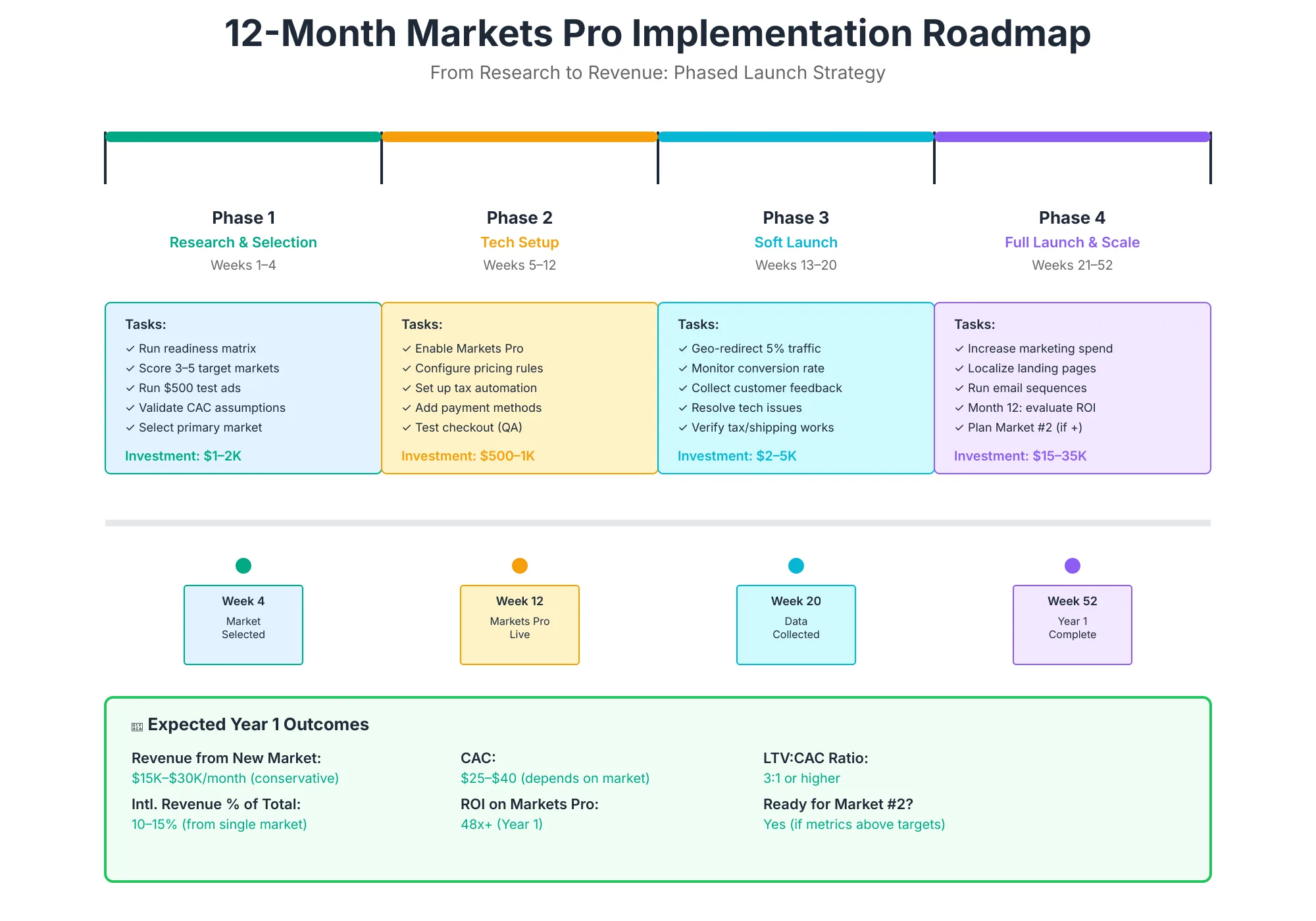
Phase 1: Research & Selection (Weeks 1–4)
Week 1:
- [ ] Pull international traffic breakdown from Google Analytics
- [ ] Analyze conversion rates by country
- [ ] Identify current high-performing international traffic sources
Week 2:
- [ ] Assess shipping economics (check DHL rates for Tier 1 markets)
- [ ] Score localization complexity for top 10 markets (use framework above)
- [ ] Identify highest-margin SKUs (international shipping is margin-dependent)
Week 3:
- [ ] Validate revenue potential by vertical (benchmark against public companies)
- [ ] Determine HS codes for top 50 SKUs
- [ ] Audit product descriptions for English-only language barriers
Week 4:
- [ ] Finalize Tier 1 market selection (typically UK, Canada, Australia; or EU primary)
- [ ] Draft regional pricing strategy
- [ ] Plan localization budget + hire translator (if needed)
Deliverable: Market selection memo + revenue forecast + implementation timeline
Phase 2: Markets Pro Setup & Localization (Weeks 5–12)
Week 5–6:
- [ ] Request Markets Pro early access (if not yet available to your store)
- [ ] Set up Markets Pro in Shopify admin
- [ ] Add Tier 1 markets (UK, Canada, Australia)
Week 7–8:
- [ ] Configure currencies, tax settings, HS codes
- [ ] Enable regional payment methods
- [ ] Set regional pricing (use elasticity framework)
Week 9–10:
- [ ] Translate product descriptions, homepage, FAQ (top-priority pages)
- [ ] Review auto-translations for tone + accuracy
- [ ] Localize address forms, checkout messaging
Week 11–12:
- [ ] Set up regional return policies
- [ ] Test checkout flow in each market (mobile + desktop)
- [ ] Validate hreflang implementation
- [ ] Set up regional email sequences
Deliverable: Live Markets Pro store, 3 markets, full localization, hreflang validated
Phase 3: Marketing Launch & Optimization (Weeks 13–24)
Weeks 13–16:
- [ ] Launch paid ads (Google Shopping, Facebook/Instagram) in Tier 1 markets
- [ ] Seed customer reviews in new markets
- [ ] Monitor conversion rate by market (target: 2-3% initial)
Weeks 17–20:
- [ ] Optimize high-friction pages (product pages, cart, checkout) based on data
- [ ] Launch influencer partnerships or local testimonials
- [ ] Expand to Tier 2 markets (EU, Japan, Singapore) if Tier 1 traction confirmed
Weeks 21–24:
- [ ] Scale paid marketing in performing markets
- [ ] Launch organic content (blog, SEO for international keywords)
- [ ] Test Tier 2 market expansion
Deliverable: $20K–$40K monthly international revenue (Tier 1 + select Tier 2)
Phase 4: Scale & Optimization (Months 7–12)
Months 7–9:
- [ ] Expand to 5-7 markets (Tier 1 + mature Tier 2)
- [ ] Launch regional email sequences (retention)
- [ ] Implement SMS marketing for high-performing markets
Months 10–12:
- [ ] Analyze profitability by market
- [ ] Optimize regional pricing based on margin data
- [ ] Plan Year 2 expansion (new verticals? new regions?)
- [ ] Forecast Year 2 international revenue (target: 2-3x Year 1)
Expected results by end of Year 1:
- 5-7 active markets
- $80K–$200K international revenue (depending on vertical + marketing investment)
- 15-25% of total store revenue from international
- 12-18 month payback period on total investment
FAQ
How much does Shopify Markets Pro cost?
Transaction fees: 3.5% per transaction + 1.5% currency conversion = 5% all-in (Oct 2025 pricing).
Setup: $0 (included with Shopify admin).
No monthly subscription. You pay only on sales.
Which payment methods does Markets Pro support in each region?
Markets Pro integrates with Shopify Payments, which supports 70+ local payment methods globally:
- EU: SEPA Direct Debit, Klarna, Apple Pay, Google Pay, local cards
- UK: Klarna, PayPal, Apple Pay, Google Pay
- APAC: Convenience store payments (Japan), WeChat Pay (China), local transfers (India)
- LATAM: Pix (Brazil), OXXO Pay (Mexico), Boleto (Brazil)
Enable by market in the Markets Pro settings; no additional configuration.
How long does it take to go live with a new market?
Typical timeline: 2–4 weeks
- Minimum (English-speaking country, no localization): 1 week
- Standard (full localization + local payment methods): 2–3 weeks
- Complex (multiple languages, full cultural adaptation): 3–4 weeks
Can I use Markets Pro with my existing fulfillment partner?
Yes. Markets Pro doesn't dictate fulfillment it integrates with any compatible fulfillment app. Common options:
- 3PL warehouse: Use your existing 3PL with Markets Pro
- Dropshipping: Works with Oberlo, DSers, etc.
- DHL Express: Use negotiated rates via Markets Pro for direct shipping
- In-house fulfillment: Ship from your warehouse manually or via automation
What if my product isn't eligible for export to a specific country?
Markets Pro has an automated restrictions engine. Flag restricted products per market in the admin:
- Example: Can't export certain electronics to China (export control)
- Result: Product is hidden from those markets at checkout
How does Markets Pro handle refunds and currency fluctuation?
Global-e guarantees FX rates on refunds. If a customer orders €92 (approx. $100) and refunds 30 days later when EUR/USD moves unfavorably, Global-e absorbs the FX loss. Zero merchant exposure.
Do I need to register for tax in each country?
No. Global-e registers for tax on your behalf. You provide basic business info (legal name, address, EIN), and Global-e handles registration, filing, and quarterly/annual reporting in each market.
What's the difference between "duties prepaid" and "duties collect"?
- Duties prepaid: Customer pays all duties + taxes at checkout (included in order total). Order ships immediately. Higher conversion (8-12% lift).
- Duties collect: Carrier collects duties at delivery (collect-on-delivery model). Customer often abandons after seeing surprise fees.
Recommendation: Always use duties prepaid with Markets Pro. Conversion lift pays for the feature.
Can I test a market before fully launching?
Yes. Start with one product + one market, run for 4-6 weeks, measure metrics (conversion rate, repeat purchase, profitability). If metrics are strong, expand SKU selection and scale marketing. If weak, pause and iterate on localization/pricing.
How do I measure success by market?
Track these KPIs per market in your Shopify admin:
- Conversion rate (target: 2-3% initial, 3-4% after optimization)
- Average order value (target: 10-15% higher than domestic)
- Repeat purchase rate (target: 25-35% by month 6)
- Profitability (gross margin minus transaction fees minus shipping costs)
- CAC payback period (target: 2-4 months on first order, then compounding repeat revenue)
Shopify's Markets Pro dashboard surfaces these automatically.
How do I handle returns/refunds for international orders?
Markets Pro supports regional return policies:
- Set per-market return windows (EU = 30-day minimum, US = 60-day common)
- Automate return labels for each market
- Calculate refunds in original currency (Global-e handles FX)
For high-touch support, consider a returns platform like Loop or Returnly.
Conclusion
30% of your traffic is international. Without Markets Pro, converting that traffic feels like herding cats: compliance nightmares, currency confusion, payment method mismatches, shipping chaos.
With Markets Pro, it's a lever. Tax registration? Handled. Duty collection? Automated. Fraud prevention? Covered. DHL rates? Negotiated. Shipping delays? Eliminated via 1-5 day express delivery.
What remains is the strategy: picking the right markets, pricing correctly for each region, localizing your messaging, and marketing aggressively to each market. Those are the decisions that move the needle and they're your job, not Global-e's.
The 12-month roadmap above gives you a blueprint. Start with Tier 1 markets (UK, Canada, Australia), nail localization, measure for 6 months, then expand to Tier 2 (EU, APAC). By the end of Year 1, target 15-25% of revenue from international, and by Year 2, 30-40%.
Next step: Audit your Google Analytics international traffic, score markets using the framework above, and request early access to Markets Pro if it's not yet live on your store. You're leaving money on the table every day you delay.
For merchants ready to scale beyond their primary market, Markets Pro isn't optional it's the infrastructure that makes international expansion sustainable.