Launching a Shopify store is the easy part. Keeping it fast, current, and profitable a year later is where most merchants struggle.
Here's the problem: Shopify doesn't stand still. Its Spring '26 Edition landed on June 17, 2026 with more than 150 updates, and legacy Shopify Scripts stopped running on June 30, 2026 Shopappy. Any store still relying on Scripts for custom discounts or shipping logic had that logic switch off, whether anyone was watching or not.
Meanwhile, themes age. Apps pile up. Product data drifts. Staff accounts nobody remembers creating still have admin access. None of this breaks loudly. It just quietly costs you sales, one slow page and one broken discount code at a time.
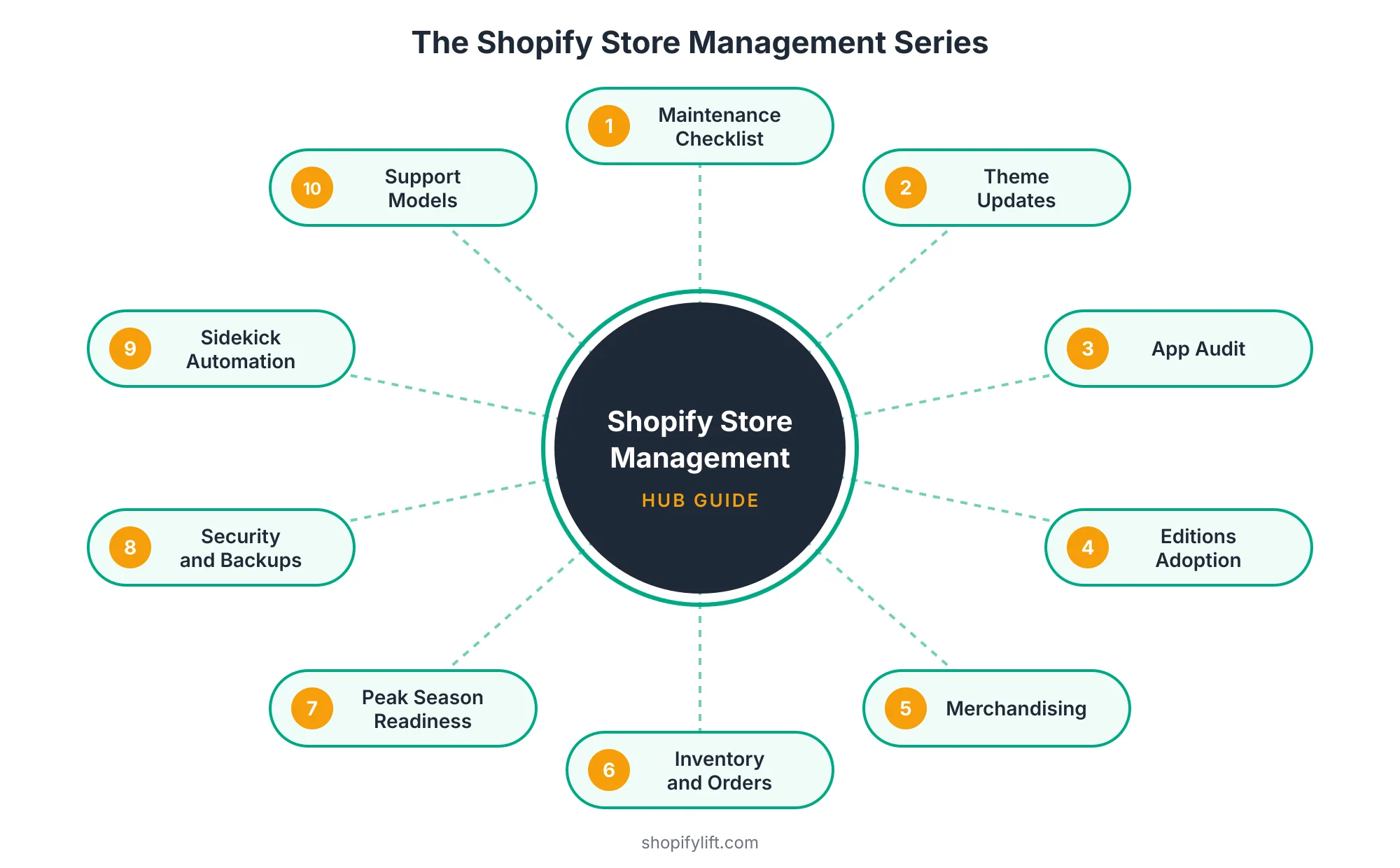
This guide covers what Shopify store management actually involves, what Shopify handles for you (and what it doesn't), how often each task should happen, and how to decide who should own the work. Each section links to a deeper guide in our Store Management series, so you can go further on whatever matters most to your store right now.
Key Takeaways
- Shopify manages the platform, but your theme, apps, data backups, staff access, and page speed are your responsibility.
- Shopify ships two major Editions a year with 150+ updates each. Some come with hard deadlines, like the June 30, 2026 Scripts shutdown.
- Only 48% of mobile sites pass Google's Core Web Vitals, according to the 2025 Web Almanac, so performance is a maintenance task, not a one-time project.
- The best-managed stores run on a set cadence: weekly checks, monthly audits, quarterly reviews, and a twice-yearly deep review.
What Is Shopify Store Management?
Shopify store management is the ongoing work of keeping a live store stable, current, and selling after launch. It covers five areas: daily operations, platform and theme updates, merchandising, technical health, and security. If development is building the store, management is running it well every week after that.
That sounds simple. In practice, it's the part most merchants underestimate, because the work is spread across dozens of small tasks that don't feel urgent until something breaks.
It helps to separate store management from a few things it often gets confused with:
- It is not store development. Development builds new capabilities: a custom theme, a platform migration, a headless storefront. That side of the work is covered by our Shopify development services.
- It is not marketing. Ads, email campaigns, and social content drive traffic. Store management makes sure the store is ready when that traffic arrives.
- It is not just emergency fixes. Bug fixes are part of the job, but good management means you need far fewer of them.
So what does it look like week to week? A typical managed store might see a theme section updated for a new campaign, a slow app removed, a collection re-sorted for a seasonal push, a checkout test before a promotion, and a quick review of which staff accounts still need access. None of those tasks is dramatic. Together, they decide whether your store keeps pace or slowly falls behind.
There's one misconception worth clearing up early. Because Shopify is a hosted platform, a lot of owners assume everything's taken care of. It isn't. Shopify looks after the servers, security patches, and platform updates, but the theme, apps, custom code, page speed, and checkout experience sit with the merchant Capaxe Labs. That gap is exactly what store management fills.
Why Does Shopify Store Management Matter More in 2026?
Store management has always mattered, but three shifts in 2026 have raised the cost of neglecting it. Shopify is releasing features faster, AI shopping agents now read your catalog directly, and the revenue concentrated in peak season keeps climbing. Each one rewards stores that are actively managed and penalizes stores that aren't.
Shopify Is Shipping Faster Than Most Teams Can Absorb
Shopify releases its Editions twice a year, and each one is large. The last two alone, Winter '26 in December 2025 and Spring '26 in June 2026, brought deeper Sidekick automation, scheduled theme rollouts, and new agentic commerce tools Coalition Technologies. Most of these are genuinely useful. A few come with deadlines that can't be ignored.
The Scripts shutdown is the clearest example. Merchants who hadn't migrated their custom logic to Shopify Functions didn't get a warning banner on launch day. The scripts simply stopped. That's the pattern to watch for: optional features you can adopt at your own pace, mixed in with platform changes that force action by a fixed date.
Who on your team reads the Editions release notes and decides what to do about them? If the honest answer is "nobody," that's a store management gap. We cover a practical triage process in How to Evaluate and Adopt New Shopify Features After Every Editions Release.
AI Shopping Agents Are Now Part of Your Storefront
Agentic storefronts are now generally available for all Shopify stores. That means ChatGPT Shopping, Google AI Mode, Perplexity, and Microsoft Copilot can browse your catalog, build carts, and route shoppers to your checkout what.digital.
This changes what "maintained" means. It used to be enough for a product page to look good to a human. Now AI agents read your structured product data, and messy titles, missing attributes, or outdated metafields can keep your products out of their answers entirely. Catalog hygiene has moved from a nice-to-have to an ongoing management task. Our Growth Guide covers the optimization side in depth in AI Product Data Optimization for Shopify.
The Stakes at Peak Season Keep Rising
Shopify merchants generated a record $14.6 billion in sales over Black Friday Cyber Monday 2025, up 27% from the year before, and sales peaked at $5.1 million per minute Shopify. More than 94,900 merchants had their highest-selling day ever during that weekend Shopify Investor Relations.
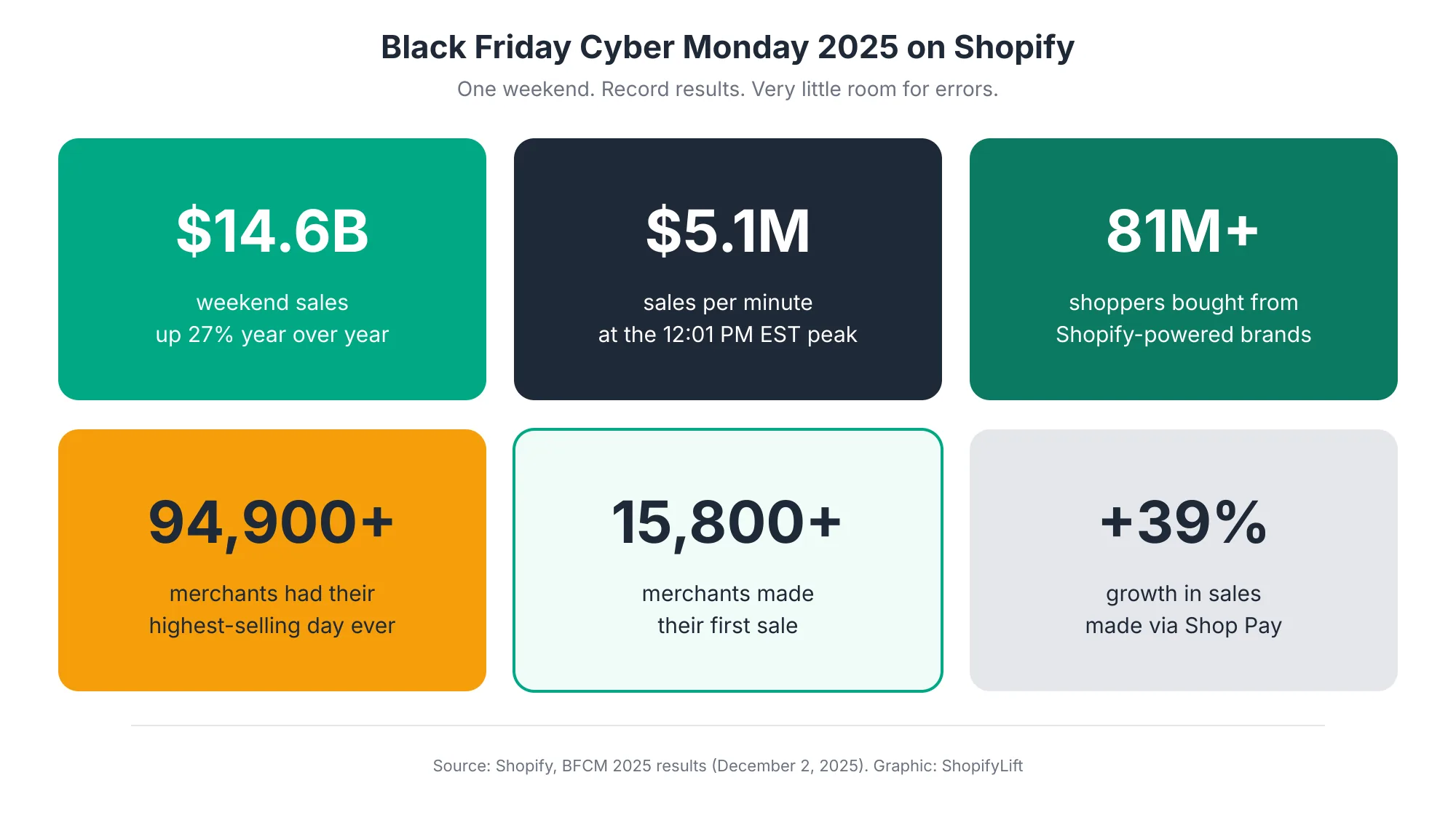
When a single weekend can be your biggest of the year, a broken discount code at noon on Black Friday isn't a minor bug. It's a direct hit to annual revenue. Stores that are managed year-round go into peak season with tested themes, clean app stacks, and verified backups. Stores that aren't tend to discover their problems live, in front of their busiest traffic.
What Does Shopify Handle, and What Is Your Responsibility?
Shopify follows a shared responsibility model. Shopify handles the software, infrastructure, and disaster recovery for the platform as a whole, while merchants are responsible for their own store's data, apps, permissions, and customizations Rewind. Knowing exactly where that line sits is the foundation of good store management.
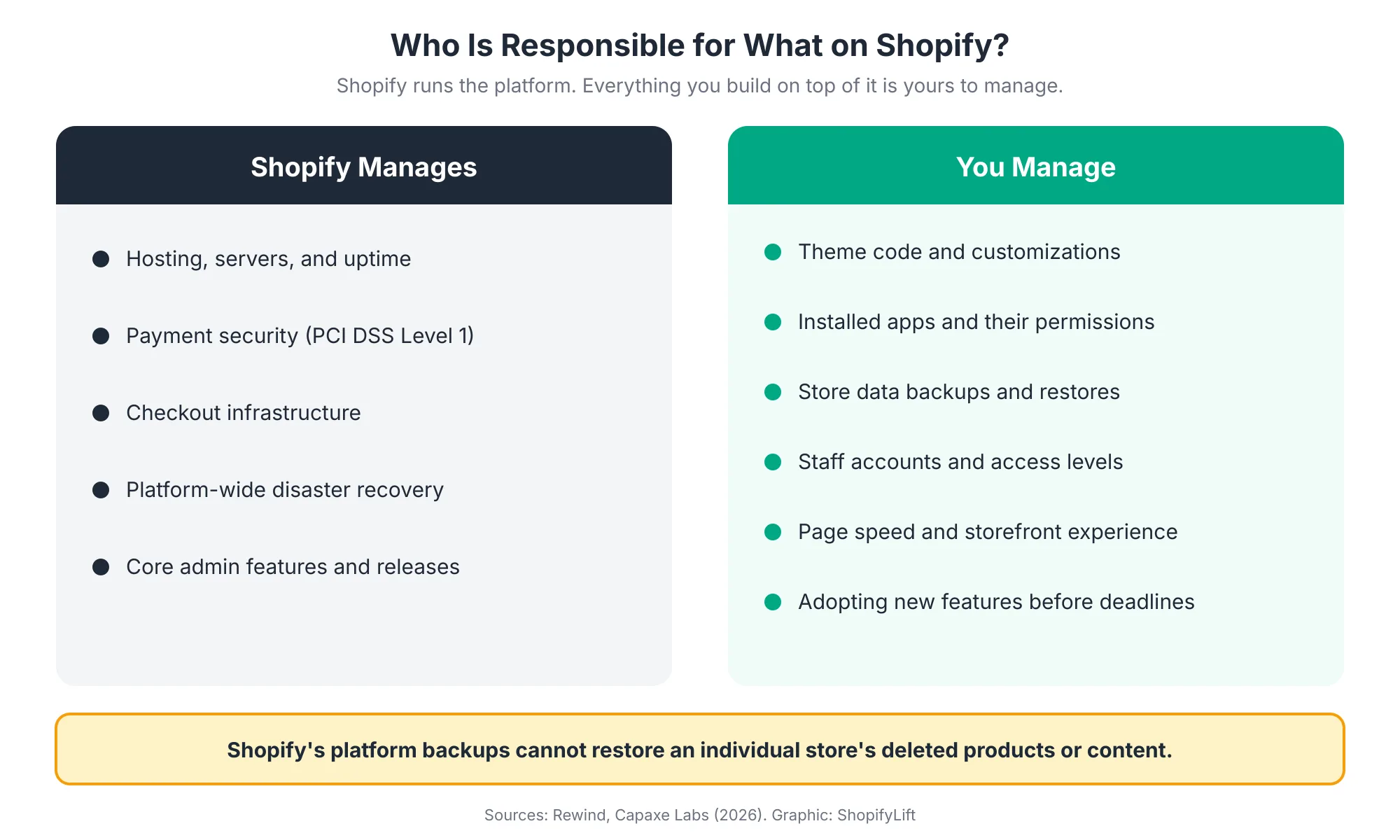
Here's the part that surprises most merchants. Shopify does keep platform backups, but they exist to restore the whole platform after a major incident. Shopify's disaster recovery backup can't be used to restore data inside an individual store Rewind. And if you accidentally delete products or collections, Shopify's documentation treats that as permanent deletion rather than something you can recover from the admin TinyBackup.
Think about what that means in real terms. A staff member runs a bulk edit on the wrong collection. An app overwrites 400 product descriptions. A theme edit breaks your product template the night before a launch. Shopify's infrastructure is fine in every one of those cases. Your store isn't.
That's why the merchant's side of the model needs an owner. Someone has to decide who gets admin access, which apps are allowed to write to your catalog, how backups are taken, and how quickly you can restore. We go through the full setup in Shopify Store Security: Staff Permissions, Data Backups, and Fraud Prevention.
The Five Core Areas of Shopify Store Management
At ShopifyLift, we organize ongoing store work into five areas. Each one has its own rhythm, its own risks, and its own warning signs. Most stores are strong in one or two areas and quietly neglected in the rest, which is usually where the problems start.
1. Store Operations and Daily Maintenance
Operations is the day-to-day layer: orders, fulfillment, inventory, customer-facing content, and the small checks that confirm everything is still working. It's the least glamorous area and the one that most directly protects revenue.
Good operational maintenance means catching problems before customers do. That includes failed orders, fulfillment sync errors, discount codes that don't apply, broken links, and pages that return errors after a product's archived. It also covers inventory accuracy. If your stock counts drift from reality, you'll oversell popular items or hide products you actually have.
For growing stores, operations gets more complex fast. Multiple warehouses, retail locations, pre-orders, and B2B pricing all add moving parts. Shopify's newer native tools cover more of this than they used to, but merchants running an ERP typically keep it as the source of truth rather than switching to Shopify's native order management what.digital.
Two spokes cover this area in depth:
- The Shopify Store Maintenance Checklist: Weekly, Monthly, and Quarterly Tasks for 2026
- Shopify Inventory and Order Management: A Practical Guide for Growing Stores
2. Platform, Theme, and Feature Updates
This area covers everything that changes underneath you: theme versions, Shopify platform releases, app extension changes, and API deprecations. The goal is simple. Stay current without breaking what already works.
Theme updates are where most merchants get burned. Your theme developer ships a new version with bug fixes and support for new Shopify features, but your store has custom code layered on top. Update carelessly and those customizations disappear. Skip updates for too long and you drift out of compatibility with the platform.
There's a bigger decision to make too. Horizon is Shopify's new theme foundation, with AI-generated blocks, hover-to-preview, conditional sidebar settings, and copy-paste across templates Revinfotech. For many stores, moving to a Horizon-based theme is worth it. For others, a heavily customized legacy theme still makes more sense for now. Either way, it's a decision that should be made deliberately, not by accident.
Shopify has also made updates safer. A rollout is a scheduled set of changes to your main theme, checkout, and accounts pages that you can release gradually, prepare ahead of a season, or run as an experiment Ambaum. That's a big improvement over the old all-or-nothing theme publish.
Go deeper:
- How to Update Your Shopify Theme Without Losing Custom Code
- How to Evaluate and Adopt New Shopify Features After Every Editions Release
If your checkout still carries legacy customizations, our Growth Guide article on the Shopify Checkout Extensibility migration covers that transition specifically.
3. Merchandising and Catalog Management
Merchandising is how you decide what shoppers see, in what order, and why. It covers collections, sorting, search, filters, featured products, bundles, and the product data that powers all of it.
It's also the area that goes stale fastest. Seasonal collections stay live in March. Best-seller sorting keeps pushing last year's hero product. Filters stop working because new products were added without the right metafields. None of that throws an error. It just makes your store harder to shop.
Merchandising tools have improved a lot, but they're only useful if someone actually uses them. One agency reviewing the June 2026 Edition noted that for most merchants, sophisticated merchandising tools had never been used at all what.digital. That matches what we see in store audits. The tools exist. The ownership doesn't.
A managed approach puts merchandising on a calendar. Collections get reviewed monthly, search terms that return zero results get fixed, and product data gets cleaned before new launches rather than after. Clean catalog data also feeds AI shopping agents, so the same work helps you in two places at once.
Go deeper: Shopify Merchandising Strategy: Collections, Search, and Filters That Drive Sales. For the conversion side of product pages, see Shopify Product Page Optimization in our Growth Guide.
4. Technical Health, Performance, and App Governance
Technical health is the invisible layer: page speed, script loading, app conflicts, theme code quality, and tracking accuracy. It's where small problems compound fastest.
Speed is the clearest example of why this area needs ongoing attention. According to the HTTP Archive's 2025 Web Almanac, which analyzes real-user data from millions of sites, only 48% of mobile sites and 56% of desktop sites pass all three of Google's Core Web Vitals HTTP Archive. Loading speed is the most common failure, with just 62% of mobile sites achieving a good Largest Contentful Paint score HTTP Archive.
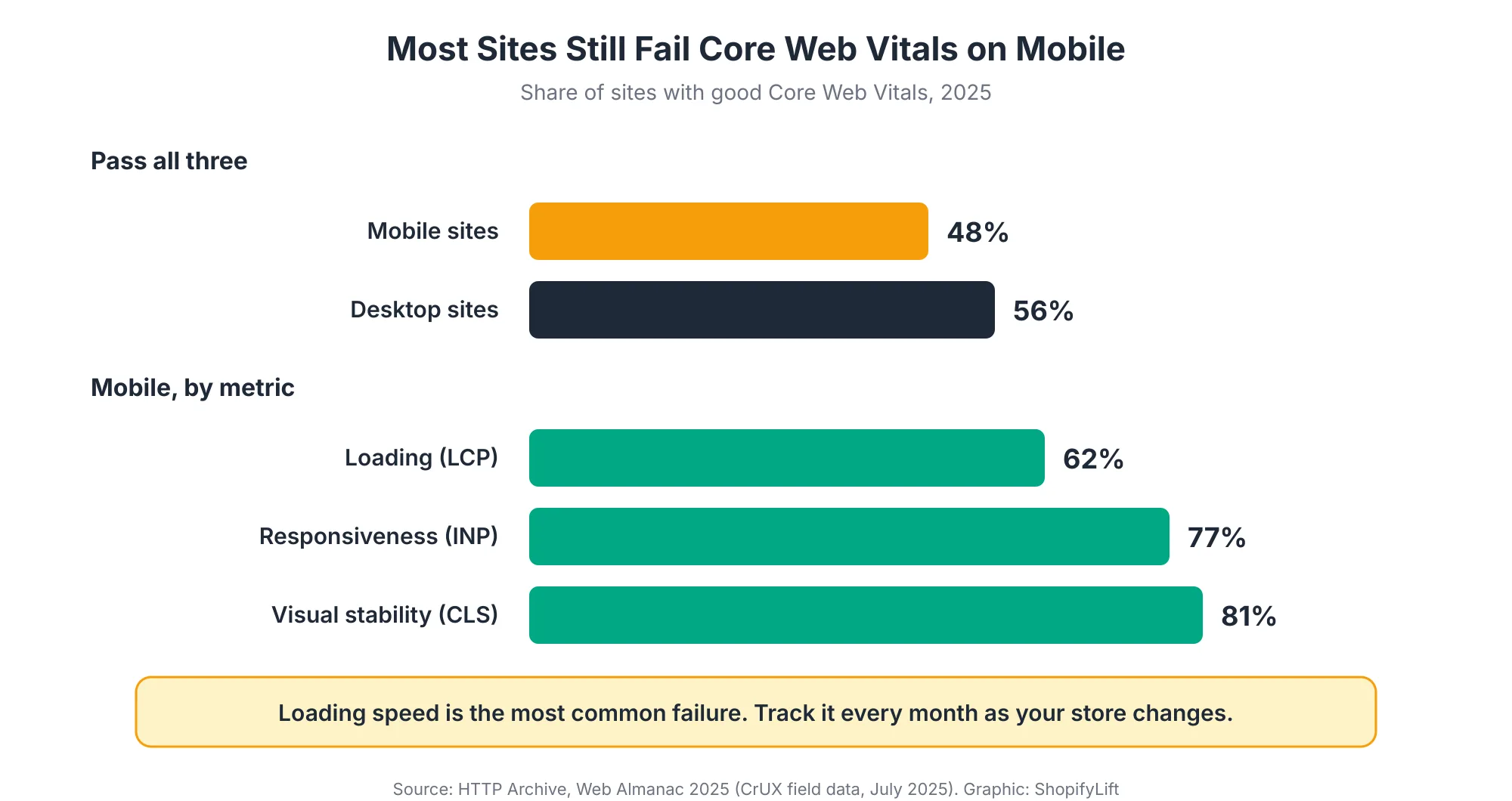
Why does that matter for a Shopify store? Because passing isn't a one-time achievement. Speed rarely collapses overnight. It erodes as apps get installed, marketing scripts get added, and image-heavy sections get stacked onto pages.
Apps are usually the biggest culprit. One 2026 estimate puts the Shopify App Store at more than 17,600 apps, with merchants installing six on average and some running as many as thirty App Store Research. App bloat is widely cited as the leading cause of slow Shopify stores, and leftover code from uninstalled apps can keep loading long after the app is gone Capaxe Labs.
App governance means every app has a reason to exist, an owner, and a periodic review. Does it still earn its monthly fee? Does it duplicate something Shopify now does natively? Does it load scripts on pages where it isn't needed? Those three questions alone usually cut an app stack down noticeably.
Go deeper: The Shopify App Audit: How to Reduce App Bloat, Hidden Costs, and Conflicts. For the performance engineering side, our Growth Guide covers Core Web Vitals and site speed for Shopify in full.
5. Security, Access, and Data Protection
Security is the area merchants think about least until the day they need it. It covers staff accounts and permissions, collaborator access for agencies and freelancers, app permissions, backups, and fraud prevention.
Access creep is the most common issue we see. A freelancer who finished a project two years ago still has full access. A former employee's account was never removed. An app installed for a one-time import still has permission to edit every product. Each one is a door left open.
Then there's recovery. Since Shopify can't restore your individual store data, you need your own backup and restore plan, and you need to know it works before you're relying on it. Many backup tools on the Shopify App Store automate this, but someone still needs to verify restores and decide how often backups should run.
Fraud and chargebacks round out this area. Order risk review, rules for high-risk orders, and a clear process for disputes protect margins, especially during high-volume periods.
Go deeper: Shopify Store Security: Staff Permissions, Data Backups, and Fraud Prevention
Where Automation Fits: Sidekick and AI Tools
AI now touches all five areas. Shopify's Sidekick assistant can carry out store tasks from plain-language commands, such as creating a VIP discount code or tagging an entire collection as seasonal Shopappy. That's real time saved on repetitive admin work.
But automation doesn't remove the need for management. It changes where the effort goes. Someone still needs to decide what gets automated, check the output, and catch the cases where a fast bulk change does the wrong thing at scale. The best use of AI tools is to free up your team's time for judgment calls, not to replace judgment altogether.
Go deeper: Using Shopify Sidekick to Automate Daily Store Operations
Not sure which area needs attention first?
Our free Shopify Store Health Audit reviews all five areas and gives you a prioritized list of fixes, with no obligation attached. Request your free audit
How Often Should You Maintain Your Shopify Store?
Most Shopify stores do best with a four-tier maintenance cadence: quick weekly checks, deeper monthly audits, quarterly reviews of access and code, and a twice-yearly strategic review aligned with Shopify's Editions releases. The exact frequency depends on your order volume and how often your store changes, but the structure works for almost everyone.
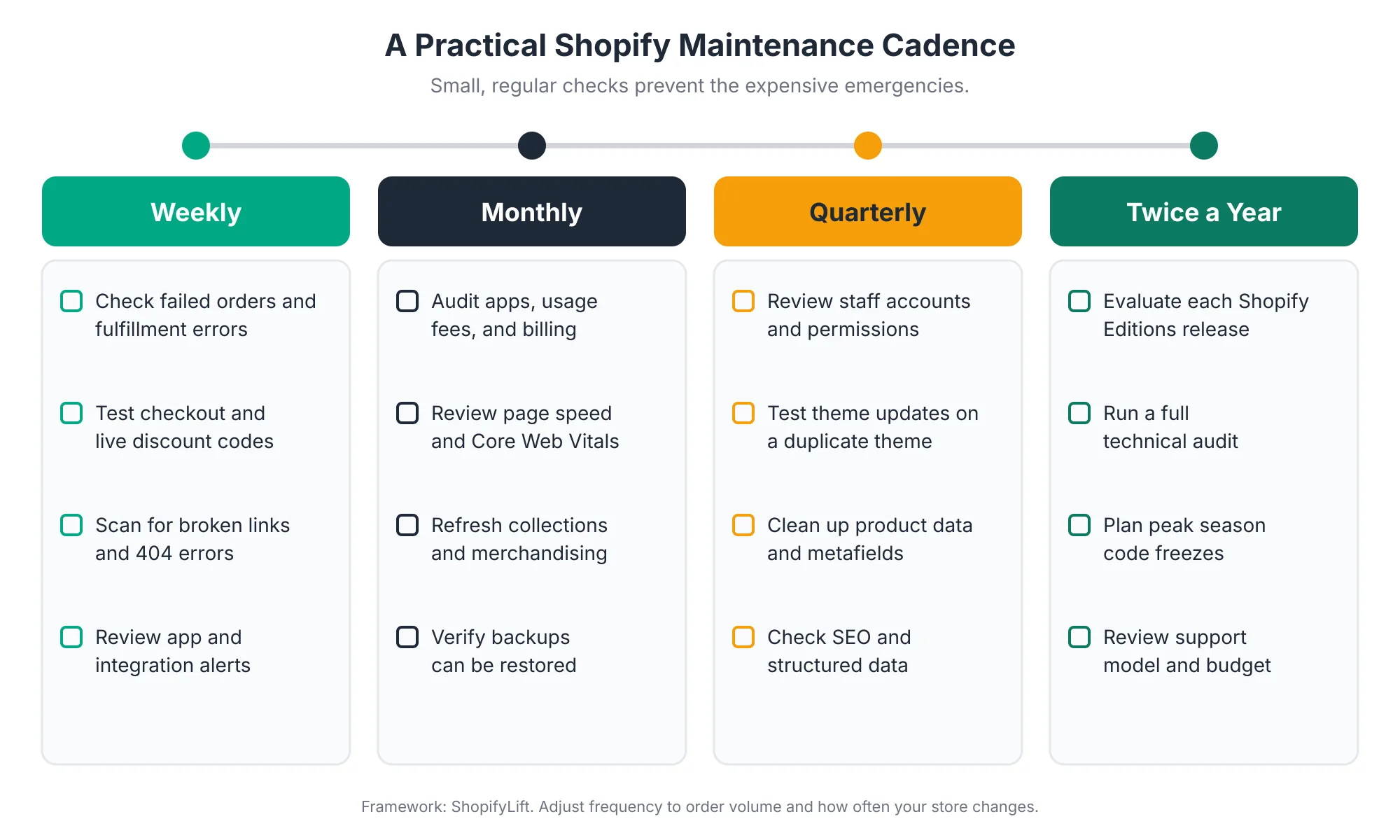
Here's why the cadence matters more than any single task. Most store problems aren't caused by one big mistake. They come from small things that nobody checked for a few months. A cadence turns "we should look at that sometime" into "we look at that on the first Monday of every month."
Weekly checks are quick. Look for failed orders and fulfillment errors, test checkout and any live discount codes, scan for broken links, and review alerts from apps and integrations. For most stores this takes under an hour.
Monthly audits go a level deeper. Review your app stack and billing, check page speed trends, refresh collections and merchandising, and confirm your backups can actually be restored. A backup you've never tested is really just a hope.
Quarterly reviews handle the slower-moving risks. Clean up staff accounts and permissions, test pending theme updates on a duplicate theme, tidy product data and metafields, and check that SEO basics and structured data are still intact.
Twice-yearly reviews line up with Shopify's Editions cycle. Evaluate what's new, run a full technical audit, plan peak season code freezes, and step back to ask whether your support model and budget still fit the store you're running today.
We've turned this into a working checklist, with specific tasks and time estimates for each tier, in The Shopify Store Maintenance Checklist: Weekly, Monthly, and Quarterly Tasks for 2026.
How Should You Prepare Your Store for Peak Season?
Peak season preparation should start at least eight weeks before your biggest sales event. In 2026, Black Friday falls on November 27 and Cyber Monday on November 30, so stores that want a calm holiday season should be finishing their technical work in early November, not starting it.
Peak readiness pulls together every area of store management at once. It's the one time of year when all the small neglected issues can surface together, under maximum traffic.
A solid peak plan usually covers:
- A code freeze date: A fixed point after which no theme or app changes go live without senior sign-off.
- Scheduled rollouts: Campaign themes and landing pages prepared in advance and released on a schedule, rather than published manually at midnight.
- App review: Anything unnecessary removed before traffic spikes, not during them.
- Checkout and discount testing: Every promotion tested end to end on real devices, including stacked discounts and edge cases.
- Fresh, verified backups: Taken right before the freeze, with a restore tested.
- A response plan: Who's on call, how they're reached, and who has authority to roll back a change.
Is your team clear on who does what if something breaks at 12:01 PM on Black Friday? That's exactly when Shopify saw its peak sales rate in 2025, so it's worth deciding in advance.
We cover the full timeline, week by week, in Seasonal Store Readiness: How to Prepare Your Shopify Store for BFCM and Peak Sales.
Who Should Manage Your Shopify Store?
There are three common ways to staff Shopify store management: an in-house developer, a freelancer, or an agency on a support retainer. Each works well in the right situation, and many growing stores end up combining two of them. The right choice depends on how often your store changes, how complex it is, and how predictable you need costs to be.
A support retainer is an agreed monthly arrangement that covers work like theme changes, bug fixes, app changes, CRO improvements, SEO checks, analytics QA, and release support StoreBuilt. Instead of hiring help every time something comes up, you have a team that already knows your store.
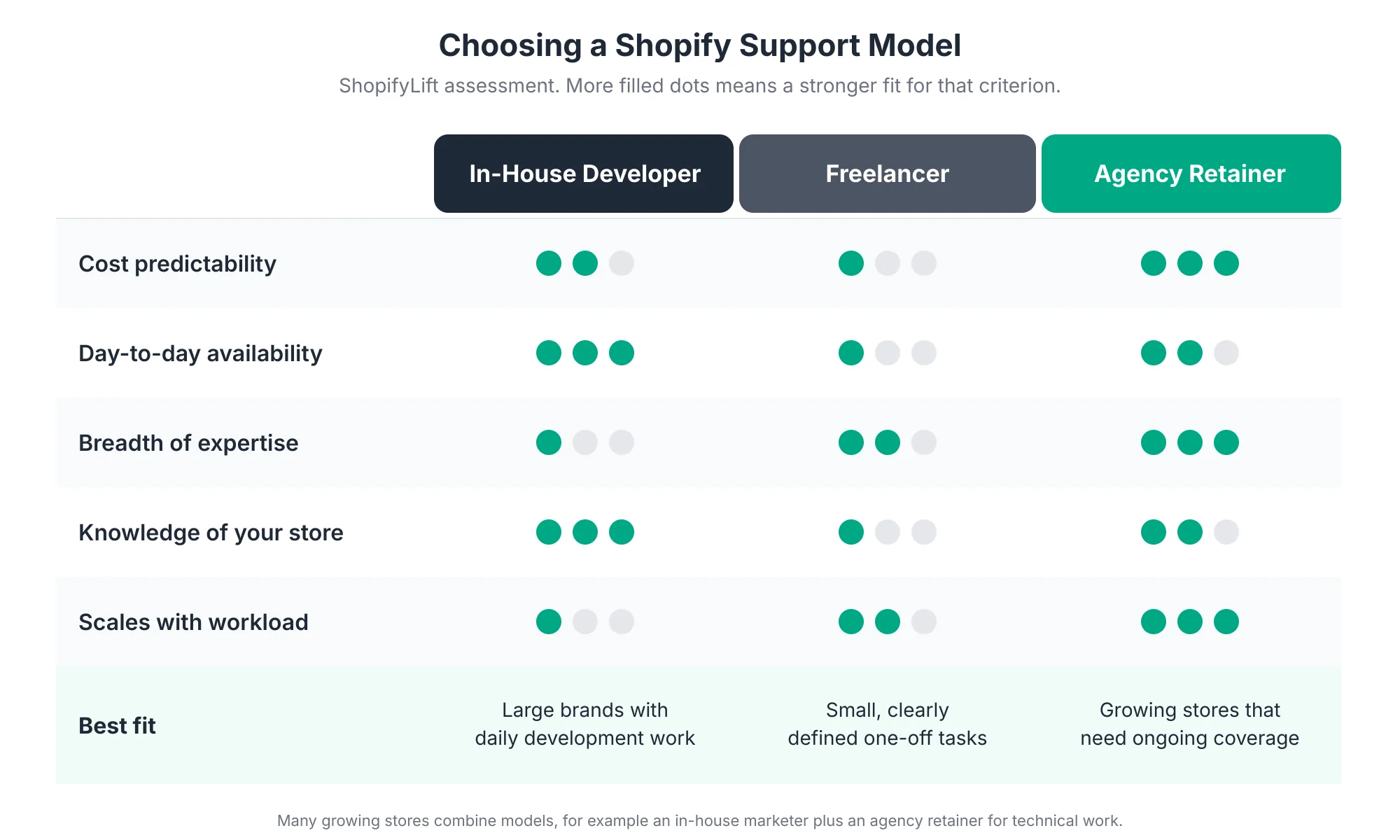
An in-house developer knows your store better than anyone and is available every day. The trade-off is cost and breadth. One person rarely covers theme development, app integrations, performance, and analytics equally well, and you're exposed when they're on holiday or leave.
A freelancer is a good fit for small, clearly defined tasks. The challenge is continuity. Availability varies, knowledge of your store leaves with them, and there's rarely anyone accountable for proactive maintenance between projects.
An agency retainer trades some day-to-day intimacy for breadth, predictable monthly costs, and the ability to scale up for busy periods. Retainers tend to work best when a store is active every week, with regular merchandising updates, campaign pages, app evaluations, and testing Grumspot.
One more thing worth knowing: maintenance has limits. When the theme, platform, data model, or app stack itself prevents safe improvement, it's time to move beyond maintenance into a rebuild or re-platform StoreBuilt. A good management partner will tell you when you've reached that point rather than patching indefinitely.
For a full breakdown, including costs, contract terms, and questions to ask before you sign, read In-House, Freelancer, or Agency Retainer: Choosing the Right Shopify Support Model.
What Are the Warning Signs That Your Store Needs Better Management?
Most under-managed stores show the same symptoms. None of them is catastrophic alone, but three or more usually means the store is drifting and the cost is building quietly in the background.
Watch for these signs:
- You're afraid to update your theme: Nobody's sure what custom code will break, so updates keep getting postponed.
- You can't name every app you pay for: Or what each one does, or who installed it.
- Your store feels slower than it used to: And nobody has measured it in months.
- Collections and banners are out of season: Summer promotions still appear in autumn.
- Former staff or contractors still have access: Nobody has reviewed permissions this year.
- You've never tested a restore: You may have backups, but you've never checked that they work.
- Shopify releases catch you by surprise: You learned about a deadline after it passed.
- Every change feels like an emergency: Small requests wait weeks, then get rushed.
If several of these sound familiar, you're not alone. They're the most common patterns we find when reviewing Shopify stores, and every one of them is fixable with a clear owner and a regular cadence. The good news is that the first round of fixes usually delivers the biggest gains, because you're picking up the easiest wins first.
How Does Store Management Connect to Development, CRO, and SEO?
Store management sits in the middle of everything else you do on Shopify. It keeps the foundation stable so that development projects, conversion work, and SEO improvements actually hold their value over time instead of eroding after launch.
The connections run in both directions:
- Development: New builds create things that need managing. A well-managed store also makes development cheaper, because clean code and documented customizations are faster to extend. See our Shopify development services.
- Conversion rate optimization: CRO tests only work on a stable store. If speed drifts or apps conflict, test results get muddied. The Growth Guide spoke on conversion rate optimization covers the testing side, and our Shopify CRO services can help you run a testing program.
- SEO: Broken links, deleted products, and theme changes that strip structured data all hurt rankings. Routine management catches these before they cost you traffic. See our Shopify SEO services.
- Growth and marketing: Campaigns send traffic. Management makes sure the store converts it. For the bigger picture on 2026 growth strategy, read The Shopify Growth Guide 2026.
Frequently Asked Questions
What is included in Shopify store management?
Shopify store management covers daily operations, theme and platform updates, merchandising, technical health, and security. That includes tasks like checkout testing, app audits, collection updates, speed monitoring, staff permission reviews, and backups. It's ongoing work, since Shopify releases two major Editions a year with more than 150 updates each.
Does Shopify maintain my store for me?
Partly. Shopify manages hosting, platform security, and disaster recovery for the whole platform. Your theme, apps, custom code, page speed, staff access, and store data backups are your responsibility. Shopify's platform backups can't restore an individual store's deleted products or content, so merchants need their own backup plan.
How often should I update my Shopify theme?
Review theme updates at least quarterly and test them on a duplicate theme before publishing. Also check for compatibility issues after each Shopify Editions release, which happens twice a year. Stores with heavy custom code should document every customization so updates don't wipe it out.
How much does Shopify store management cost?
Costs vary widely based on store complexity, order volume, and how much ongoing development you need. Freelancers usually bill per task, in-house developers carry a full salary, and agency retainers are billed monthly for a set scope or number of hours. Comparing the three against your actual workload is the best way to decide.
When should I hire help instead of managing my store myself?
Consider outside help when maintenance keeps getting postponed, you're nervous about theme updates, or small changes wait weeks. It's also worth it before peak season. BFCM 2025 saw Shopify sales peak at $5.1 million per minute, which leaves very little room for untested changes.
Final Thoughts
Shopify gives you a remarkably stable platform. What it can't give you is a store that stays fast, current, and well merchandised on its own. That part takes ownership, a regular cadence, and someone who notices the small problems before customers do.
The good news is that store management isn't complicated. It's mostly consistency. A weekly check here, a monthly audit there, and a deliberate plan for every major Shopify release and every peak season. Stores that do this well spend less time firefighting and more time growing.
Start with the area where you feel least confident. For most merchants, that's either the app stack or backups. Then work through the rest using the guides in this series.
Want a team that already knows how to run Shopify stores?
ShopifyLift's Store Management service covers maintenance, updates, merchandising support, performance, and security on a predictable monthly plan. Explore Shopify Store Management Services
Explore the Shopify Store Management Series
- The Shopify Store Maintenance Checklist: Weekly, Monthly, and Quarterly Tasks for 2026
- How to Update Your Shopify Theme Without Losing Custom Code
- The Shopify App Audit: How to Reduce App Bloat, Hidden Costs, and Conflicts
- How to Evaluate and Adopt New Shopify Features After Every Editions Release
- Shopify Merchandising Strategy: Collections, Search, and Filters That Drive Sales
- Shopify Inventory and Order Management: A Practical Guide for Growing Stores
- Seasonal Store Readiness: How to Prepare Your Shopify Store for BFCM and Peak Sales
- Shopify Store Security: Staff Permissions, Data Backups, and Fraud Prevention
- Using Shopify Sidekick to Automate Daily Store Operations
- In-House, Freelancer, or Agency Retainer: Choosing the Right Shopify Support Model
Sources
[1] Shopappy, "Shopify Editions Summer 26: What Shopify Actually Announced," July 2026
[2] what.digital, "Shopify Summer 2026 Edition: What Really Matters," August 2026
[3] Ambaum, "Shopify Summer Editions 2026: Agentic Commerce Updates," July 2026
[4] Revinfotech, "Shopify Editions Summer 2026," July 2026
[5] Shopify, "Shopify merchants generate record-breaking $14.6 billion in Black Friday Cyber Monday sales," December 2025
[6] Shopify Investor Relations, BFCM 2025 press release, December 2025
[7] Rewind, "Backups for Shopify: FAQ," October 2025
[8] TinyBackup, "Does Shopify Back Up Your Store?," June 2026
[9] Capaxe Labs, "The Complete Shopify Store Maintenance Checklist for 2026," March 2026
[10] App Store Research, "Shopify App Ecosystem Trends You Can't Ignore in 2026," June 2026
[11] HTTP Archive, "Web Almanac 2025: Performance," 2026
[12] StoreBuilt, "Shopify Support Retainer Guide," August 2026
[13] Grumspot, "Shopify Maintenance Agency: Your Guide to Store Stability," May 2026
[14] Coalition Technologies, "Shopify Editions Winter '26," December 2025