Part of our Shopify Store Management guide. Spoke 4 of 10.
Twice a year, Shopify publishes an Edition: a single release bundling more than 150 product updates. The announcement lands, the recap articles flood in, and every Shopify merchant faces the same question. What, if anything, should we actually do about this?
Most merchants answer by doing nothing. One agency reviewing the latest Edition put it bluntly: most merchants read a roundup, nod along, and change nothing what.digital. That's understandable. Nobody has time to evaluate 150 features. But doing nothing has a cost too, because a few updates in every release come with deadlines, and a few more could genuinely save you money or lift conversions.
This guide gives you a repeatable way to handle every Edition. You'll learn how to cut 150+ updates down to a short list, sort that list by urgency and value, score features before committing to them, and roll them out without putting your live store at risk.
Key Takeaways
- Shopify's Winter '26 Edition (December 10, 2025) and Spring '26 Edition (June 17, 2026) each shipped more than 150 updates.
- Some updates carry hard deadlines. Shopify Scripts stopped running on June 30, 2026, and Shopify confirmed the date would not move.
- Sort relevant updates into four buckets: must act, should adopt, monitor, and ignore for now.
- Adopt features through a pipeline of test, pilot, launch, and measure, and always record a baseline first.
What Are Shopify Editions?
Shopify Editions are Shopify's twice-yearly product releases. Each one bundles well over a hundred updates across the admin, storefront, checkout, apps, and developer tools into a single announcement. The Winter '26 Edition launched on December 10, 2025, and the Spring '26 Edition followed on June 17, 2026, each with more than 150 updates.
Editions are Shopify's main showcase, but they aren't the only way changes arrive. Shopify also publishes updates continuously through its changelog, releases new API versions every quarter, and announces major initiatives on their own schedule.
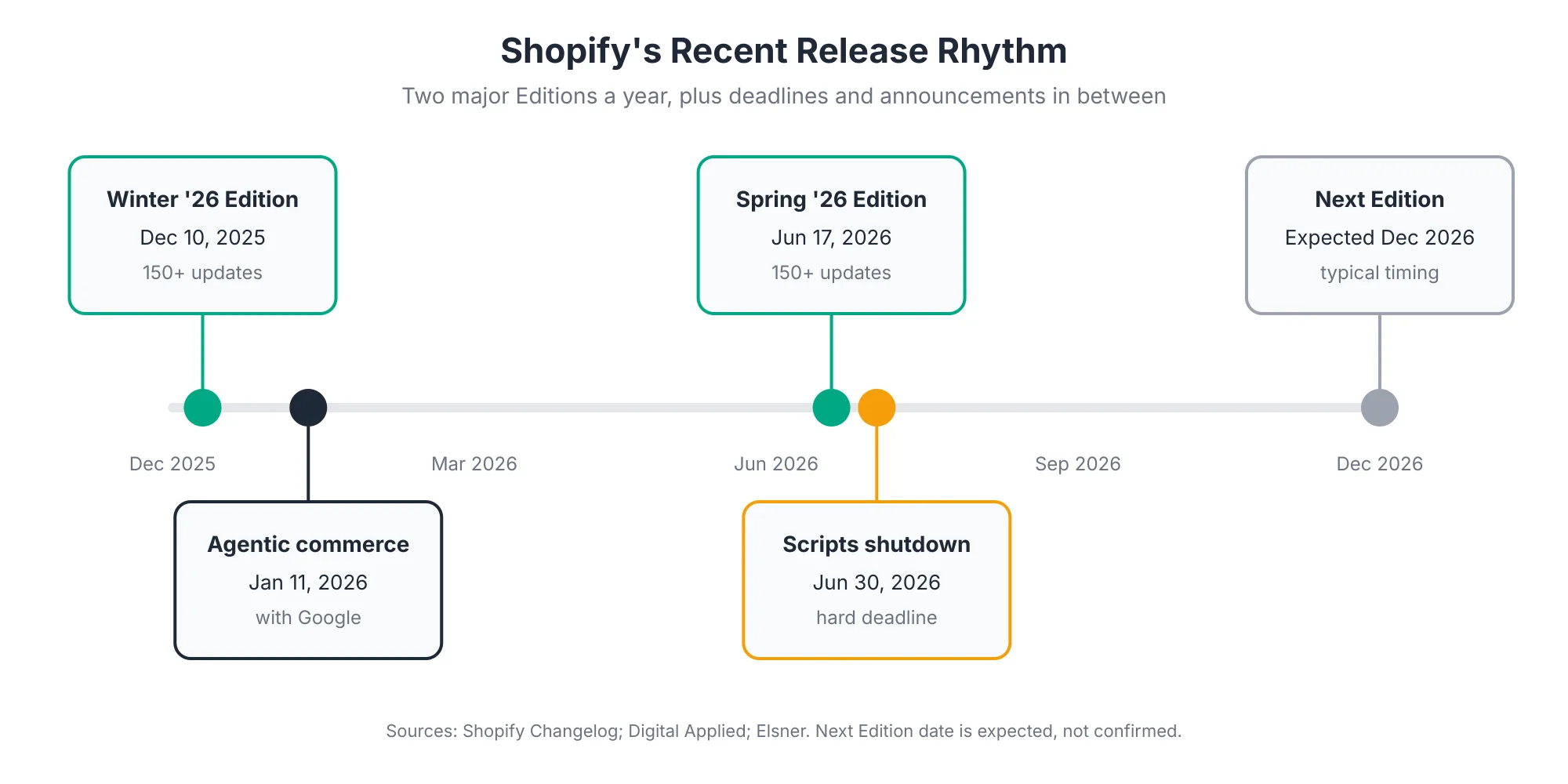
Here's what the last two Editions looked like:
- Winter '26 (December 10, 2025): Shopify announced more than 150 updates Shopify Changelog. Themes included deeper Sidekick execution in the admin, Agentic Storefronts for AI-driven discovery, heatmaps, theme Rollouts, and the AI Store Builder Coalition Technologies.
- Spring '26 (June 17, 2026): Another 150+ updates, built on the agentic commerce platform Shopify and Google announced on January 11, 2026, and on Agentic Storefronts from Winter '26 Digital Applied.
A quick note on naming, since it trips people up. Many recap articles refer to the June 2026 release as the "Summer '26" Edition, but Shopify's name for it is Spring '26. As one agency pointed out, anyone searching for a Summer 2026 Edition is looking for Spring '26 Fudge.
Why Do New Shopify Features Need a Formal Evaluation Process?
New features need a formal process because a single Edition mixes deadlines, genuine opportunities, early previews, and features irrelevant to your store, all announced at once. Without a way to sort them, merchants either ignore everything and miss deadlines, or chase too many features at once and destabilize their store.
There are three specific risks a process protects you from.
Missing a deadline. The clearest recent example is Shopify Scripts. Scripts stopped running on June 30, 2026, and Shopify confirmed the date would not be extended Elsner. Any custom discount, shipping, or payment logic still running on Scripts simply stopped working. Deadlines like that aren't always headline features. They're often buried in the fine print.
Adopting too early. Not every announced feature is fully available on launch day. Some Winter '26 features, including Rollouts and SimGym, rolled out gradually or launched in preview BoldMatch. Parts of Spring '26 also rolled out over the following weeks and months Shop Circle. Building a campaign around a feature that isn't ready for your store is a common and avoidable mistake.
Assuming everything applies to you. Some features are limited to specific plans. Certain checkout customizations and B2B capabilities remain exclusive to Shopify Plus, for example BoldMatch. Others depend on your theme, your markets, or your app stack.
There's also an upside risk. Shopify increasingly builds features that replace third-party apps. Many Spring '26 additions either removed a manual step or took over work merchants used to pay an app to handle Shopappy. If nobody evaluates the release, you keep paying for apps you no longer need. Our Shopify App Audit guide covers how to act on that.
How Do You Narrow 150+ Updates to a Short List?
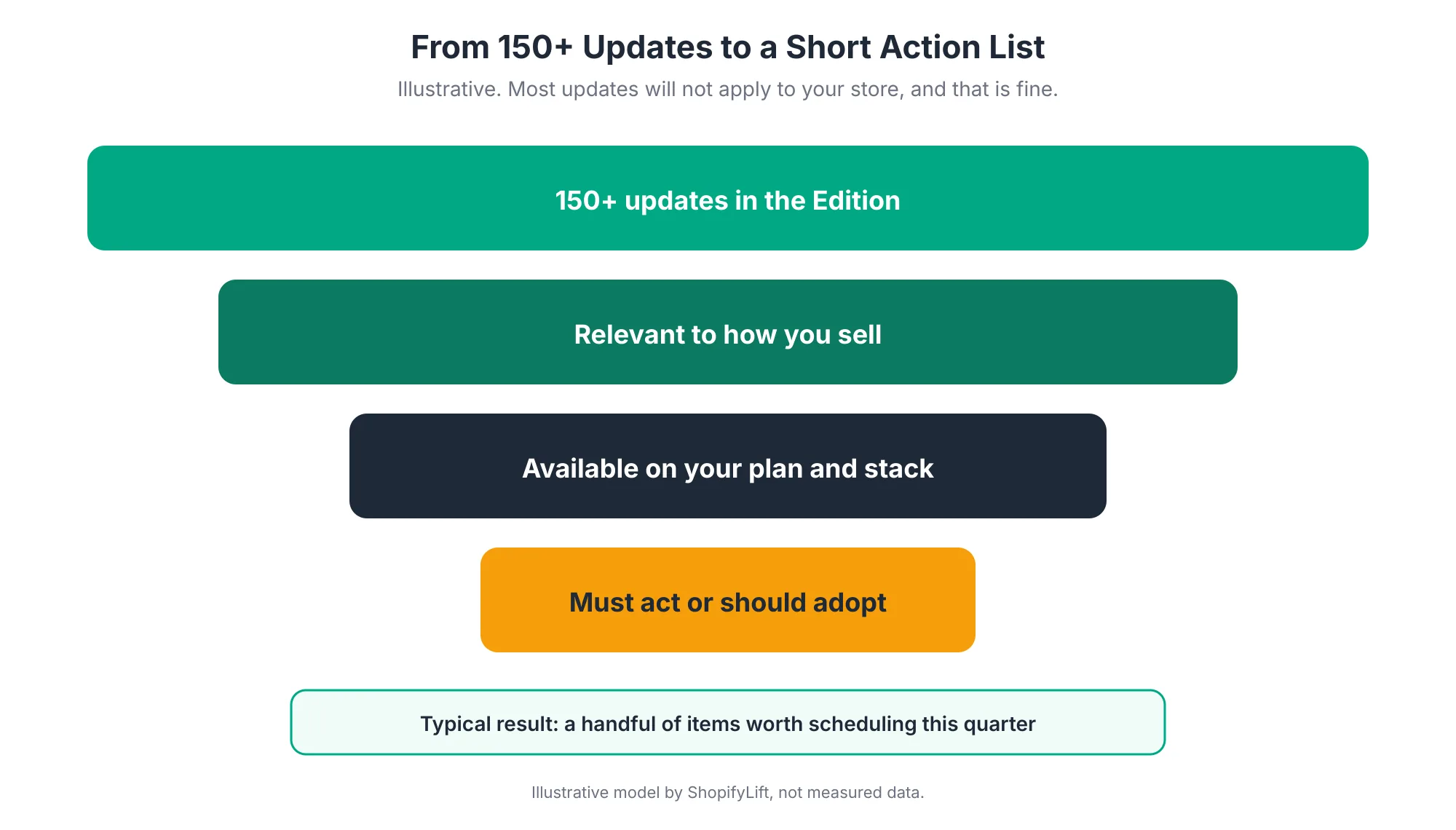
Narrow an Edition down in three passes. First, drop updates unrelated to how you sell. Second, drop updates unavailable on your plan, theme, or markets. Third, sort what remains into four buckets. For most stores, this leaves a handful of items worth acting on each release, which is a far more manageable job.
Pass 1: Filter by How You Sell
Start with Shopify's official Edition page, which groups updates by area. Skip whole sections that don't apply. If you don't run retail locations, you can skip point-of-sale updates. If you don't sell B2B, skip the B2B section. If you don't build custom apps, most developer platform updates can wait for your developer to review.
This first pass usually removes more than half the list in a few minutes.
Pass 2: Filter by Your Plan and Stack
For what's left, check three things:
- Plan: Is the feature available on your Shopify plan, or only on Plus?
- Theme: Does it need an Online Store 2.0 theme, a specific theme version, or Horizon?
- Availability: Is it available now, rolling out gradually, or in developer preview?
Anything that isn't available to you yet isn't discarded. It moves to the "monitor" bucket with a review date.
Pass 3: Sort Into Four Buckets
Now sort each remaining update into one of four buckets. This is the core of the process, and it's what turns a long list into decisions.
What Is the Four-Bucket Triage for Shopify Updates?
The four-bucket triage sorts each relevant update by urgency and value. "Must act" covers deadlines, deprecations, and security changes. "Should adopt" covers features with clear value for your store. "Monitor" covers features in preview or not yet ready. "Ignore for now" covers anything that doesn't fit how you sell. Each bucket leads to a different next step.
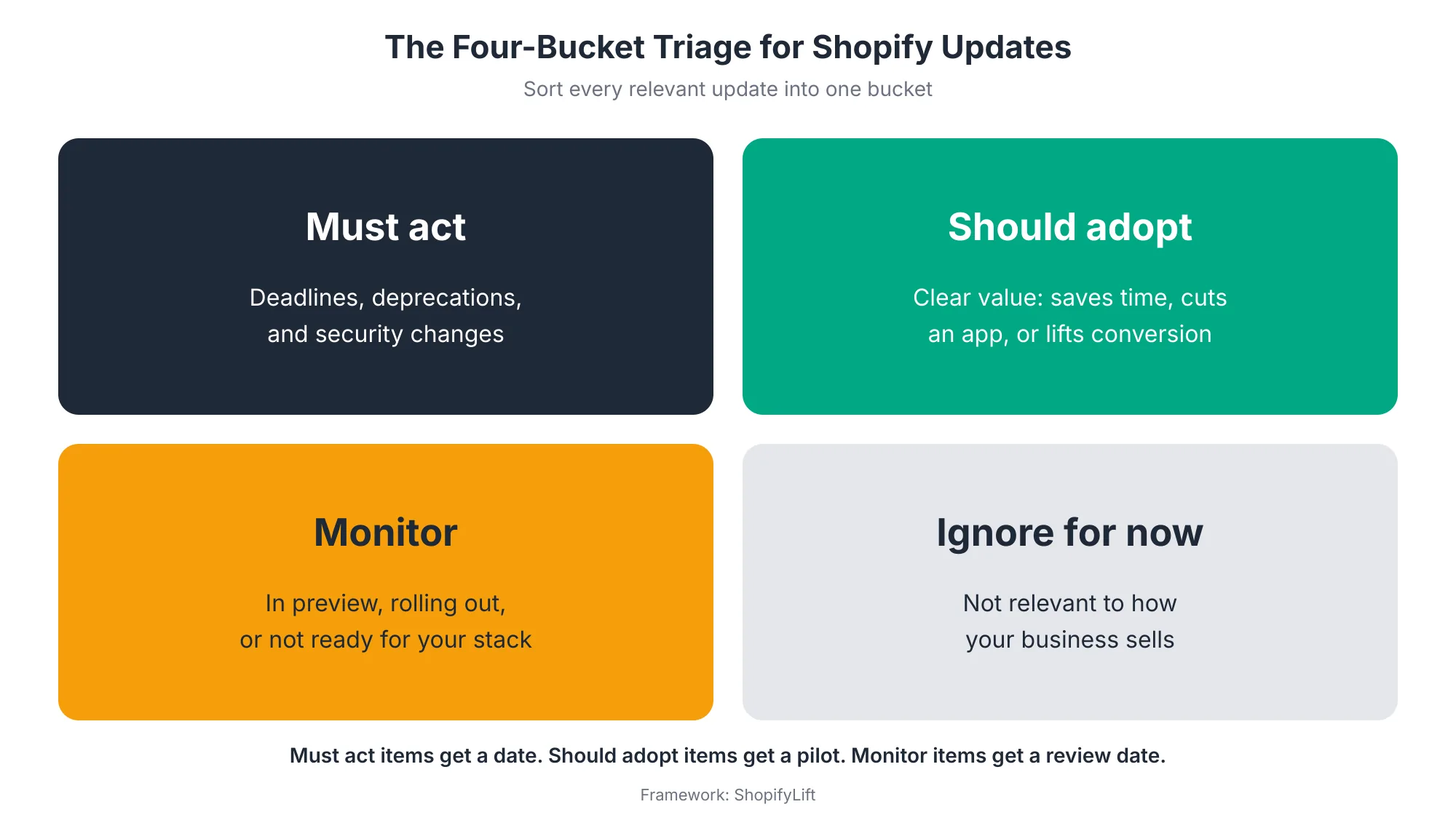
Must Act
These are changes that will affect your store whether or not you do anything. Deadlines, deprecations, security updates, and changes to features you already rely on all belong here.
For each must-act item, write down what's affected, who owns the fix, and a completion date well before the deadline. Don't rely on Edition announcements alone to catch these. Deprecations are announced in Shopify's developer changelog with migration guidance, and a deprecated API can stop working at any time once it's unsupported Shopify Developer Docs. If you run custom apps or integrations, your developer should be checking the changelog every quarter anyway. We cover API version checks in The Shopify Store Maintenance Checklist.
Should Adopt
These are features with clear value for your store. Good signs include replacing an app you pay for, removing manual work your team does every week, closing a known gap in your customer experience, or making your store easier to discover.
Agentic commerce is a good example from the last two Editions. Shopify's Universal Commerce Protocol now exposes your catalog to AI shopping agents by default, with no setup Shopappy. You don't have to switch anything on, but you do need clean product data to benefit. Shopify has said AI searches using clean Catalog data convert at roughly twice the rate of searches using scraped data Identixweb. That turns catalog cleanup from a chore into a should-adopt priority. Our Growth Guide covers it in AI Product Data Optimization for Shopify.
Should-adopt items don't go straight into production. They go into a pilot, which we'll cover shortly.
Monitor
These features look promising but aren't ready for you yet. They might be in preview, rolling out gradually, missing a capability you need, or not yet supported by your theme or key apps.
Give each one a review date, usually at the next quarterly review. That keeps them from being forgotten without committing you to anything.
Ignore for Now
Everything else. These features aren't wrong or bad. They just don't fit your business right now. The "for now" matters, though. A feature that's irrelevant today might matter next year if you open a retail store, launch B2B, or expand internationally.
How Would the Last Two Editions Sort Into the Four Buckets?
Applied to Winter '26 and Spring '26, the triage looks like this for a typical direct-to-consumer store. Migrating off Shopify Scripts was a must-act item. Clean catalog data, theme Rollouts, and Sidekick automation were strong should-adopt candidates. Features in preview went to monitor, and retail or B2B updates were ignored by stores without those channels.
Worked examples make the buckets easier to apply. Here's how we'd sort some of the headline changes for a typical online-only store:
- Must act: migrate off Shopify Scripts. Scripts stopped running on June 30, 2026, with no extension Elsner. Any store with Scripts-based discounts or shipping rules needed to move that logic to Shopify Functions before the cutoff.
- Should adopt: clean catalog data for AI agents. Agentic commerce is on by default Shopappy, so the work isn't switching it on. It's making sure your product data is complete enough to show up well.
- Should adopt: theme Rollouts. Scheduled and gradual releases make every future theme change safer, which pays off across the whole store Ambaum.
- Should adopt, with care: Sidekick automation. Useful for repetitive admin work, but bulk changes need review before they're applied.
- Monitor: features in preview or gradual rollout. Some Winter '26 features, such as SimGym, started in preview or rolled out gradually BoldMatch. Revisit them at your next quarterly review.
- Ignore for now: channels you don't use. Spring '26 included a major point-of-sale update, POS v11 Shop Circle. It matters a lot for stores with retail locations and not at all for stores without them.
Your sort will look different if you sell B2B, run retail locations, or sell internationally. That's expected. The buckets are about your store, not the Edition.
How Do You Score a New Feature Before Adopting It?
Score each should-adopt feature on four factors: business value, effort to implement, risk to your live store, and cost savings such as replacing an app. Rate each from one to five, where five is most favorable, and add them up. The total gives you a simple, defensible order for which features to adopt first.
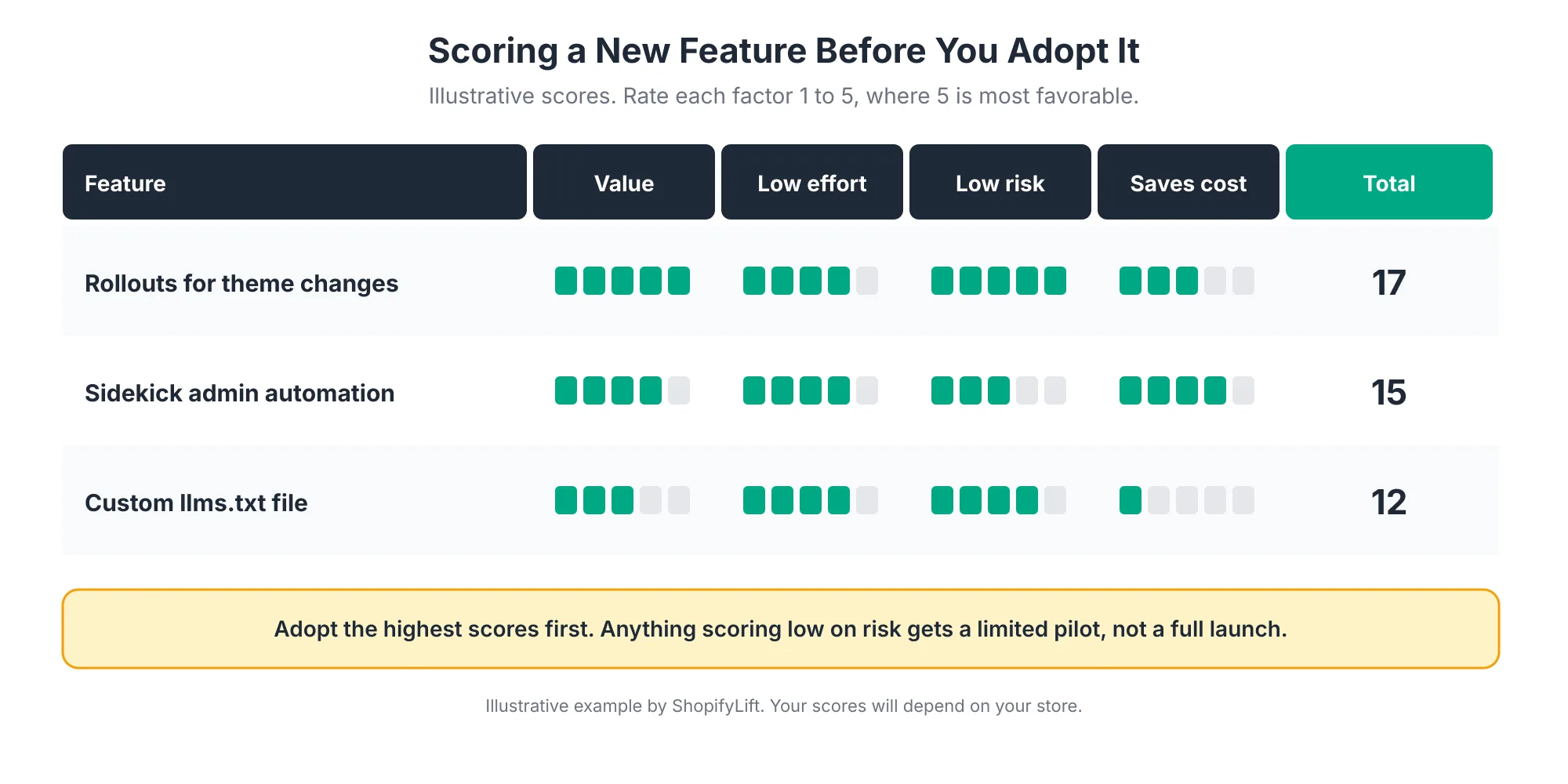
The four factors in detail:
- Value: How much will this help revenue, conversion, discoverability, or customer experience? Be specific about the outcome you expect.
- Low effort: How much work is it to implement? A setting toggle scores high. A theme rebuild scores low.
- Low risk: How likely is it to disrupt your live store? Features that can be piloted on a duplicate theme or a single market score high.
- Saves cost: Does it replace an app or reduce ongoing manual work? Replacing a paid app with a native feature scores high.
Take the three examples in the graphic. Theme Rollouts let you schedule, gradually release, or experiment with changes to your theme, checkout, and account pages Ambaum. It's high value, low risk, and easy to adopt, so it scores well. Sidekick automation is valuable and fairly easy, but needs care, since bulk changes made quickly can also go wrong quickly. We cover it in Using Shopify Sidekick to Automate Daily Store Operations.
The third is a smaller Spring '26 change: themes can now customize the llms.txt, llms-full.txt, and agents.md files that help control what AI tools see learnshopify.dev. It's low risk and fairly easy, but its value depends on how much of your traffic comes from AI assistants, so it scores lower for most stores today.
Your scores will differ. That's the point. The scorecard forces a conversation about why a feature matters to your store specifically, rather than because it was in the keynote.
How Should You Roll Out a New Shopify Feature Safely?
Roll out new features through six stages: read, triage, test, pilot, launch, and measure. Test on a duplicate theme or development store, pilot with a limited rollout or a single market, and launch fully only once the pilot shows the result you expected. Record a baseline before the pilot so you can tell whether the feature actually helped.
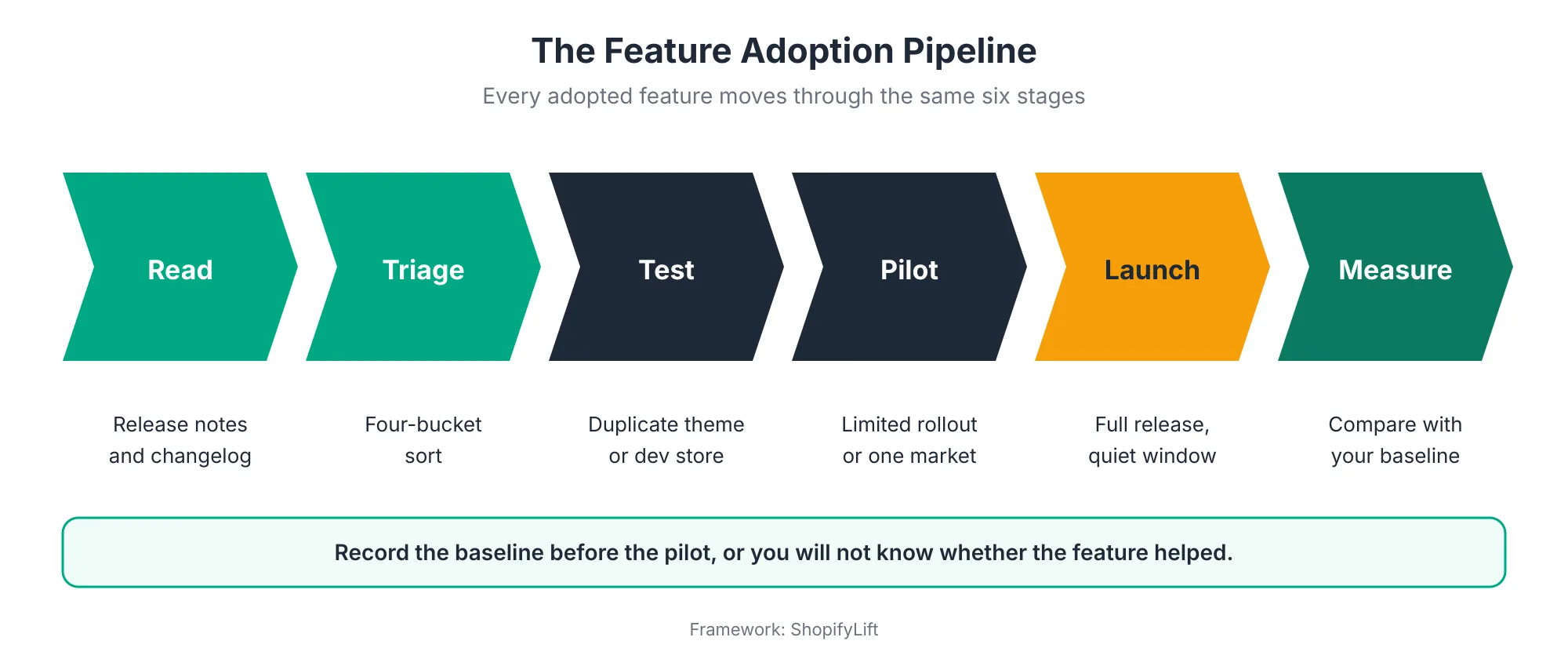
Read and Triage
You've covered these already. The output is a short list of must-act items with dates and should-adopt items with scores.
Test
Try each feature somewhere it can't hurt sales. For storefront features, that's a duplicate theme. For admin features, it's often a development store or a small, low-risk slice of real work. At this stage you're checking that the feature works with your theme, your apps, and your processes.
Pay particular attention to app interactions. A new native feature can overlap or conflict with an app that does something similar.
Pilot
Once it works in testing, try it with real customers on a limited scale. Shopify's rollout tools support gradual releases and experiments for theme, checkout, and account changes Ambaum. For other features, you might pilot in one market, one collection, or one customer segment.
Before the pilot starts, record a baseline. What's the current conversion rate, average order value, time spent on the task, or whatever metric the feature is supposed to improve? Without a baseline, you'll end up judging the pilot on gut feel.
Launch
If the pilot delivers, launch fully. Treat it like any other storefront change: publish during a quiet window, with someone watching, and with a clear way to roll back. Our guide to updating your Shopify theme covers safe publishing in detail.
Measure
A few weeks after launch, compare results with your baseline. Did the feature deliver what you expected? If it replaced an app, remove the app and record the saving. If it didn't deliver, decide whether to adjust it or switch it off. Either way, note the result in your maintenance log.
What Should You Do in the 90 Days After an Edition?
Spread adoption across 90 days. In weeks one and two, read the release, triage it, and set dates for every must-act item. In weeks three to six, test and pilot your top should-adopt features. In weeks seven to twelve, launch what worked, measure it, and remove any apps it replaced.
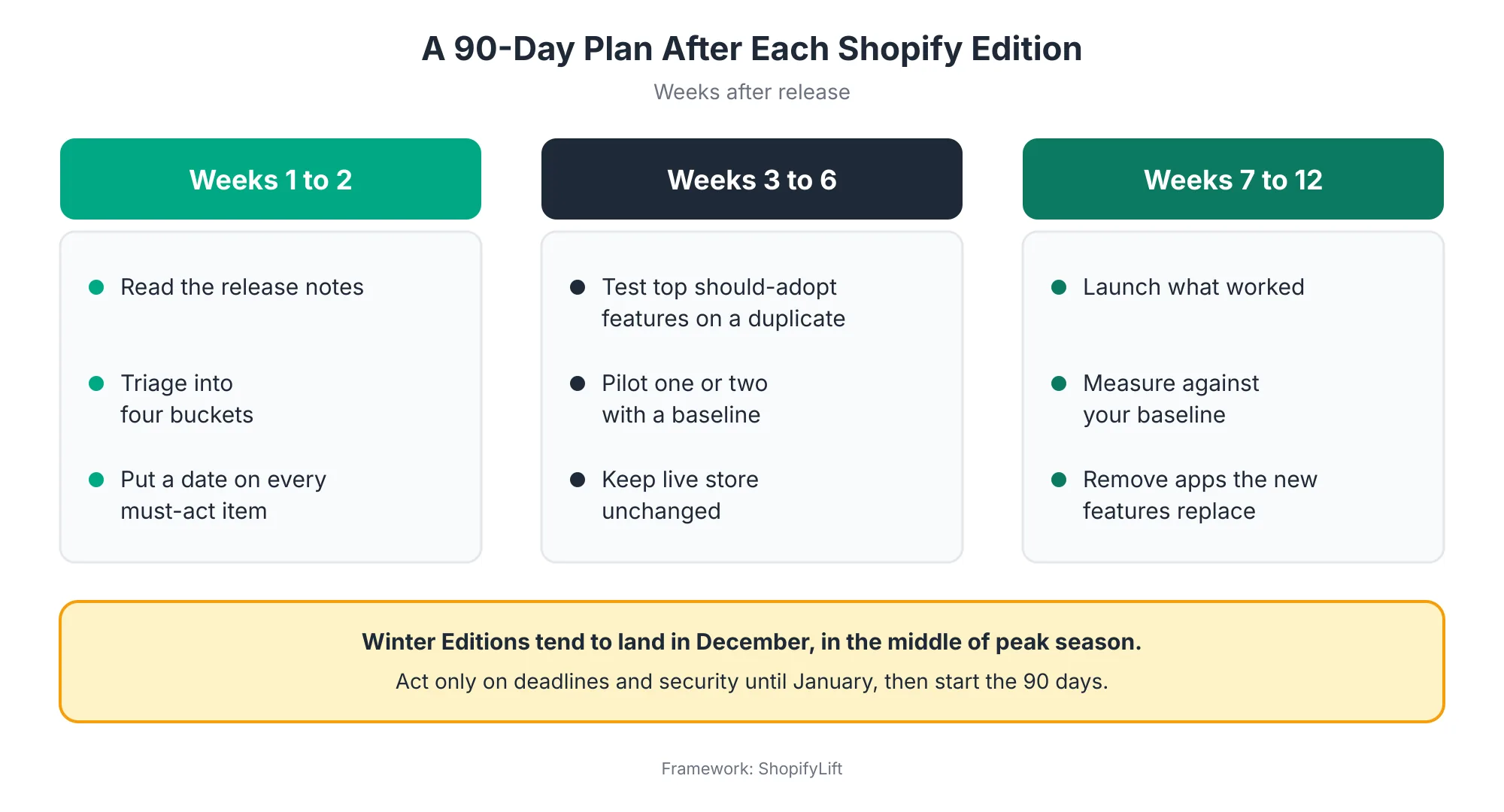
Why 90 days? Because it's long enough for features that are still rolling out to become available, and short enough that the next Edition doesn't arrive before you've acted on this one. It also fits neatly around a quarterly maintenance cycle.
There's one important timing wrinkle. Winter Editions tend to arrive in December. Winter '26 landed on December 10, 2025, right in the middle of peak season. Adopting new features during your busiest trading weeks is exactly what a peak season code freeze exists to prevent.
So when a Winter Edition lands, handle it differently. Read it and flag any must-act items, especially deadlines and security changes. Then hold everything else until January, when trading calms down, and start your 90 days from there. We cover code freezes in Seasonal Store Readiness: How to Prepare Your Shopify Store for BFCM and Peak Sales.
Want someone to triage the next Edition for you?
Our free Shopify Store Health Audit includes a review of recent Shopify updates that affect your store, with a prioritized action list. Request your free audit
How Do You Document an Edition Review for Your Team?
Capture each Edition review in a single short document. Record the Edition name and date, the owner, every must-act item with its deadline, should-adopt features with their scores, monitor items with review dates, and final decisions. Keep it alongside your maintenance log so the next review can start from where this one ended.
A one-page review is enough. More than that and nobody reads it. Here's a simple structure:
- Header: Edition name, release date, review date, and reviewer.
- Must act: Each item, what it affects, owner, and completion date.
- Should adopt: Each feature, its scorecard total, and the planned pilot dates.
- Monitor: Each feature and the date you'll check it again.
- Apps affected: Any app that a new feature could replace, with a decision date.
- Decisions and results: Filled in over the following 90 days as pilots finish.
Share it with everyone who touches the store: operations, marketing, and your developer or agency. It prevents two common problems. The first is people assuming someone else is handling a deadline. The second is people adopting features on their own without telling anyone, which makes it hard to know what changed when results move.
When the next Edition arrives, open the previous review first. Monitor items may now be ready. Pilots may have finished. That continuity is what turns a twice-yearly scramble into a steady routine.
What Mistakes Should You Avoid When Adopting New Shopify Features?
The most common mistakes are chasing keynote features that don't fit your store, adopting during peak season, skipping the changelog between Editions, launching without a baseline, forgetting to remove apps that new features replace, and assuming a feature is available on your plan. Each one is easy to avoid with the process above.
A few of these deserve a little more explanation:
- Chasing the keynote: The features that get the most attention at launch aren't necessarily the ones that matter most for your store. Score features on your own terms.
- Skipping the changelog: Deadlines and deprecations don't always make the Edition headlines. The changelog is where they're announced in detail.
- No baseline: Without a before number, every pilot looks like a success or a failure depending on who's asked.
- Paying twice: If a native feature replaces an app, remove the app. Otherwise you're paying for the same job twice and loading extra code for nothing.
- Assuming availability: Check plan requirements and rollout status before promising a feature to your team or building a campaign around it.
Where Should You Track Shopify Changes Between Editions?
Editions get the headlines, but changes arrive all year. Track four sources: Shopify's official Edition pages, the Shopify changelog for merchant-facing updates, the Shopify developer changelog for API and platform changes, and admin notifications in your own store. Assign one person to check them on a set schedule.
Here's a practical setup:
- Edition pages: Review within two weeks of each release, using the triage process above.
- Shopify changelog: Skim monthly for merchant-facing updates that arrive between Editions.
- Developer changelog: Your developer or agency should review it at least quarterly for deprecations and API changes.
- Admin notifications: Check the notifications in your Shopify admin weekly. Shopify often flags actions specific to your store there.
The owner doesn't need to be technical. They need to be consistent, and to know who to pass things to. A store owner who skims the changelog monthly and forwards anything unclear to their developer is doing exactly the right job.
How Do You Keep Feature Adoption From Disrupting Your Store?
Keep adoption safe by limiting how many features you change at once, testing everything off your live store first, coordinating with theme and app updates, and freezing non-critical changes ahead of peak season. The goal is steady improvement, not a burst of changes after every Edition.
A few guardrails help:
- Limit work in progress: Pilot no more than two or three features at once. More than that and you won't know which change caused which result.
- Coordinate with theme updates: If a feature depends on a newer theme version, bundle it with your next quarterly theme update rather than doing both separately.
- Check app compatibility: Ask your key app providers whether they support the new feature, especially for checkout, cart, and product page changes.
- Document everything: Add every adopted feature to your maintenance log, including the baseline and the result.
- Respect the freeze: No new features during your peak season code freeze, however exciting they look.
When Should You Get Help Evaluating Shopify Updates?
Consider outside help when your store relies on custom apps, checkout customizations, or complex integrations that new releases could affect. Help also makes sense if Editions keep passing without anyone reviewing them, or if you missed a deadline like the Scripts shutdown. A partner who reviews every release can turn it into a short, prioritized plan.
Signs it's time:
- Nobody on your team reads the Edition announcements or the changelog.
- You found out about a deprecation after something broke.
- You run custom apps or integrations built on Shopify's APIs.
- You're on Shopify Plus with checkout customizations.
- You're paying for several apps and aren't sure whether Shopify now does the same job.
We compare support options in In-House, Freelancer, or Agency Retainer: Choosing the Right Shopify Support Model. For larger platform decisions that come out of an Edition, such as moving to a new theme foundation, see our Shopify development services.
Frequently Asked Questions
How often does Shopify release Editions?
Shopify releases Editions twice a year. The Winter '26 Edition launched on December 10, 2025, and the Spring '26 Edition on June 17, 2026, each with more than 150 updates. Shopify also ships changes continuously through its changelog and releases new API versions every quarter.
Is there a Shopify Summer '26 Edition?
Not by that name. Shopify's June 17, 2026 release is officially the Spring '26 Edition, sometimes called the Everywhere Edition. Many third-party articles refer to it as "Summer '26," but they're describing the same release with more than 150 updates.
Do I have to adopt every new Shopify feature?
No. Most updates in an Edition won't apply to your store. What you must do is catch deadlines and deprecations, like the June 30, 2026 Scripts shutdown. Beyond that, adopt only features that score well on value, effort, risk, and cost savings for your specific store.
How do I know if a new Shopify feature is available on my plan?
Check the feature's help center article or Edition listing for plan requirements. Some features, such as certain checkout customizations and B2B capabilities, remain limited to Shopify Plus. Others roll out gradually or start in preview, so availability can change in the weeks after an Edition.
Should I adopt new features during peak season?
Generally no. Winter Editions tend to arrive in December, during peak trading. Act only on deadlines and security changes until January, then start testing and piloting new features once your busiest season is over and your code freeze has ended.
Final Thoughts
Shopify's pace isn't slowing down. Two Editions a year with 150+ updates each, plus quarterly API releases and ongoing changelog updates, is simply how the platform works now. Trying to keep up with everything isn't realistic. Ignoring it isn't safe.
The middle path is a process. Narrow each release down, sort it into four buckets, score what's worth adopting, and roll it out through a pilot. Do that every Edition, and new features become a steady source of improvement instead of a source of stress.
For the full picture of keeping your store in shape, head back to our Shopify Store Management guide.
Want every Shopify release reviewed and acted on for you?
ShopifyLift's Store Management service includes Edition reviews, deadline tracking, feature pilots, and app cleanup after each release. Explore Shopify Store Management Services
Continue the Store Management Series
- Hub: Shopify Store Management: The Complete Guide
- Previous: The Shopify App Audit: How to Reduce App Bloat, Hidden Costs, and Conflicts
- Next: Shopify Merchandising Strategy: Collections, Search, and Filters That Drive Sales
- Using Shopify Sidekick to Automate Daily Store Operations
- How to Update Your Shopify Theme Without Losing Custom Code
Sources
[1] Shopify Changelog, "The Winter '26 Edition is live," December 2025
[2] Coalition Technologies, "Shopify Editions Winter '26," December 2025
[3] Digital Applied, "Shopify Spring '26 Edition: Agentic Commerce Arrives," June 2026
[4] Fudge, "Shopify Spring '26 Edition: What Actually Matters for Your Store," June 2026
[5] Elsner, "Shopify News June 2026: Spring '26 Edition," June 2026
[6] Shopappy, "Shopify Editions Summer 26: What Shopify Actually Announced," July 2026
[7] what.digital, "Shopify Summer 2026 Edition: What Really Matters," August 2026
[8] BoldMatch, "What Shopify's Winter '26 Edition Means for Your Online Store in 2026," March 2026
[9] Shop Circle, "Shopify Spring Edition 2026: 5 Major Updates Explained," 2026
[10] Shopify Developer Documentation, "About Shopify API versioning," 2026
[11] Ambaum, "Shopify Summer Editions 2026: Agentic Commerce Updates," July 2026
[12] learnshopify.dev, "Shopify Spring '26 Edition for developers: what actually changed," June 2026
[13] Identixweb, "Shopify Spring '26 Edition: Which Updates Matter the Most?," June 2026