Part of our Shopify Store Management guide. Spoke 5 of 10.
Think about the last time you walked into a well-run shop. The new arrivals were near the entrance. The best sellers were easy to find. Things that belonged together sat together. Nobody had to explain the layout to you. You just found what you wanted.
Online merchandising is the same idea, built from collections, sorting, search, and filters instead of shelves and signs. When it's done well, shoppers barely notice it. When it isn't, they leave, usually without telling you why.
And most stores have room to improve. Baymard Institute's 2025 benchmark found that 58% of desktop sites and 78% of mobile sites deliver a mediocre or worse product list and filtering experience Baymard Institute. On a platform as capable as Shopify, a lot of that gap comes down to setup and upkeep rather than technology.
This guide covers how to structure collections, sort and feature products, improve site search, choose the right filters, and keep all of it fresh with a simple monthly routine.
Key Takeaways
- Roughly half of shoppers in Baymard's testing prefer search to navigation, yet 56% of benchmarked sites have mediocre or worse search.
- Shopify's free Search & Discovery app covers filters, synonyms, product boosts, and recommendations. Most stores never finish setting it up.
- Offer Baymard's five essential filters (price, brand, rating, size, color) plus the attributes shoppers compare within each category.
- Merchandising depends on product data. Clean data also matters for AI discovery, since Shopify says Catalog-powered AI searches convert at twice the rate of scraped data.
What Is Merchandising on a Shopify Store?
Merchandising on Shopify is how you decide which products shoppers see, in what order, and how they narrow down their choices. It combines collections and navigation, sort order and featured placement, site search, filters, and product recommendations, all built on top of your product data. Good merchandising shortens the path from landing to buying.
It helps to think of merchandising as a stack. Each layer depends on the one beneath it.
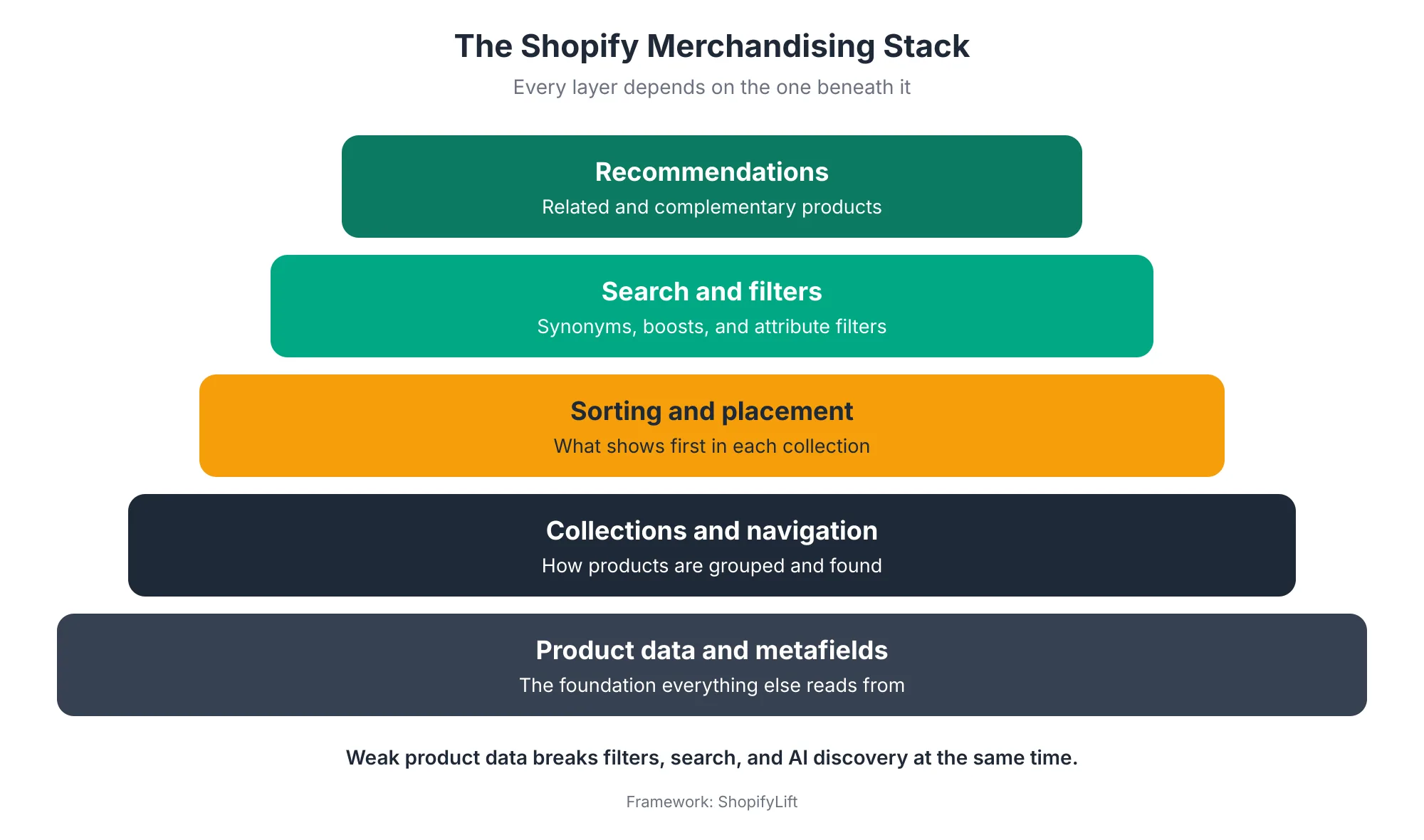
At the bottom sits your product data: titles, types, tags, variants, and metafields. Above that come collections, which group products. Then sorting, which decides what shows first. Then search and filters, which help shoppers narrow things down. At the top sit recommendations, which suggest what else to look at.
The practical lesson is that problems often start lower down than they appear. A filter that doesn't work is frequently a product data problem, not a filter problem. If half your products are missing a material or size value, no filter setting will make that filter useful.
Merchandising is also different from product page optimization. This guide is about how shoppers find products. Once they land on a product page, a different set of decisions takes over. Our Growth Guide covers that side in Shopify Product Page Optimization.
Why Does Shopify Merchandising Need Ongoing Management?
Merchandising needs ongoing management because catalogs, seasons, stock levels, and shopper behavior all change constantly, and a merchandising setup that fit last quarter slowly stops fitting. Research also shows most sites underperform on search and filtering to begin with, so there's usually meaningful room to improve.
Start with how shoppers actually find products. Across many rounds of Baymard's usability testing, roughly half of participants preferred search, with the other half using the main navigation Baymard Institute. That means both paths matter, and both need attention.
Yet most sites underperform on both.
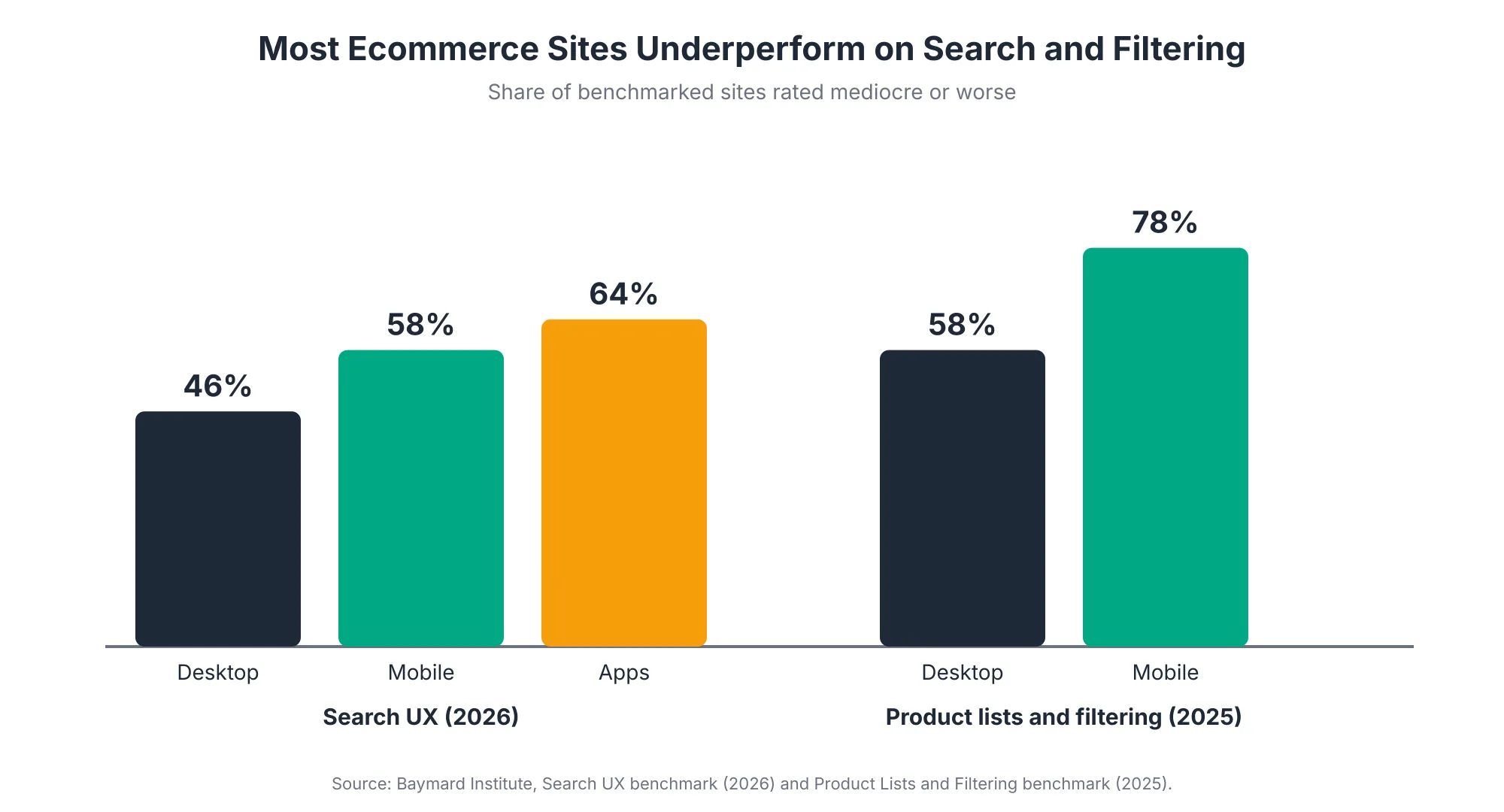
Baymard's 2026 search benchmark found that 56% of sites have mediocre or worse search, including 46% of desktop sites, 58% of mobile sites, and 64% of apps Baymard Institute. Its 2025 product list benchmark rated 58% of desktop sites and 78% of mobile sites as mediocre or worse Baymard Institute. Notice that mobile is consistently weaker, which matters because most shopping traffic is mobile.
On top of that, merchandising goes stale in predictable ways:
- Seasonal drift: Collections, banners, and featured products built for one season stay live well into the next.
- Stock changes: Best sellers sell out but stay at the top of collection pages, pushing available products down.
- Catalog growth: New products get added without the tags or metafields that filters and automated collections depend on.
- Unused tools: One agency reviewing Shopify's June 2026 Edition noted that most merchants had never used Shopify's more sophisticated merchandising tools at all what.digital.
There's a newer reason too. Shopify now includes eligible merchants' products in Shopify Catalog by default, which feeds AI shopping experiences Shopify. The same product data that powers your filters and search now also shapes how AI assistants understand your products. Messy data now costs you in two places at once.
How Should You Structure Shopify Collections?
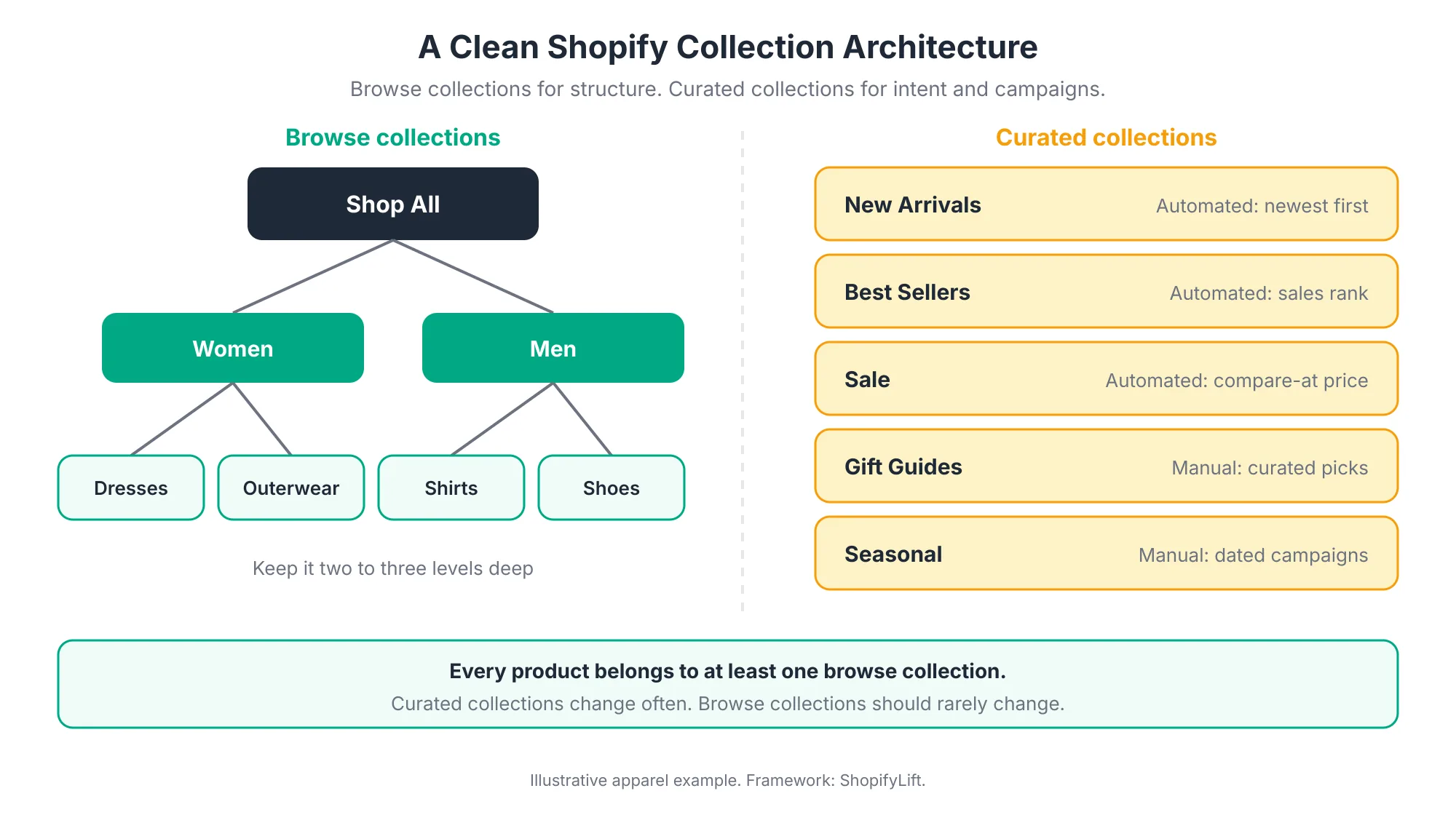
Structure collections in two groups. Browse collections form a stable hierarchy, such as Shop All, then categories, then subcategories, and every product belongs to at least one. Curated collections cover intent and campaigns, such as New Arrivals, Best Sellers, Sale, and gift guides. Keep the browse hierarchy two or three levels deep and change it rarely.
Browse Collections: Your Store's Structure
Browse collections mirror how shoppers think about your catalog. For a clothing store, that might be Women, then Dresses, Outerwear, and Shoes. For a supplements brand, it might be by goal, then by format.
A few rules keep them healthy:
- Every product has a home: Each product belongs to at least one browse collection. Orphaned products are hard to find through navigation.
- Stay shallow: Two or three levels is usually enough. Deeper hierarchies make navigation menus unwieldy, especially on mobile.
- Use shoppers' language: Name collections the way customers describe products, not the way your supplier or warehouse does.
- Change them rarely: Stable URLs help SEO. If you must restructure, set up redirects. For help with collection page SEO, see our Shopify SEO services.
Curated Collections: Intent and Campaigns
Curated collections answer a specific shopper intent. What's new? What's popular? What's on sale? What should I buy for my dad?
Many of these work best as automated collections, which add products automatically based on conditions like product type, tag, price, or inventory. New Arrivals, Best Sellers, and Sale are good candidates. Gift guides and editorial edits usually work better as manual collections, because they depend on judgment.
Automated collections are getting more flexible. Shopify's Spring '26 Edition added Collections API support for composable source groups, variant-level conditions, and exclusion rules, which apps can use to build more precise automated collections Shopify Editions. In practice, that means rules like "include this category, but exclude out-of-stock variants" are becoming easier to set up.
Avoid Collection Sprawl
Collections multiply fast. Every campaign, influencer partnership, and one-off promotion can leave another collection behind. Over time, you end up with dozens of near-duplicate collections, some still linked from old emails or ads.
Once a quarter, list your collections and ask whether each one is still linked, still accurate, and still useful. Archive or redirect the ones that aren't. This is part of the quarterly product data review in The Shopify Store Maintenance Checklist.
How Should Your Navigation Menu Support Merchandising?
Your main navigation should mirror your browse collections, keep top-level choices few and clear, and give search a prominent place, especially on mobile. Add one or two curated collections, such as New Arrivals or Sale, where they match strong shopper intent. Review menus whenever collections change so links never point to empty or retired pages.
Navigation is the other half of product finding. If roughly half of shoppers prefer to browse rather than search, the menu is their main route into your catalog. It's also an area where most sites fall short. Baymard's 2025 benchmark rated homepage and category navigation as mediocre or poor on 58% of desktop sites and 67% of mobile sites Baymard Institute.
A few principles keep menus working:
- Mirror your browse collections: The menu should reflect the same hierarchy as your browse collections. When the two drift apart, shoppers end up on collection pages that don't match what the menu promised.
- Limit top-level items: A handful of clear top-level categories is easier to scan than a long row of options. Put depth in dropdowns or mega menus, not in the top bar.
- Design for mobile first: On phones, menus collapse into a drawer. Check that the most important categories are visible without extra taps and that labels aren't truncated.
- Keep search visible: On mobile especially, a visible search field or icon helps the half of shoppers who prefer searching.
- Feature intent, sparingly: New Arrivals, Best Sellers, or Sale can earn a top-level spot. Don't fill the menu with every campaign collection.
- Audit links regularly: When you archive or rename a collection, update the menu the same day. A menu link to an empty collection is one of the fastest ways to lose a shopper.
Menu changes also affect SEO, since navigation links tell search engines which pages matter most. Keep your most important collections linked from the main menu.
How Should You Sort and Feature Products in Collections?
Sort each collection according to its purpose. Use best-selling order for broad browse collections, newest first for new arrivals, and manual order for curated edits. Pin your strongest available products near the top, move sold-out items down or out, and review sort orders monthly so collections reflect what's actually in stock and in season.
The first row of a collection page does most of the selling. Shoppers scan the top products and decide quickly whether the collection has what they want. So what appears there deserves deliberate attention.
Shoppers also expect to re-sort lists themselves. Baymard's 2025 benchmark found that 68% of desktop and 69% of mobile sites don't offer all four core sort types Baymard Institute, so check that your theme's sort menu covers the basics, such as best selling, price, newest, and customer rating where you show reviews.
Shopify lets you choose a default sort order for each collection. Here's a practical way to choose:
- Best selling: Good for broad browse collections, since it surfaces proven products automatically.
- Newest: Right for New Arrivals and for categories where freshness drives sales.
- Manual: Best for curated edits, gift guides, and campaigns where you want full control.
- Price: Occasionally useful for sale collections, though shoppers can usually re-sort by price themselves.
Keep Sold-Out Products From Crowding the Top
Best-selling order has a common flaw. A product that sold out last week can still rank at the top because of past sales, pushing available products down the page. Shoppers then click, see "sold out," and leave.
Options include hiding sold-out products from collections, moving them to the end using your theme or an app, or switching affected collections to manual order during stock shortages. Accurate inventory makes all of this easier, which we cover in Shopify Inventory and Order Management.
Rotate What You Feature
Featured positions on your homepage and at the top of key collections are your most valuable merchandising space. Treat them like a shop window and change them regularly.
A simple starting point comes from one Shopify agency's advice after the latest Edition: take your top ten products plus ten new arrivals and focus your merchandising effort there first what.digital. That keeps proven sellers visible while giving new products a real chance.
How Do You Improve Shopify Site Search?
Improve Shopify site search by reviewing what shoppers search for, fixing searches that return no or poor results, and using synonyms and product boosts to connect shoppers' words to your products. Shopify's free Search & Discovery app provides these tools. Review search terms monthly, since zero-result searches point directly to gaps in your catalog data or naming.
Search deserves special attention because searchers tell you exactly what they want. Every search term is a small piece of customer research.
Use Shopify's Search & Discovery App
Shopify's Search & Discovery app is free and lets you manage storefront search, collection filters, product boosts, synonyms, and product recommendations Pixel Union. For most stores, it covers the essentials:
- Synonyms: Connect words shoppers use to words in your catalog. If you call it a "sling bag" but customers search "crossbody," a synonym group bridges the gap.
- Product boosts: Push specific products higher in results for chosen search terms, useful for new launches or high-margin items.
- Recommendations: Manually set related and complementary products on product pages when Shopify's automatic suggestions aren't right.
- Filters: Configure which filters appear on collection and search pages. We cover filters in the next section.
Shopify's native search has also improved. Spring '26 made storefront search more forgiving of typos and unusual phrasing Webvista Studio. That reduces some zero-result searches automatically, but it doesn't replace reviewing your search data.
Run the Zero-Results Fix Loop
The most useful monthly search habit is simple: find searches that fail, and fix them.
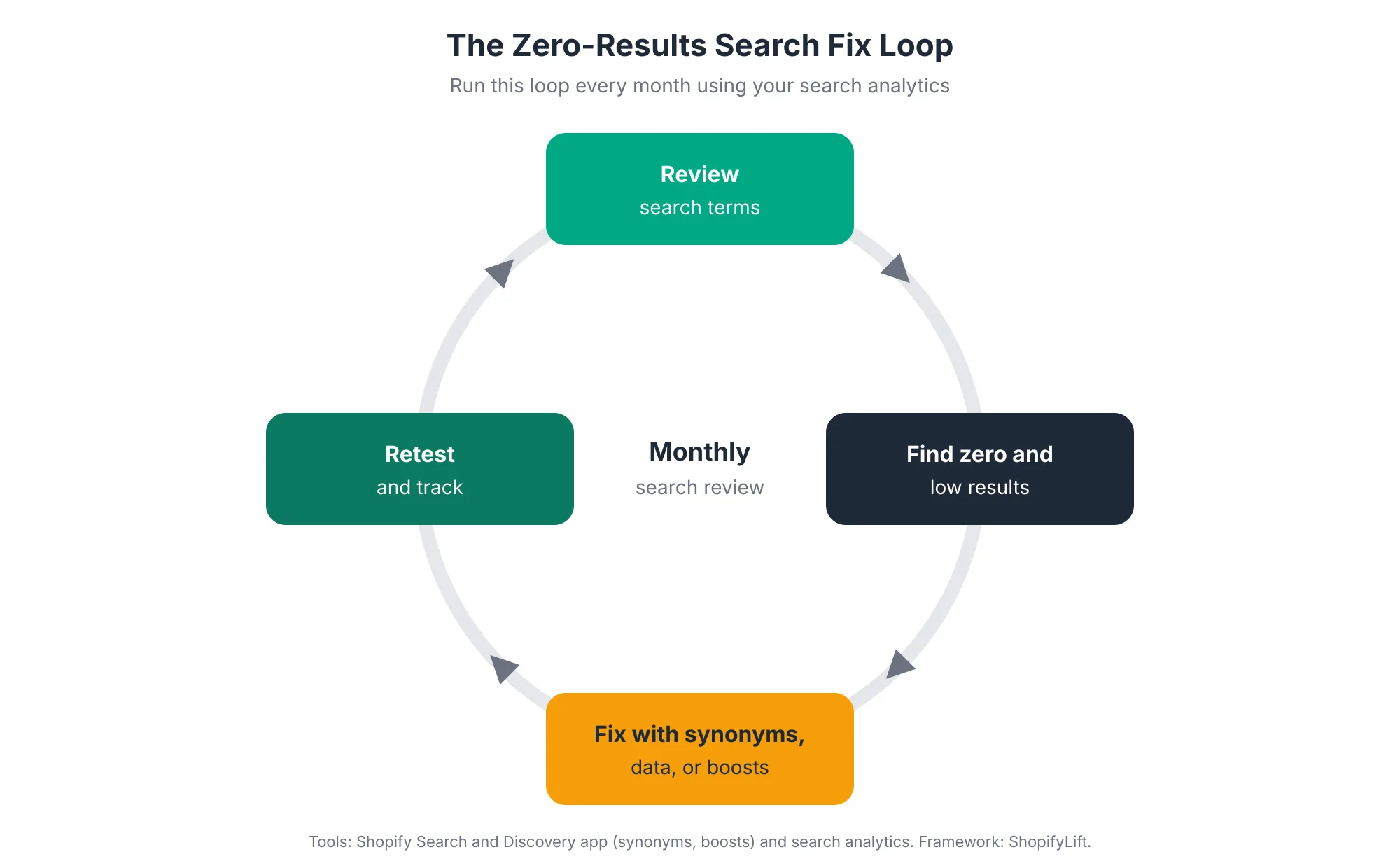
Each failed search usually has one of four causes, and each has a fix:
- Different words: The shopper used a term you don't. Add a synonym.
- Missing data: The product exists, but the searched attribute isn't in its title, description, or metafields. Update the product data.
- Wrong ranking: Results appear, but the best match is buried. Add a product boost.
- Real demand you don't meet: You don't sell it. That's valuable product research. Consider whether to stock it, or point shoppers to the closest alternative with a curated collection.
When to Consider a Third-Party Search App
Shopify's native search and the Search & Discovery app are enough for many stores. A dedicated search app may be worth it when your catalog is very large, when shoppers search with complex or technical language, or when search drives a large share of your revenue.
Before adding one, weigh the extra cost and storefront code. Search apps often load on every page. Our Shopify App Audit guide explains how to judge whether an app earns its place.
Which Filters Should Your Shopify Store Offer?
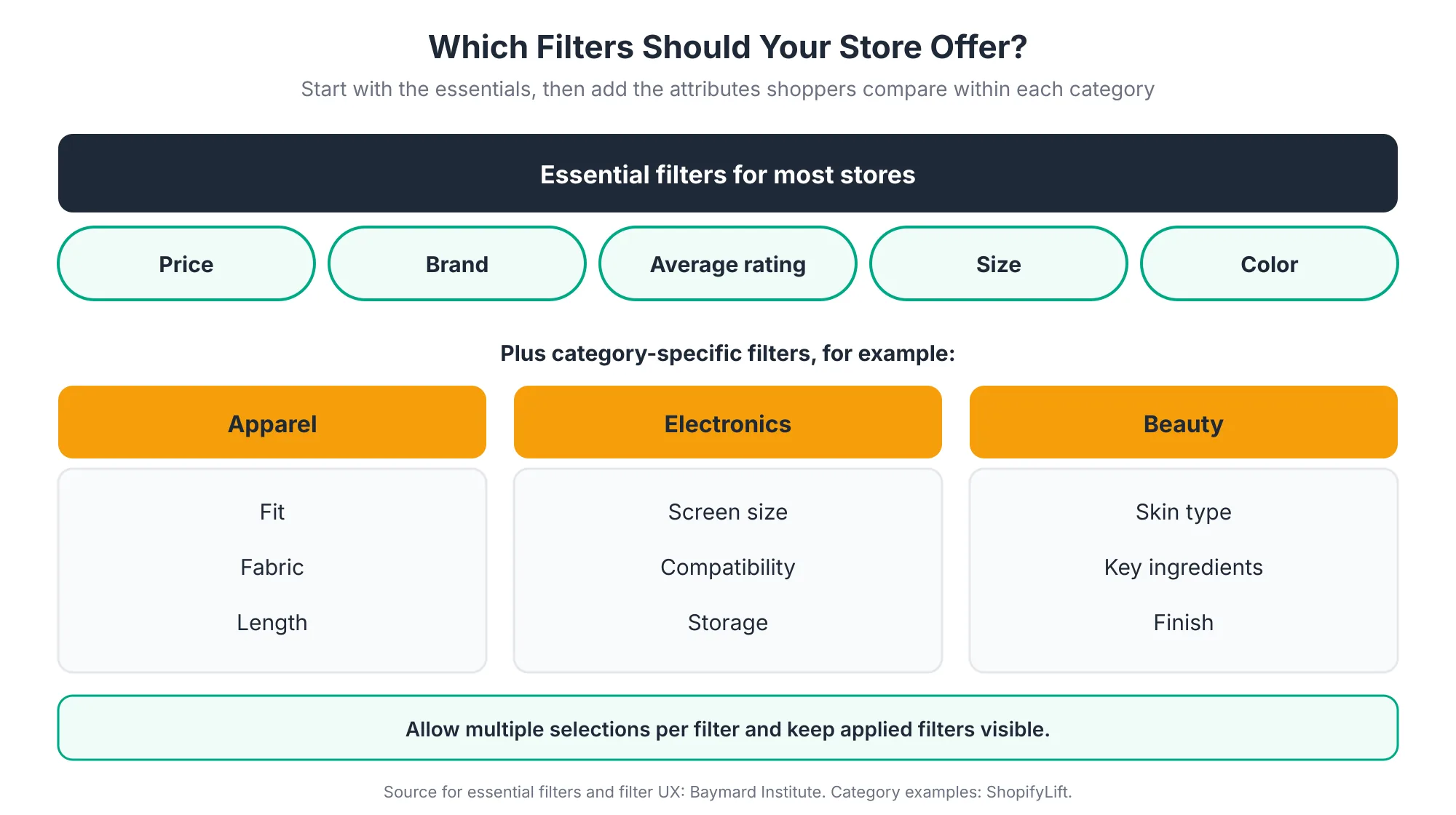
Most stores should offer five essential filters (price, brand, average rating, size, and color) plus category-specific attributes shoppers compare, such as fabric for apparel or screen size for electronics. Filters should allow multiple selections, keep applied filters visible, and cover every attribute shown on your product cards. On Shopify, filters are configured in the Search & Discovery app.
Start With the Essentials
Baymard recommends that most ecommerce sites offer at least five essential filters, price, brand, average rating, size, and color, plus relevant category-specific attributes Baymard Institute. Not every store needs all five. A single-brand store doesn't need a brand filter. But the principle holds: offer the filters shoppers expect for your type of product.
Add Category-Specific Filters
Generic filters only go so far. Shoppers comparing products within a category want to filter by the attributes that matter in that category. Apparel shoppers care about fit and fabric. Electronics shoppers care about compatibility and screen size. Beauty shoppers care about skin type and ingredients.
A useful test: if you show an attribute on your product cards, shoppers will want to filter by it. Category-specific filters also need clear labels. Baymard's 2025 desktop benchmark found that 66% of sites don't explain industry-specific filters Baymard Institute, which leaves shoppers guessing what terms like "relaxed fit" or "non-comedogenic" actually mean. A short tooltip or description fixes it.
Get the Filter Behavior Right
How filters work matters as much as which filters exist. Baymard's research highlights two common failures. 14% of sites don't let users select more than one option within a filter, and 20% don't keep applied filters visible while shoppers browse Baymard Institute. Many sites also fail to show an overview of which filters are currently applied Baymard Institute.
Check your own theme against these. Can shoppers pick both "Black" and "Navy"? Can they see which filters are on without scrolling back up? Can they remove one filter without clearing them all?
Know Shopify's Filter Requirements
A few Shopify specifics trip people up:
- Theme support: Your theme needs to support storefront filtering. If it doesn't, filters you create in Search & Discovery won't display to customers Shopify Help Center.
- Large collections: Collections with more than 5,000 products don't display filters Shopify Help Center. Very large catalogs may need to be split into smaller collections.
- Category metafields: When you assign products to a category in Shopify's Standard Product Taxonomy, standard attributes are created automatically as metafield definitions, which can then power filters Shopify Help Center.
That last point is worth acting on. Assigning accurate product categories unlocks structured attributes that feed filters, search, and AI discovery at the same time.
Not sure where your merchandising is losing sales?
Our free Shopify Store Health Audit reviews your collections, search, and filters against current UX benchmarks and gives you a prioritized fix list. Request your free audit
How Does Product Data Power Shopify Merchandising?
Product data powers every merchandising layer. Automated collections read tags, types, and prices. Filters read options and metafields. Search reads titles, descriptions, and synonyms. AI shopping tools read all of it. Consistent, complete product data is therefore the single highest-leverage merchandising investment most stores can make.
Good merchandising data has three qualities:
- Consistent: The same attribute uses the same values everywhere. "Navy," "navy blue," and "dark blue" split one filter option into three.
- Complete: Every product has the attributes its category needs. A filter is only useful if most products in the collection have a value for it.
- Structured: Attributes live in dedicated fields, such as options, categories, and metafields, rather than buried in description text.
Shopify has expanded what's possible here. Winter '26 raised the limit to 2,048 variants per product, which is a reason to revisit catalog architecture if you sell products with many option combinations Think Commerce.
The stakes have also grown beyond your own storefront. Shopify reports that AI searches powered by Shopify Catalog convert at twice the rate of those using scraped data Shopify. Clean, structured product data is how your products show up well there. Our Growth Guide covers this in depth in AI Product Data Optimization for Shopify.
What Does a Monthly Shopify Merchandising Routine Look Like?
A practical monthly routine runs in four weekly steps. In week one, review collection performance, search terms, and stock. In week two, refresh sort orders, featured products, and seasonal collections. In week three, fix failed searches, synonyms, and missing filter data. In week four, test changes on mobile and plan next month's campaigns.
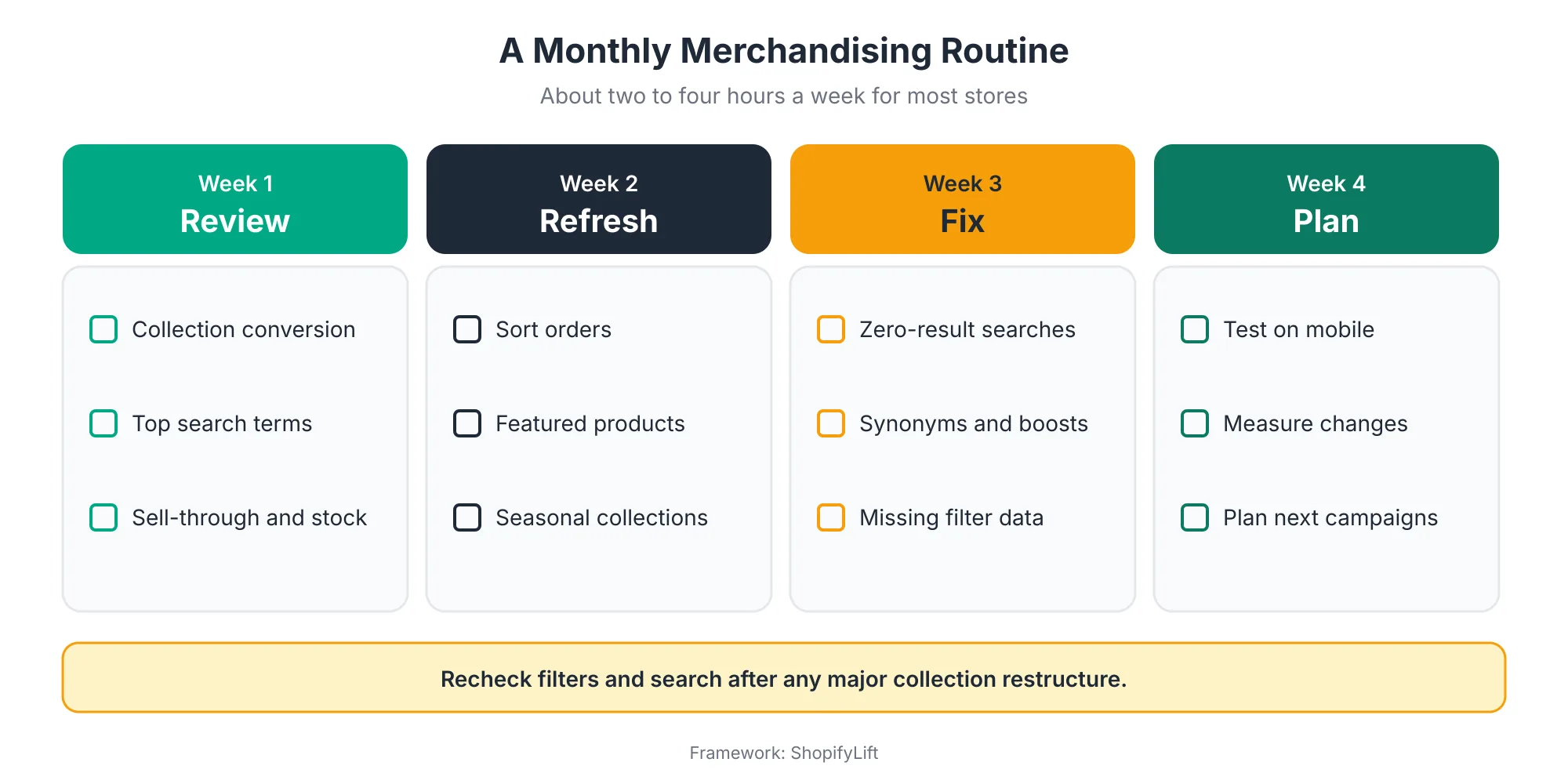
Why spread it across the month? Because merchandising done in one big session tends to get postponed. A small, regular slot fits around everything else and keeps the store feeling current.
A few details make the routine work:
- Start from data: Week one should always come first. Collection conversion, search terms, and sell-through tell you where to spend the rest of the month.
- Recheck after restructures: Search and filtering often misbehave after collections are reorganized Grumspot. Test filters and search whenever collections change significantly.
- Test on mobile: Most merchandising problems are worse on phones. Walk through your top collections on a real device every month.
- Plan ahead for peaks: In the months before your busiest season, use week four to prepare gift guides and campaign collections early. See Seasonal Store Readiness.
AI tools can take on some of the repetitive work. Sidekick can carry out tasks like tagging a whole collection from a plain-language request Shopappy, which speeds up bulk merchandising changes. We cover how to use it safely in Using Shopify Sidekick to Automate Daily Store Operations.
How Do You Measure Merchandising Performance?
Measure merchandising with a small set of metrics: conversion rate by collection, the share of sessions using search, the zero-result search rate, filter usage, and how often shoppers see sold-out products. Track them monthly, compare against your own baseline, and test significant changes before rolling them out fully.
Useful metrics to watch:
- Collection conversion: Which collections turn visits into add-to-carts and orders? Low performers need attention first.
- Search usage and exits: How many sessions use search, and how many leave straight from the results page?
- Zero-result rate: The share of searches that return nothing. Lower is better, and it should fall as you work the fix loop.
- Filter usage: Which filters get used, and which are ignored? Ignored filters may be poorly named, poorly placed, or unnecessary.
- Sold-out exposure: How often do sold-out products appear in the first row of your top collections?
For bigger changes, such as a new navigation structure or a new default sort order, test before committing. Shopify's native A/B testing within themes makes this easier than it used to be Webvista Studio. If you'd like tests designed and analyzed for you, see our Shopify CRO services.
What Merchandising Mistakes Should You Avoid?
The most common Shopify merchandising mistakes are leaving collections sorted by stale best-seller data, letting sold-out products crowd the top of pages, running filters on inconsistent product data, ignoring zero-result searches, and building campaign collections that never get retired. Each one is easy to fix once you look for it.
A few more patterns we see often in store reviews:
- Setting and forgetting: Merchandising configured at launch and never reviewed. Seasons change, catalogs grow, and the setup quietly stops fitting.
- Filters nobody can use: Filters that exist but have values on only a fraction of products in the collection. Shoppers apply them and get almost nothing back.
- Supplier language: Product titles and collection names that use internal or supplier terms instead of the words shoppers actually search for.
- Too many near-duplicate collections: Multiple collections with overlapping products, splitting SEO value and confusing navigation.
- Changing everything at once: Restructuring collections, menus, and filters together, so nobody can tell which change helped or hurt.
- Ignoring mobile: Merchandising decisions made on a desktop screen, when most shoppers see a much narrower layout.
Frequently Asked Questions
What is the difference between manual and automated collections in Shopify?
Manual collections contain products you add one by one, which suits curated edits and gift guides. Automated collections add products automatically based on conditions like tags, product type, or price, which suits New Arrivals, Sale, and category pages. Most stores use both.
How many filters should a Shopify store have?
There isn't a fixed number. Baymard recommends five essential filters for most sites, price, brand, rating, size, and color, plus category-specific attributes shoppers compare. Also make sure every attribute shown on product cards is filterable, and explain any industry-specific filters, which 66% of sites don't do.
Why are my filters not showing on my Shopify store?
The most common causes are a theme that doesn't support storefront filtering, or a collection with more than 5,000 products, since Shopify doesn't display filters on those. Also check that the filters are set up in the Search & Discovery app and that products have values for the filtered attributes.
Is Shopify's native search good enough?
For many stores, yes, especially with the free Search & Discovery app for synonyms and boosts. Spring '26 also made storefront search more tolerant of typos. Consider a dedicated search app if your catalog is very large, shoppers use technical language, or search drives a major share of revenue.
How often should I update my Shopify merchandising?
Review merchandising monthly, including sort orders, featured products, failed searches, and filters. Update seasonal and campaign collections as each season changes. Recheck search and filters immediately after any major change to your collection structure, since those changes often break them.
Final Thoughts
Merchandising isn't a one-time setup. It's an ongoing conversation with your shoppers, conducted through what you show them, in what order, and how easily they can narrow things down.
The good news is that Shopify gives you most of what you need for free. The Search & Discovery app, automated collections, and clean product data cover the fundamentals for most stores. What makes the difference is using them consistently: reviewing the data, fixing what's broken, and keeping the shop window fresh.
For the full picture of keeping your store in shape, head back to our Shopify Store Management guide.
Want your merchandising managed for you?
ShopifyLift's Store Management service includes monthly merchandising reviews, collection and filter setup, search tuning, and product data cleanup. Explore Shopify Store Management Services
Continue the Store Management Series
- Hub: Shopify Store Management: The Complete Guide
- Previous: How to Evaluate and Adopt New Shopify Features After Every Editions Release
- Next: Shopify Inventory and Order Management: A Practical Guide for Growing Stores
- The Shopify App Audit: How to Reduce App Bloat, Hidden Costs, and Conflicts
- Seasonal Store Readiness: How to Prepare Your Shopify Store for BFCM and Peak Sales
Sources
[1] Baymard Institute, "Ecommerce Search UX Best Practices 2026," April 2026
[2] Baymard Institute, "Product List UX Best Practices 2025," September 2025
[3] Baymard Institute, "What Is an Ecommerce Filter? UI Best Practices," July 2026
[4] Baymard Institute, "10 Desktop Web UX Best Practices," March 2025
[5] Shopify Help Center, "Adding filters with Shopify Search & Discovery," 2026
[6] Pixel Union, "Using the Search & Discovery app," July 2026
[7] Shopify, "Selling everything, everywhere, all at once: The Spring '26 Edition," June 2026
[8] Shopify Editions, "Spring '26," June 2026
[9] Webvista Studio, "Shopify Editions Spring '26: A Merchant's Practical Recap," June 2026
[10] Think Commerce, "Shopify Spring 2026 Editions: What Merchants Need to Know," June 2026
[11] what.digital, "Shopify Summer 2026 Edition: What Really Matters," August 2026
[12] Grumspot, "Shopify Maintenance Agency: Your Guide to Store Stability," May 2026
[13] Shopappy, "Shopify Editions Summer 26: What Shopify Actually Announced," July 2026
[14] Baymard Institute, "Homepage and Navigation UX Best Practices 2025," September 2025