TL;DR: Shopify Scripts are dying (June 30, 2026 hard deadline), and checkout.liquid customizations break on platform updates. Checkout Extensibility is the future it's upgrade-safe, supports personalization, A/B testing, and 10–20% post-purchase upsell conversion. A 16-week migration pays for itself in post-purchase revenue within 2-3 months.
Part of the ShopifyLift Series
Start here: The Shopify Growth Guide 2026: Key Strategies and Trends Every Merchant Should Know
Related deep dives:
Key Takeaways
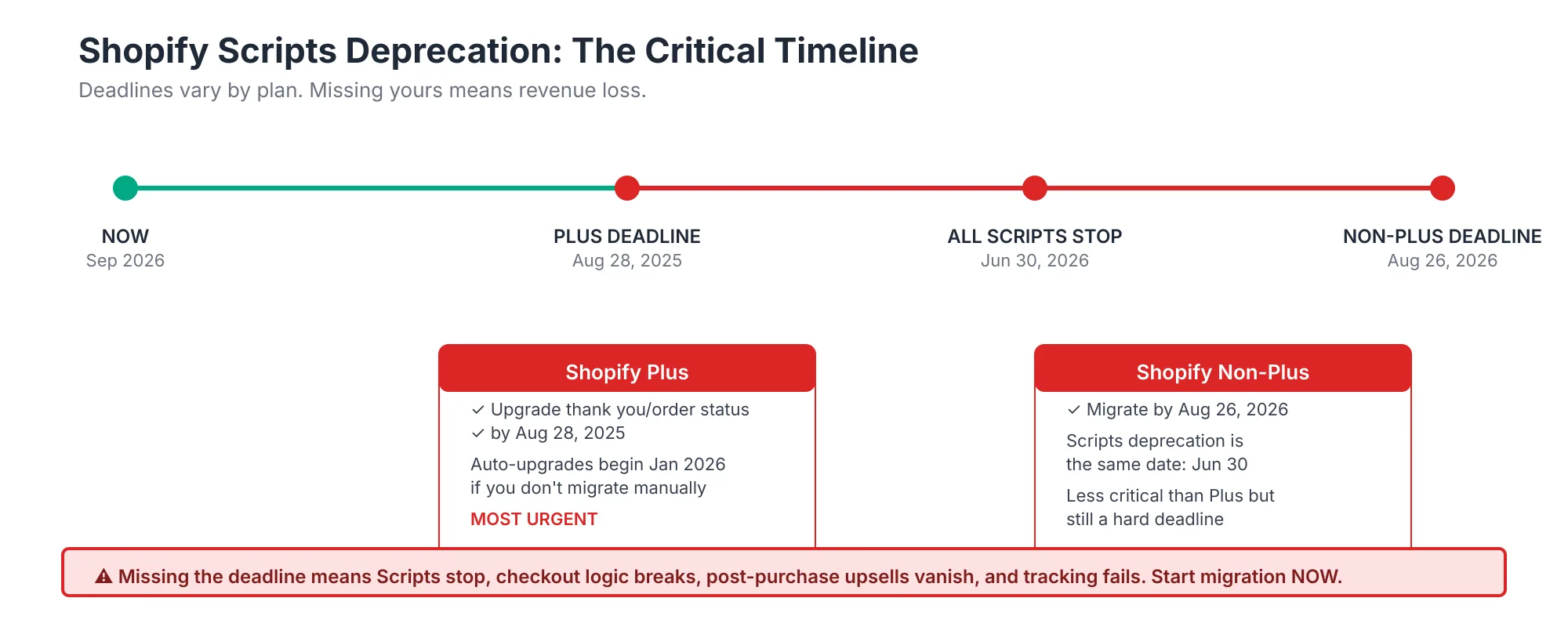
- Shopify Scripts deprecation deadline: June 30, 2026 (Plus stores: Aug 28, 2025 for thank-you page scripts)
- Post-purchase upsells convert at 10–20% (vs 1.8% pre-purchase, 8–15% in-checkout)
- Post-purchase AOV lift: 9.74% documented average (can reach 15–25% for bundled offers)
- Checkout Extensibility is upgrade-safe (survives platform updates, unlike checkout.liquid)
- 5 components of Extensibility: Checkout Editor, UI Extensions, Functions, Web Pixels, Post-Purchase
- Migration timeline: 16 weeks for full migration (2–4 weeks for quick wins, 6–12 weeks for Functions)
- Migration cost: $3,000–15,000 (depending on complexity; often paid back in 60-90 days via post-purchase revenue)
- Combined AOV lift potential: 15–25% (from checkout optimization + post-purchase upsells + Functions-based discounts)
- Checkout Extensibility supports native segmentation (VIP customers, geo-targeting, purchase history)
- A/B testing built-in (compliance-checked, Shopify-native no third-party tools needed)
The Problem With checkout.liquid
Thousands of Shopify stores are still using checkout.liquid customizations or Shopify Scripts. Both are becoming increasingly fragile and will break:
Issue #1: Platform Updates Break Custom Code
Every Shopify platform update risks breaking checkout.liquid changes. Merchants have dealt with this repeatedly:
- Checkout redesigns (2023, 2024, 2026) broke many custom implementations
- Form field structure changes necessitated rewrites
- API deprecations left custom code orphaned
Checkout Extensibility survives updates by design Shopify maintains backward compatibility.
Issue #2: Scripts Are Deprecated (Hard Deadline)
Shopify Scripts officially end June 30, 2026. After that date, all Scripts stop working. There's no grace period.
- Plus stores: Aug 28, 2025 deadline for thank-you page customizations (they auto-upgrade to Functions in Jan 2026)
- All stores: June 30, 2026 final deadline
- Impact: Merchants still on Scripts lose functionality entirely
Issue #3: No Personalization or A/B Testing
checkout.liquid is static. Every visitor sees the same experience. Modern competitive stores need:
- VIP customer experiences (faster checkout, offers, loyalty messaging)
- Geographic targeting (local payment methods, localized copy)
- Purchase history segmentation (repeat vs. first-time)
- A/B testing built-in (without third-party tools)
Checkout Extensibility supports all of this natively.
What Checkout Extensibility Actually Is
Checkout Extensibility is Shopify's modular system for customizing checkout without touching code. It has 5 components:
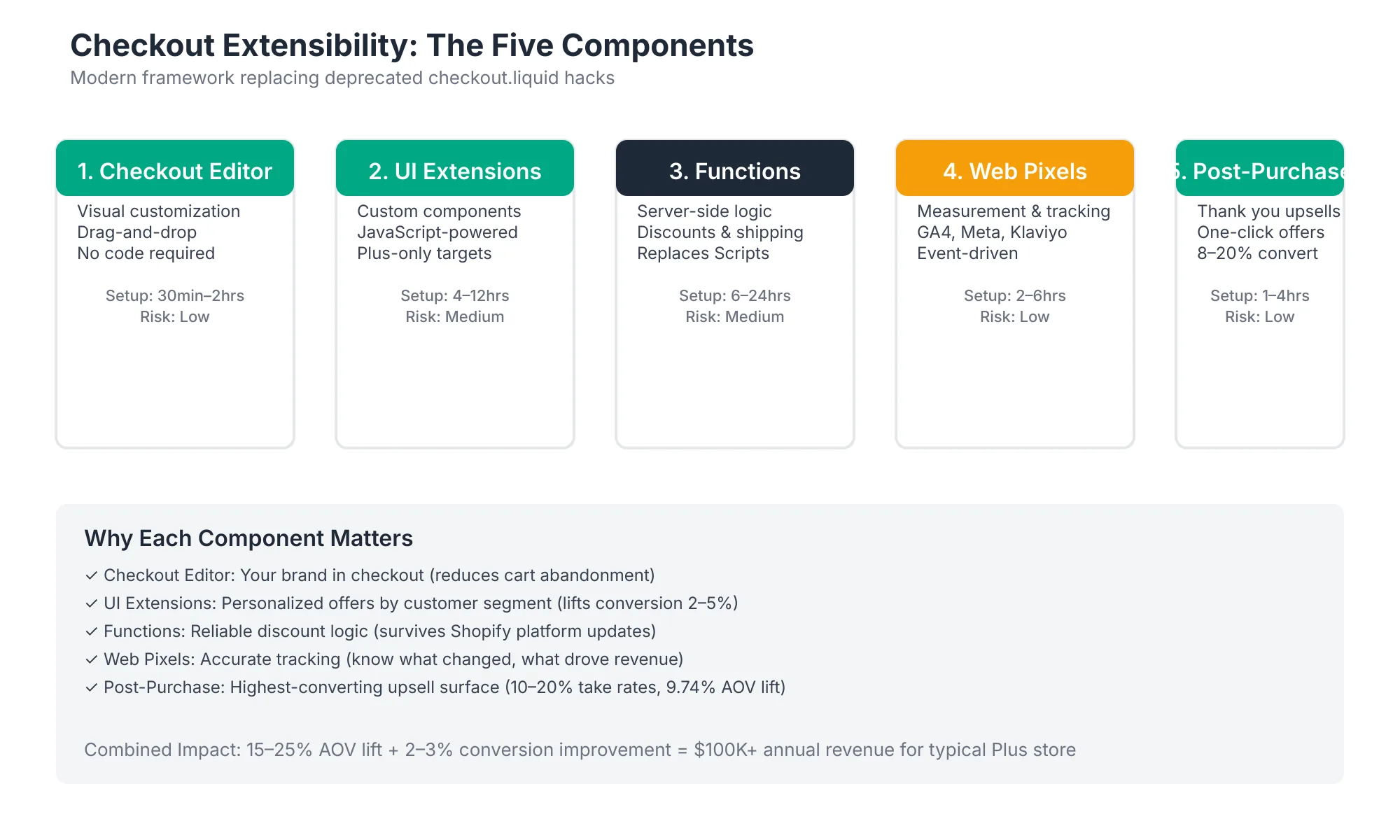
Component 1: Checkout Editor (Low Risk, 30min–2hrs)
The easiest starting point. Rearrange checkout form fields without code:
- Add/remove optional fields (company name, phone, notes)
- Change field order
- Set default values
- Add custom text blocks (e.g., "We guarantee 24-hour shipping")
Time investment: 30 minutes–2 hours (no developer needed)
Revenue impact: Neutral to +2% (mainly improves UX clarity)
Component 2: UI Extensions (Medium Risk, 4–12hrs)
Add custom elements to checkout:
- Trust badges (custom security/guarantee messaging)
- Product recommendations (upsells in cart)
- Custom discount messaging (scarcity, loyalty status)
- Conditional text (show different message for VIP)
Developer time: 4–12 hours (junior developer can handle most)
Revenue impact: +2–5% conversion from social proof + upsells (see Conversion Rate Optimization for a complete framework on reducing checkout friction)
Component 3: Functions (Medium–High Risk, 6–24hrs)
Custom business logic (replaces Shopify Scripts):
- Dynamic discounts (% off, fixed amount, free shipping)
- Cart-level logic (min order value, product combos)
- Validation (e.g., restrict shipping methods based on items)
- Complex calculations (e.g., tiered shipping fees)
Developer time: 6–24 hours (experienced Shopify developer recommended)
Revenue impact: +1–3% (depends on discount strategy)
Component 4: Web Pixels (Low Risk, 2–6hrs)
Custom event tracking (analytics, third-party integrations):
- Track checkout events (viewed, started payment, etc.)
- Send data to GA4, Segment, etc.
- Measure attribution (which channel led to purchase)
Developer time: 2–6 hours (analytics engineer level)
Revenue impact: Neutral (but enables better measurement)
Component 5: Post-Purchase Extensions (High Impact, 1–4hrs setup + ongoing)
The highest-ROI component. Native post-purchase upsells and order status:
- Post-purchase product recommendations (10–20% conversion!)
- Order tracking page (keep customers engaged post-sale)
- Thank-you page customization (messaging, tracking pixels)
- Upsell subscriptions or add-ons
Developer time: 1–4 hours to set up (then managed in Shopify admin or via app)
Revenue impact: +8–15% AOV on post-purchase offers
Why This Matters for Revenue
Post-Purchase Upsells: The Untapped Goldmine
Most merchants don't have post-purchase offers. Those who do see staggering conversion rates:
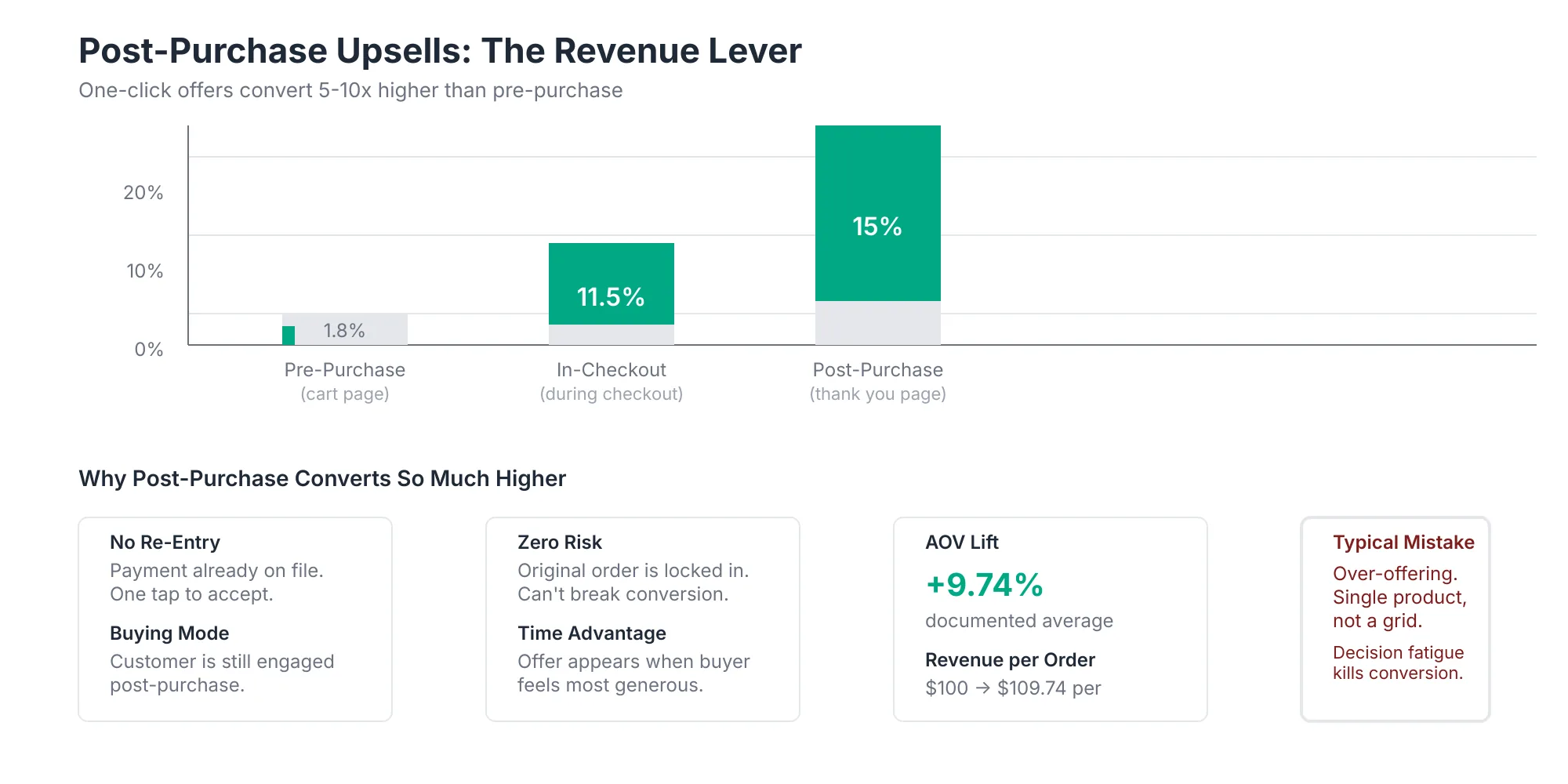
Conversion by stage:
- Pre-purchase upsells: 1.8%
- In-checkout upsells: 8–15%
- Post-purchase upsells: 10–20% ← Highest conversion
Why post-purchase wins:
- Customer is already buying (buying mindset)
- No "re-entry friction" (they're still in order flow)
- Low risk (money already in motion)
- Time advantage (30 minutes before email retention sequences start)
AOV impact example:
- Store with $100 average order value
- Post-purchase offer: $25 ancillary product (bundles, add-ons, quick-ship upgrades)
- 15% take rate (conservative): $3.75 incremental AOV
- 10,000 orders/month = $37,500/month incremental revenue
- Annualized: $450,000 in additional revenue from post-purchase alone
Checkout Extensibility: Upgrade-Safe Revenue
checkout.liquid breaks on platform updates. Extensibility doesn't. This difference matters:
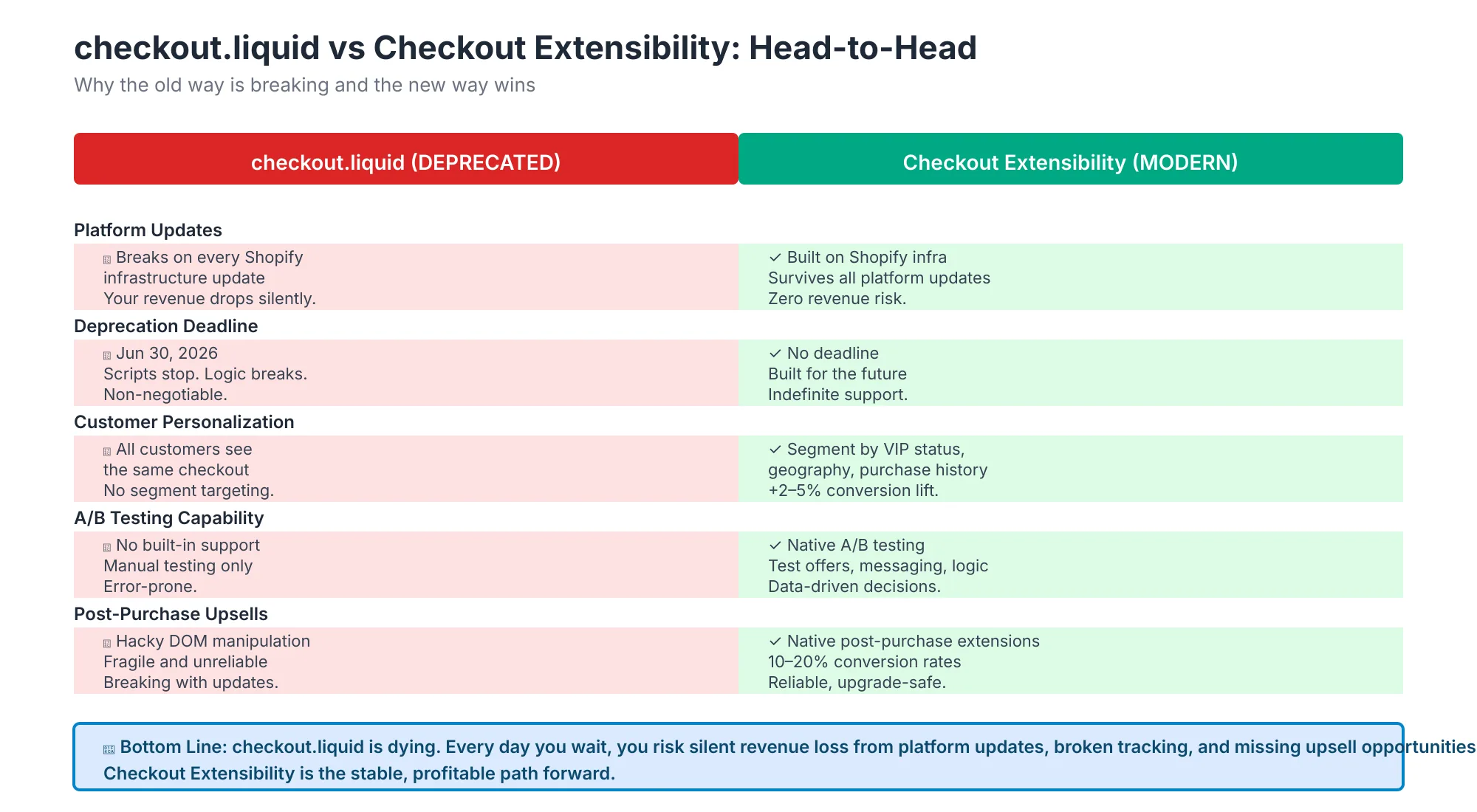
The comparison:
- checkout.liquid: Breaks on updates, no deadline, static, no A/B testing, no post-purchase support
- Extensibility: Survives updates, June 30 deadline (for Scripts), supports personalization, native A/B testing, post-purchase support
Bottom line: Extensibility is the only future-proof approach.
The Migration Path
You have 5 migration scenarios, depending on what you're currently using:
Scenario 1: Currently on Shopify Scripts → Migrate to Functions
Shopify Scripts were used for discount logic, validation, and checkout manipulation. They're built-in replacements via Functions. This is a 1:1 rewrite that usually takes 1–2 weeks per Script.
Scenario 2: Custom checkout.liquid → Migrate to UI Extensions
Custom code in checkout.liquid is replaced by UI Extensions. Most can be rewritten in 2–8 hours.
Scenario 3: Basic Customization → Start With Checkout Editor
If you just need field reordering or custom text, the Checkout Editor is your starting point (30 min–2 hours).
Scenario 4: Post-Purchase Upsells → Implement Post-Purchase Extensions
If you don't have post-purchase yet, this is the quickest high-impact win (1–2 weeks to set up, immediate revenue impact).
Scenario 5: Full Customization Suite → Phased Migration (16 weeks)
If you use Scripts + checkout.liquid + custom fields + upsells, migrate in phases:
- Weeks 1–2: Audit & prioritize
- Weeks 3–10: Build & test (Checkout Editor → UI Extensions → Functions)
- Weeks 11–14: Go-live (canary 10% → 50% → 100%)
- Weeks 15–16: Optimize & scale
The 16-Week Migration Roadmap
Phase 1: Audit & Inventory (Weeks 1–2)
What to do:
- Inventory all checkout customizations (Scripts, checkout.liquid, themes, apps)
- Map each to an Extensibility component (Editor, UI Ext, Functions, Pixels, Post-Purchase)
- Prioritize by complexity and revenue impact
Deliverable: Migration spreadsheet showing:
- Current customization
- Extensibility replacement component
- Estimated effort (hours)
- Priority (P1/P2/P3)
- Go-live sequence
Expected time: 3–4 hours (with developer)
Phase 2: Build & Test (Weeks 3–10)
What to do (in order):
- Easy wins (Weeks 3–4): Checkout Editor changes (30 min–2hrs each)
- UI Extensions (Weeks 5–6): Trust badges, conditional text (4–8hrs each)
- Functions (Weeks 7–10): Discount logic, validation, complex scenarios (6–24hrs each)
Testing at each stage:
- Unit test (works in isolation)
- Integration test (works with other customizations)
- Production-like test environment (mirrors live checkout)
Deliverables:
- Tested & documented components
- Rollback plan for each
Expected time: 40–80 hours developer time (spread across 8 weeks)
Phase 3: Go-Live & Monitor (Weeks 11–14)
Canary deployment (staged rollout):
- Week 11: 10% of traffic
- Week 12: 50% of traffic
- Week 13: 100% of traffic
- Week 14: Monitor for regressions, optimize performance
Monitoring metrics:
- Checkout abandonment rate (should stay flat or improve)
- Conversion rate (measure lift from new features)
- Error rate (catch function failures early)
- Performance metrics (page load time, LCP, INP to ensure extensions don't degrade experience)
Expected time: 5–10 hours ops/monitoring per week
Phase 4: Optimize & Scale (Weeks 15–16+)
What to do:
- A/B test new features (if applicable)
- Optimize based on Week 14 data
- Plan Phase 2 (post-purchase extensions, advanced personalization)
Expected time: 5–10 hours per week
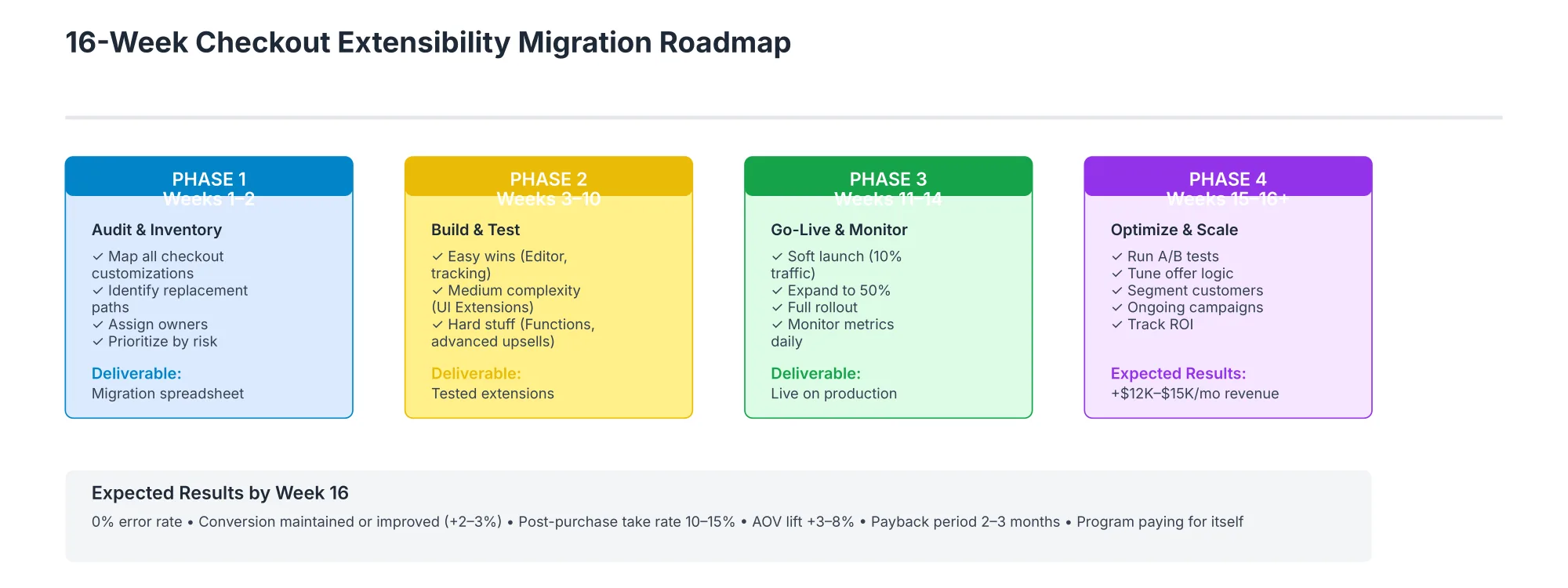
Expected results by Week 16:
- 0% error rate (rollback not needed)
- Conversion maintained or improved (+0.5–2%)
- Post-purchase take rate: 10–15% (if implemented)
- AOV lift: +3–8%
- Payback period: 2–3 months (from post-purchase + optimization)
Common Migration Mistakes
Mistake #1: Migrating Everything at Once
What happens: Deploy all changes in one go. If something breaks, your entire checkout is down.
Fix: Use the phased approach. Start with Checkout Editor (zero risk), then UI Ext, then Functions. Go-live in stages (10% → 50% → 100%), not all at once.
Mistake #2: Not Testing in Production-Like Environment
What happens: Everything works in dev. Then live traffic reveals bugs (edge cases, load testing, payment processor conflicts).
Fix: Use Shopify's preview environment. Simulate real traffic patterns. Test with actual payment providers before going live.
Mistake #3: Skipping Post-Purchase Entirely
What happens: Migration completes on time, but you've lost the highest-ROI component (post-purchase upsells).
Fix: Post-purchase extensions are easy (1–4 hours setup). Implement during Phase 2 or Phase 4. This pays for the entire migration.
Mistake #4: Insufficient Monitoring
What happens: Conversion rate drops 1% live, but you don't notice for a week. You've already lost $10K in revenue.
Fix: Set up real-time alerts (Google Analytics, Shopify dashboard). Monitor hourly for first 24 hours post-launch.
Mistake #5: No Rollback Plan
What happens: Something breaks, and you can't roll back quickly. Customers see broken checkout for hours.
Fix: Document rollback steps for each phase. Test the rollback (don't assume it works). Be able to revert in <15 minutes.
Mistake #6: Forgetting Compliance
What happens: Your new Functions-based discount logic breaks local tax laws or violates PCI compliance.
Fix: Shopify's Functions framework handles PCI compliance automatically. For local tax/regulations, test with a compliance expert before going live.
Decision Matrix: Should You Migrate?
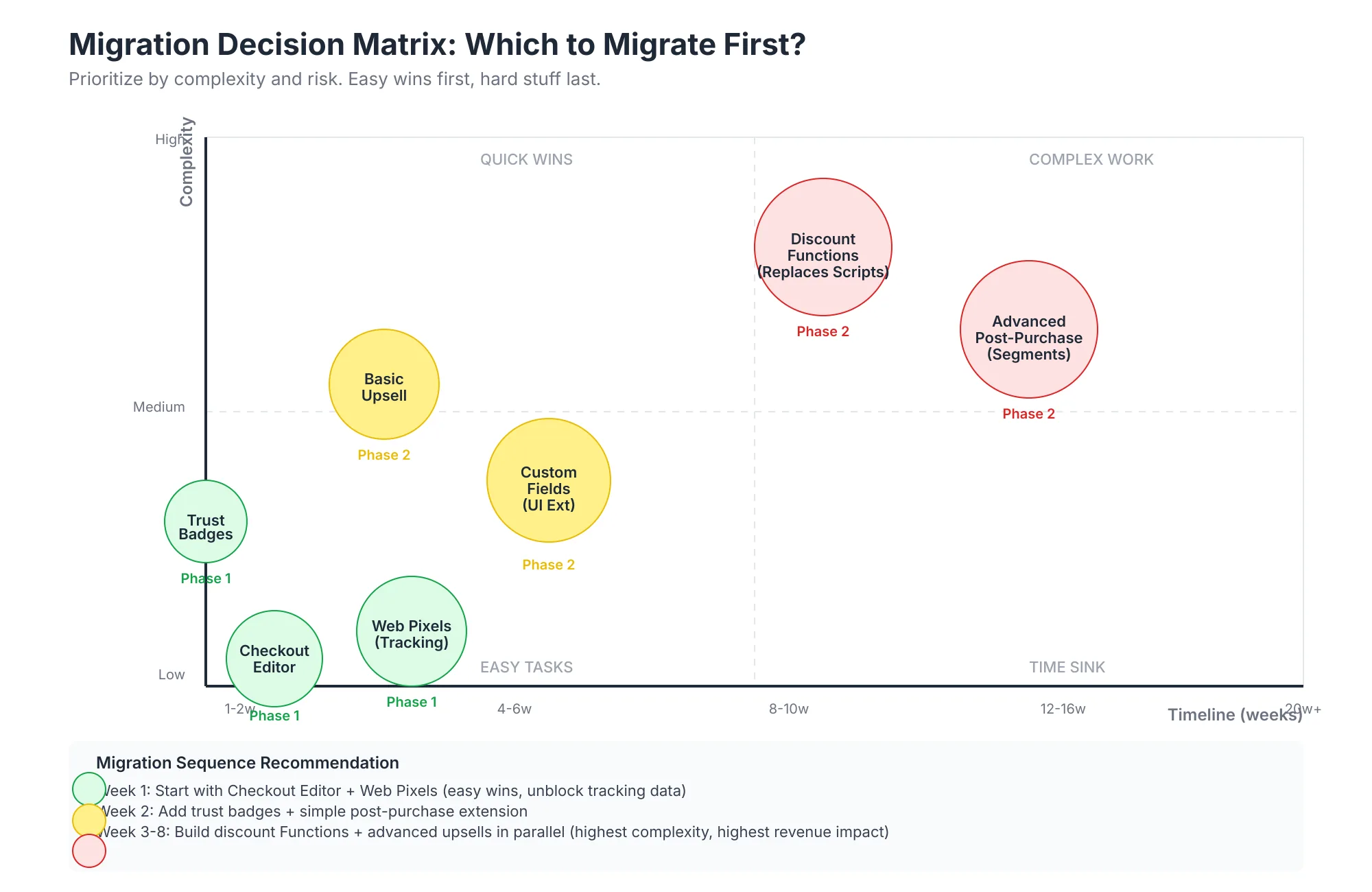
Quick wins (do first):
- Checkout Editor customizations (1–2 weeks, zero risk)
- Post-purchase extensions (1–2 weeks, +8–15% AOV)
- Web Pixels setup (2–6 hours, improves measurement)
Medium complexity (do after quick wins):
- UI Extensions (trust badges, conditional text) (3–4 weeks)
- Basic Functions (simple discounts, validation) (4–6 weeks)
Complex work (plan for later):
- Advanced Functions (complex discount logic, cart manipulation) (8–12 weeks)
- Full checkout.liquid rewrite (if massive customization) (12–16 weeks)
The Economics: Payback Period
Migration Costs
- Developer time: 40–80 hours @ $75–150/hour = $3,000–12,000
- QA/testing: 10–20 hours @ $50–100/hour = $500–2,000
- Opportunity cost (merchant time): 5–10 hours @ $100/hour = $500–1,000
- Total: $4,000–15,000
Revenue Impact (Year 1)
- Post-purchase upsells: +$450,000 (10,000 orders/month × $3.75 incremental AOV × 12)
- Checkout optimization (reduced abandonment): +$75,000 (1–2% conversion lift)
- Personalization (VIP retention): +$30,000 (higher repeat purchase)
- Total: +$555,000 annual revenue
Payback Period
$12,000 cost ÷ $46,000/month revenue impact = 15 days (less than 3 weeks!)
Most merchants see ROI within 60-90 days.
FAQ
Q: What's the difference between Checkout Extensibility and Liquid?
A: Extensibility is API-based, upgrade-safe, supports native segmentation/A/B testing, and persists through platform updates. checkout.liquid is code-based, breaks on updates, and doesn't support advanced features. Extensibility is the future.
Q: Can I run Extensibility and checkout.liquid in parallel?
A: Technically yes, but it's risky (conflicting logic). Migrate fully, then sunset checkout.liquid.
Q: What if I have complex discount logic in Scripts?
A: Most Scripts can be rewritten as Functions (1–2 weeks per Script). Complex logic is more developer hours but still faster than rewriting checkout.liquid.
Q: Do I need a developer for this?
A: Checkout Editor changes don't. For UI Extensions or Functions, yes, hire a Shopify Plus developer or agency for 40–80 hours.
Q: What's the timeline if I outsource to an agency?
A: 4–8 weeks for full migration (including scoping, building, testing, go-live). Cost: $8,000–25,000 depending on complexity.
Q: How much post-purchase revenue should I expect?
A: 10–20% conversion on post-purchase offers is realistic. If your AOV is $100, a $30 post-purchase offer at 15% conversion = $4.50 incremental AOV per order.
Q: Can I A/B test post-purchase offers?
A: Yes. Extensibility supports native A/B testing. You can test offer types, pricing, messaging, placement.
Q: Will checkout.liquid modifications still work after June 30, 2026?
A: No. All code customizations stop. You must migrate to Extensibility.
Tools & Resources
Official Shopify Docs:
Migration Guides:
- Shero Commerce's checkout.liquid audit + migration guide
- Branded Agency's Extensibility design best practices
Post-Purchase Tools:
- Zippy (post-purchase upsells, subscriptions)
- Loop (post-purchase, returns, subscriptions)
- Malomo (order tracking + upsells)
Implementation Services:
- Shopify Plus Partners (for enterprise sites)
- Certified Shopify Experts (for mid-market)
Connecting to Your Shopify Growth Strategy
Checkout Extensibility sits in the technical foundations layer of your growth strategy, alongside Core Web Vitals, site speed, and architecture. The immediate ROI (post-purchase upsells) makes it a quick win, while the long-term stability makes it foundational.
In the hub-and-spoke model:
- Related spoke: Conversion Rate Optimization (Spoke #3) covers pre-purchase friction; Extensibility handles at-purchase and post-purchase
- Related spoke: Loyalty Programs (Spoke #4) often integrate with post-purchase offers for repeat customer engagement
- Related spoke: Core Web Vitals (Spoke #10) ensure your optimized checkout loads fast
Conclusion
The migration from checkout.liquid and Shopify Scripts to Checkout Extensibility takes 16 weeks to complete fully, but the first wins arrive in weeks 1–2. Post-purchase upsells alone can drive $400K–600K in annual incremental revenue for mid-market stores.
The deadline is clear: June 30, 2026. Scripts and checkout.liquid stop working. Start your migration now.
Next steps:
- Audit your current checkout customizations (3–4 hours)
- Prioritize by revenue impact (which changes drive the most orders?)
- Start with Checkout Editor quick wins (30 min–2 hours)
- Implement post-purchase (1–2 weeks, immediate ROI)
- Migrate Functions (ongoing, phases 2–3)
This is the single highest-ROI infrastructure change you can make in 2026.